> ## Documentation Index
> Fetch the complete documentation index at: https://docs.requestly.com/llms.txt
> Use this file to discover all available pages before exploring further.
# Versions & Releases
> Release an immutable snapshot of an OpenAPI specification, where the version number comes from the spec's own info.version field.
A specification changes every time you save it. A **release** is the opposite: a fixed, self-contained snapshot of the specification at one moment, which never changes again. Anything downstream that needs a stable reference points at a release rather than at your working document.
Releases live in the **Versions** tab of the right-hand rail in the spec editor, alongside **Documentation**.
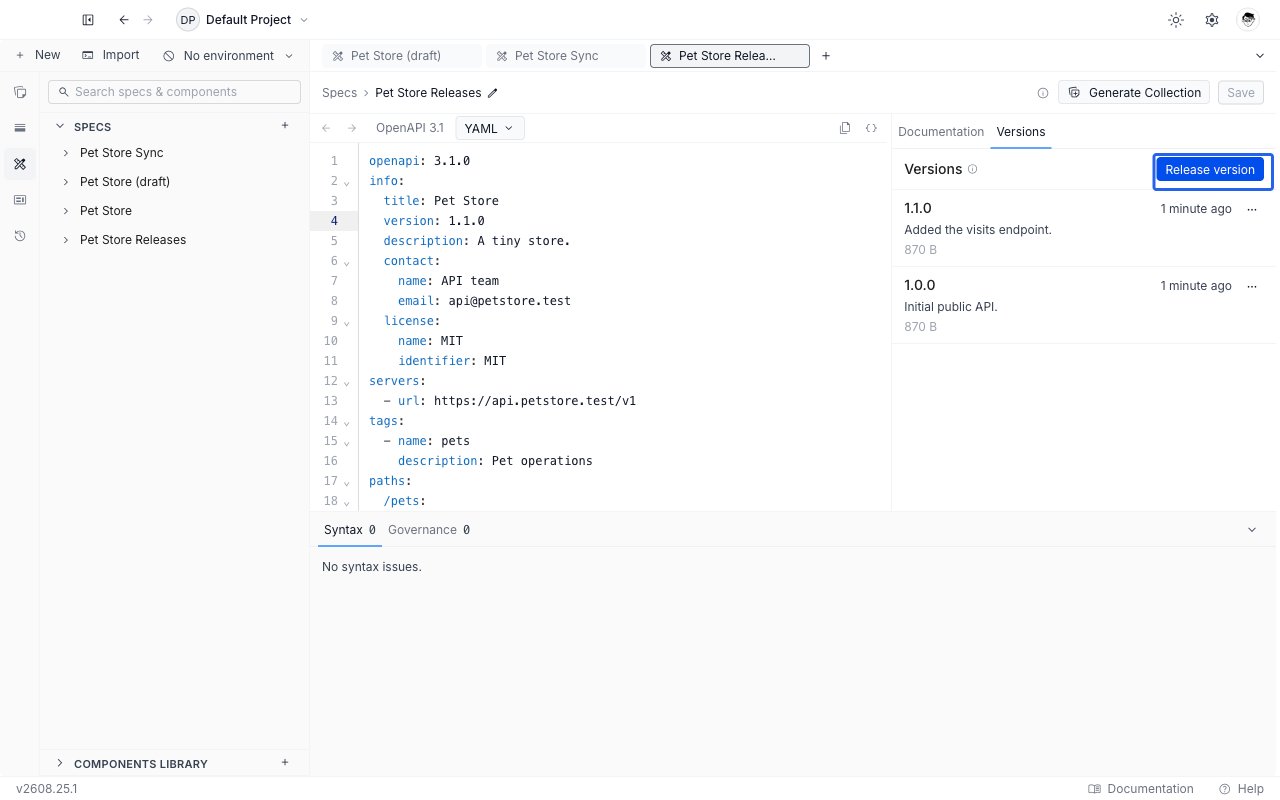
 Versions are not the same thing as the **Changelog** tab. The changelog records every save automatically; a version is a snapshot you release deliberately, and it has a name you control.
## The version number comes from your specification
You never type a version number. Requestly reads it from the `info.version` field of the specification itself, so the number in the release list is the number your API document declares.
```yaml theme={null}
openapi: 3.1.0
info:
title: Pet Store
version: 1.4.0
```
Releasing the document above produces a version called `1.4.0`. To release again later, edit `info.version`, save, and release. Releasing twice from the same `info.version` is refused with "This info.version is already released. Bump info.version in your spec to release a new version."
`info.version` has to be usable as a name: letters, numbers, dots, hyphens and underscores only, between 1 and 64 characters. A value with a space or a `+` in it, such as `1.0.0+build7`, is rejected rather than silently trimmed, and the message tells you which characters are allowed.
## Prerequisites
The **Release version** button is disabled until all three of these hold, and its tooltip names whichever one is missing:
* **No blocking errors.** A single error on either tab of the [Issues panel](/api-client/api-design/issues-and-governance) blocks the release. Click the disabled button to jump to the errors. Warnings, info and hints never block.
* **No unsaved edits.** A release snapshots saved content, so the tooltip reads "Save your changes before releasing." Save first.
* **An `info.version` value.** Without one the tooltip reads "Add an info.version to your spec to release."
## Release a version
With the specification open, switch the right-hand rail to **Versions**.
Requestly checks the specification, gathers every component the document references, and prepares the snapshot.
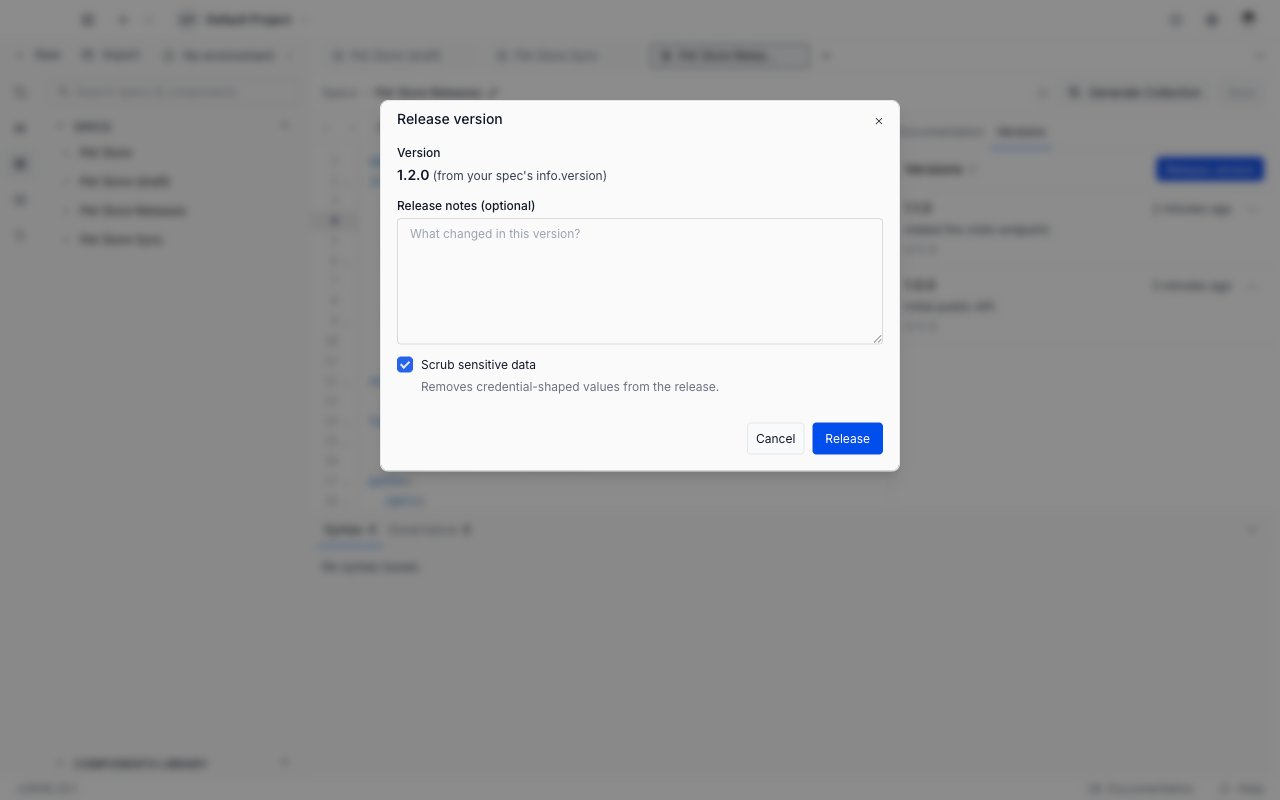
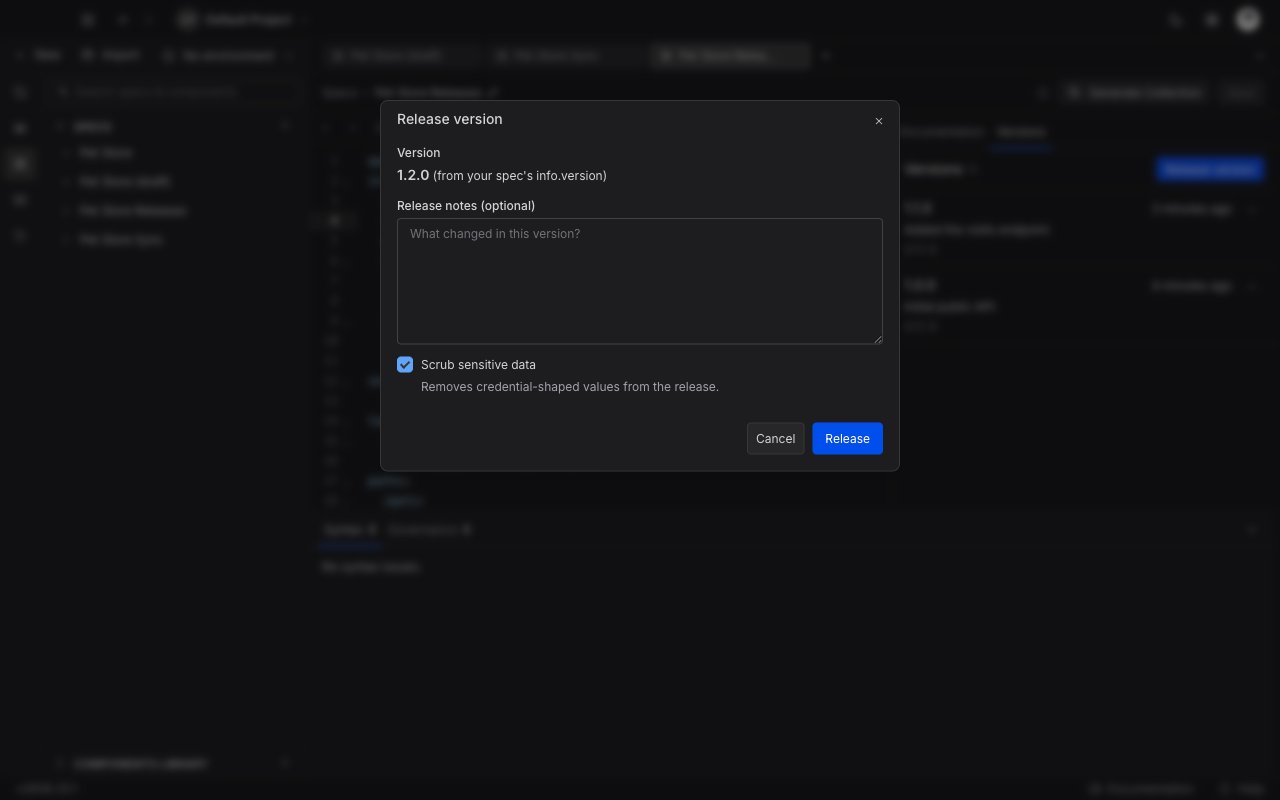
The dialog shows the version read from your specification, marked as coming from `info.version`, and it is not editable here. Release notes are optional and free text: "What changed in this version?"
**Scrub sensitive data** is on by default. It replaces credential-shaped values in the snapshot with `` while keeping the shape intact, so a `Bearer` token becomes `Bearer ` and readers can still see that the endpoint expects a bearer token.
Versions are not the same thing as the **Changelog** tab. The changelog records every save automatically; a version is a snapshot you release deliberately, and it has a name you control.
## The version number comes from your specification
You never type a version number. Requestly reads it from the `info.version` field of the specification itself, so the number in the release list is the number your API document declares.
```yaml theme={null}
openapi: 3.1.0
info:
title: Pet Store
version: 1.4.0
```
Releasing the document above produces a version called `1.4.0`. To release again later, edit `info.version`, save, and release. Releasing twice from the same `info.version` is refused with "This info.version is already released. Bump info.version in your spec to release a new version."
`info.version` has to be usable as a name: letters, numbers, dots, hyphens and underscores only, between 1 and 64 characters. A value with a space or a `+` in it, such as `1.0.0+build7`, is rejected rather than silently trimmed, and the message tells you which characters are allowed.
## Prerequisites
The **Release version** button is disabled until all three of these hold, and its tooltip names whichever one is missing:
* **No blocking errors.** A single error on either tab of the [Issues panel](/api-client/api-design/issues-and-governance) blocks the release. Click the disabled button to jump to the errors. Warnings, info and hints never block.
* **No unsaved edits.** A release snapshots saved content, so the tooltip reads "Save your changes before releasing." Save first.
* **An `info.version` value.** Without one the tooltip reads "Add an info.version to your spec to release."
## Release a version
With the specification open, switch the right-hand rail to **Versions**.
Requestly checks the specification, gathers every component the document references, and prepares the snapshot.
The dialog shows the version read from your specification, marked as coming from `info.version`, and it is not editable here. Release notes are optional and free text: "What changed in this version?"
**Scrub sensitive data** is on by default. It replaces credential-shaped values in the snapshot with `` while keeping the shape intact, so a `Bearer` token becomes `Bearer ` and readers can still see that the endpoint expects a bearer token.
 If Requestly still finds token-shaped text after scrubbing, usually inside a description or an example, it shows a **Review before releasing** screen listing each one with where it was found. Cancel to go and clean the document, or click **Release anyway** to accept it.
Click **Release**. The new version appears at the top of the list.
Everything in a release reaches everyone who can read that release. Take the review screen seriously: the values it lists are still in the snapshot.
## Work with a released version
Each row in the list shows the version name, how long ago it was released, its notes and its size.
* **Click the row** to open the version full screen, read only, with the same outline and documentation view as the editor. Every reference is already resolved inside the snapshot, so you are reading exactly what a consumer of that version gets.
* **Open the row's menu** for **Copy content to clipboard**, **Download as YAML** and **Download as JSON**. Requestly converts between the two formats for you, so you can download JSON from a YAML specification.
* **Delete version** removes it permanently. See [Deleting a version](#deleting-a-version).
A release is self-contained. Components your specification pulled in by reference are written into the snapshot itself, which is why the size shown on the row can be larger than your working document. Snapshots are capped at 20 MiB, and a release over roughly 10 MB still succeeds but warns you that large snapshots are slow for anything reading them.
## Documentation status
If any collection publishes documentation from this specification, the Versions tab gains a **Published as docs** section below the release list. It has a collapsible header, so you can fold it away when you do not need it.
Each row names the collection, the version its documentation is currently serving, and a status: **Current** when it is on the newest release, or **Newer available** when a release has landed since. **Manage** opens that collection's own Documentation tab, where publishing is controlled. The section is read only: nothing here changes what is published.
Right after you release, a short banner appears at the top of the tab if any published documentation is now behind. **Review** reveals the section above; dismiss it if you do not want to act now.
## Deleting a version
Deleting a version is permanent and cannot be undone. Anything pinned to that version loses access to it.
The confirmation dialog is worth reading rather than clicking through. If any collection's published documentation points at the version you are deleting, the dialog lists those collections by name and warns that they will be unpublished when you confirm.
## Next steps
* [Issues & Governance](/api-client/api-design/issues-and-governance) to clear the errors that block a release.
* [Sync a collection from a specification](/api-client/api-design/sync-a-collection-from-a-specification), the other action the same errors block.
* [Create and edit a specification](/api-client/api-design/create-and-edit-a-specification) to change `info.version` and save before releasing again.
If Requestly still finds token-shaped text after scrubbing, usually inside a description or an example, it shows a **Review before releasing** screen listing each one with where it was found. Cancel to go and clean the document, or click **Release anyway** to accept it.
Click **Release**. The new version appears at the top of the list.
Everything in a release reaches everyone who can read that release. Take the review screen seriously: the values it lists are still in the snapshot.
## Work with a released version
Each row in the list shows the version name, how long ago it was released, its notes and its size.
* **Click the row** to open the version full screen, read only, with the same outline and documentation view as the editor. Every reference is already resolved inside the snapshot, so you are reading exactly what a consumer of that version gets.
* **Open the row's menu** for **Copy content to clipboard**, **Download as YAML** and **Download as JSON**. Requestly converts between the two formats for you, so you can download JSON from a YAML specification.
* **Delete version** removes it permanently. See [Deleting a version](#deleting-a-version).
A release is self-contained. Components your specification pulled in by reference are written into the snapshot itself, which is why the size shown on the row can be larger than your working document. Snapshots are capped at 20 MiB, and a release over roughly 10 MB still succeeds but warns you that large snapshots are slow for anything reading them.
## Documentation status
If any collection publishes documentation from this specification, the Versions tab gains a **Published as docs** section below the release list. It has a collapsible header, so you can fold it away when you do not need it.
Each row names the collection, the version its documentation is currently serving, and a status: **Current** when it is on the newest release, or **Newer available** when a release has landed since. **Manage** opens that collection's own Documentation tab, where publishing is controlled. The section is read only: nothing here changes what is published.
Right after you release, a short banner appears at the top of the tab if any published documentation is now behind. **Review** reveals the section above; dismiss it if you do not want to act now.
## Deleting a version
Deleting a version is permanent and cannot be undone. Anything pinned to that version loses access to it.
The confirmation dialog is worth reading rather than clicking through. If any collection's published documentation points at the version you are deleting, the dialog lists those collections by name and warns that they will be unpublished when you confirm.
## Next steps
* [Issues & Governance](/api-client/api-design/issues-and-governance) to clear the errors that block a release.
* [Sync a collection from a specification](/api-client/api-design/sync-a-collection-from-a-specification), the other action the same errors block.
* [Create and edit a specification](/api-client/api-design/create-and-edit-a-specification) to change `info.version` and save before releasing again.