> ## Documentation Index
> Fetch the complete documentation index at: https://docs.requestly.com/llms.txt
> Use this file to discover all available pages before exploring further.
# Overview
> Version-control a local project with Git from inside the Requestly desktop app: stage, commit, push, and pull your collections without leaving the editor.
In a local project your collections, environments, and requests are plain files on disk. Requestly can track those files with Git for you. You stage, commit, push, and pull from a panel in the sidebar, so you do not need a terminal or a second Git client.
Git requires the **desktop app**. [Download Requestly](https://requestly.com/downloads).
## Requirements
* The Requestly desktop app on macOS, Windows, or Linux.
* A [local project](/collaboration/local-workspace). Git does not apply to team projects, whose data lives in the cloud rather than on your disk. The **Git** tab is hidden while a team project is active.
* The `git` command installed on your machine. Requestly runs your own `git` binary rather than bundling one.
## Where Git lives in the app
### The Git tab
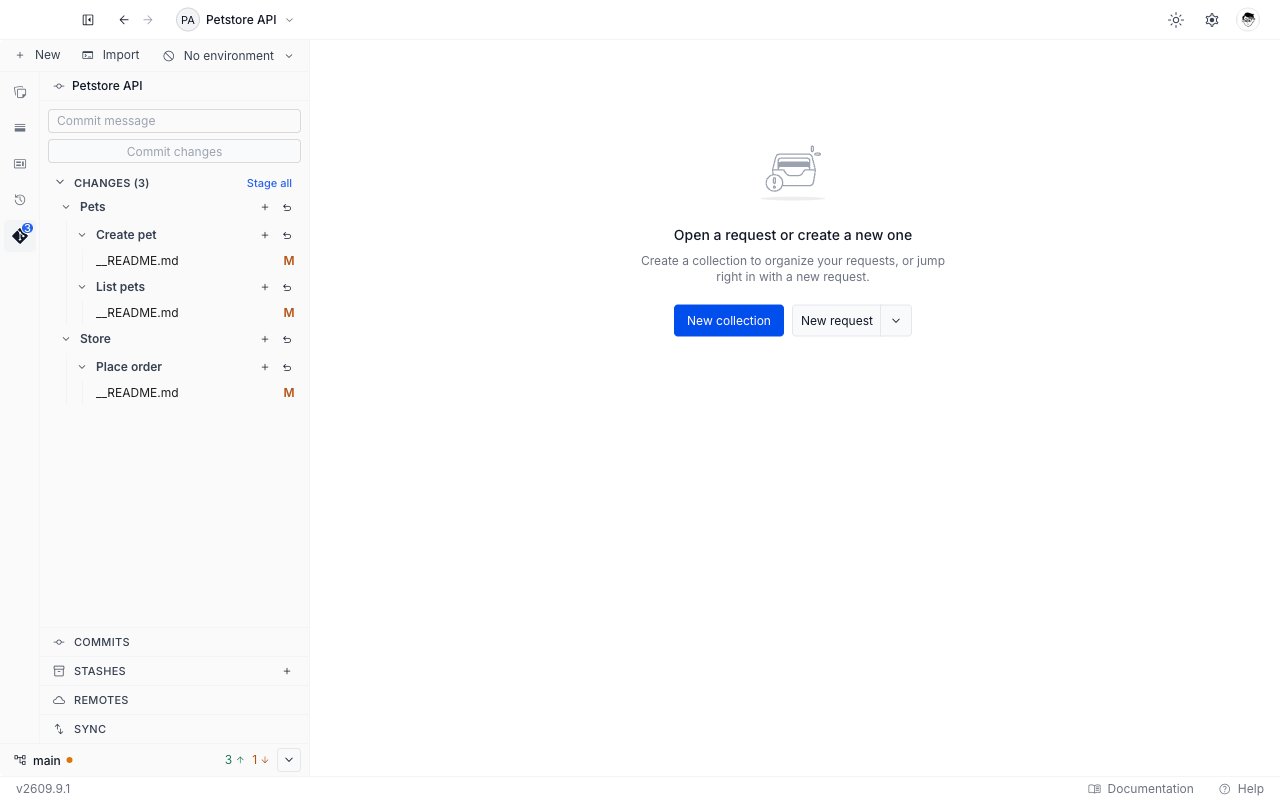
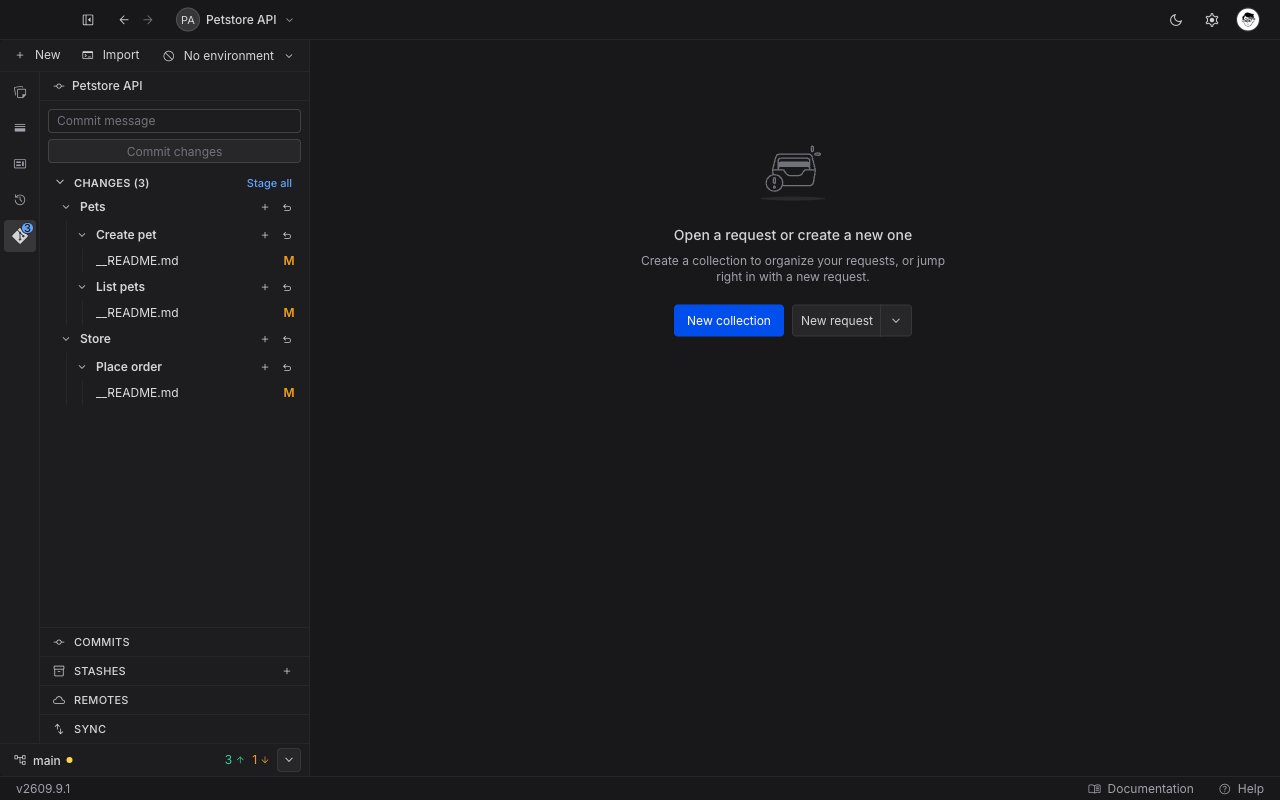
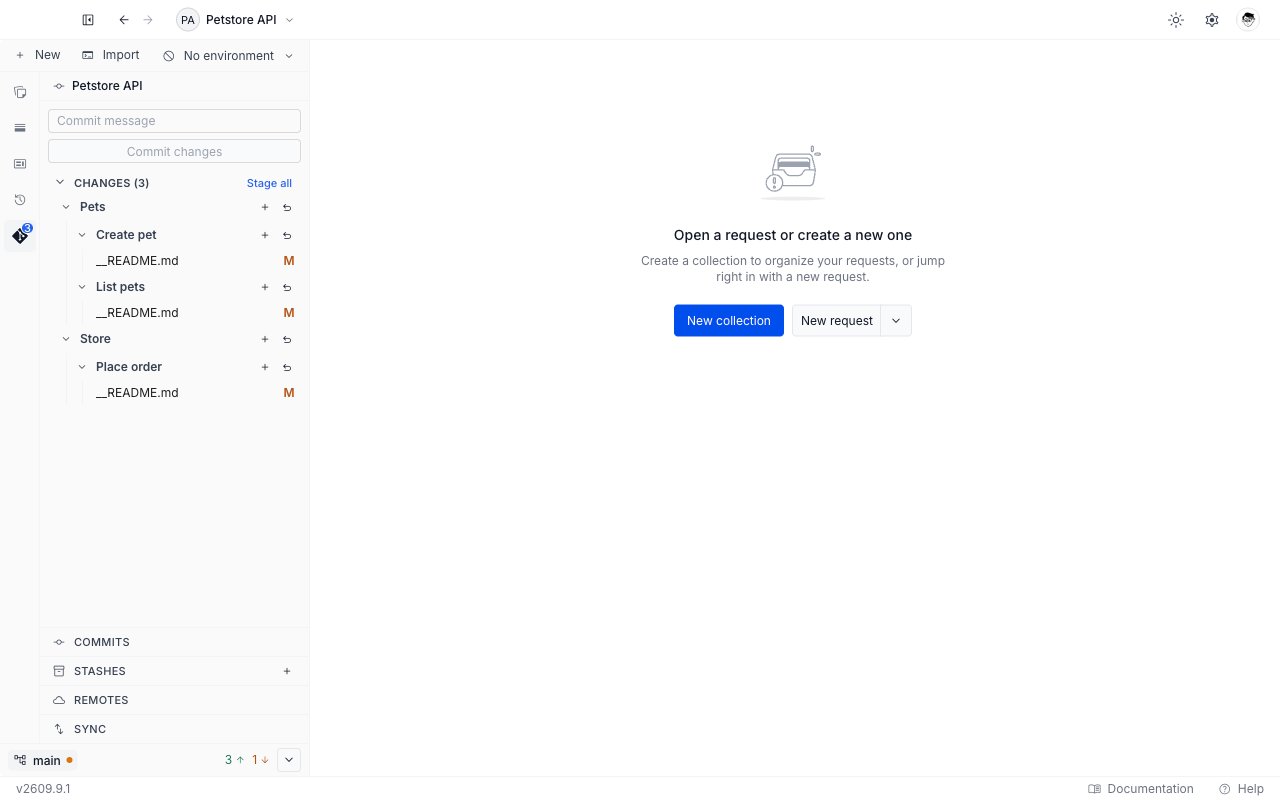
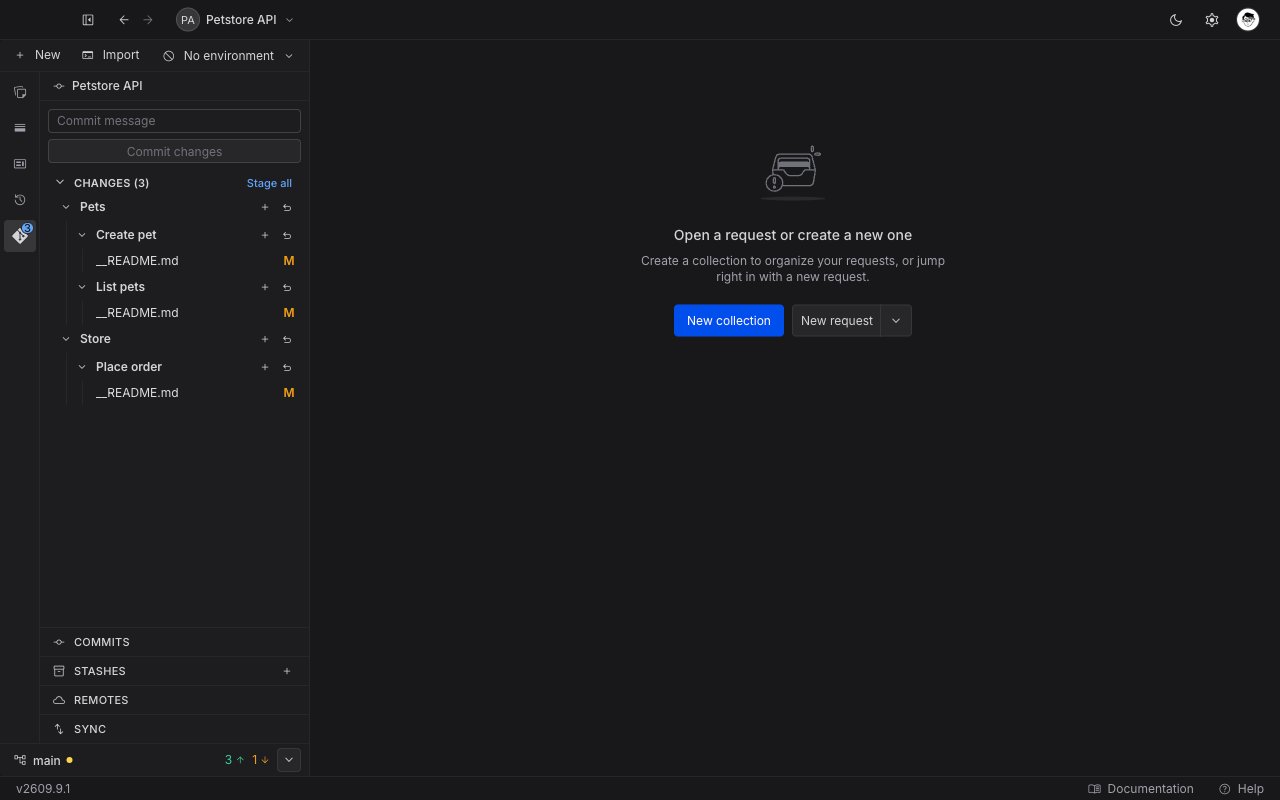
The API Client sidebar shows a **Git** tab whenever a local project is active. A badge on the tab icon counts the files with changes. In multi-project view the badge adds up the changed files across every open local project.
 ### The Git panel
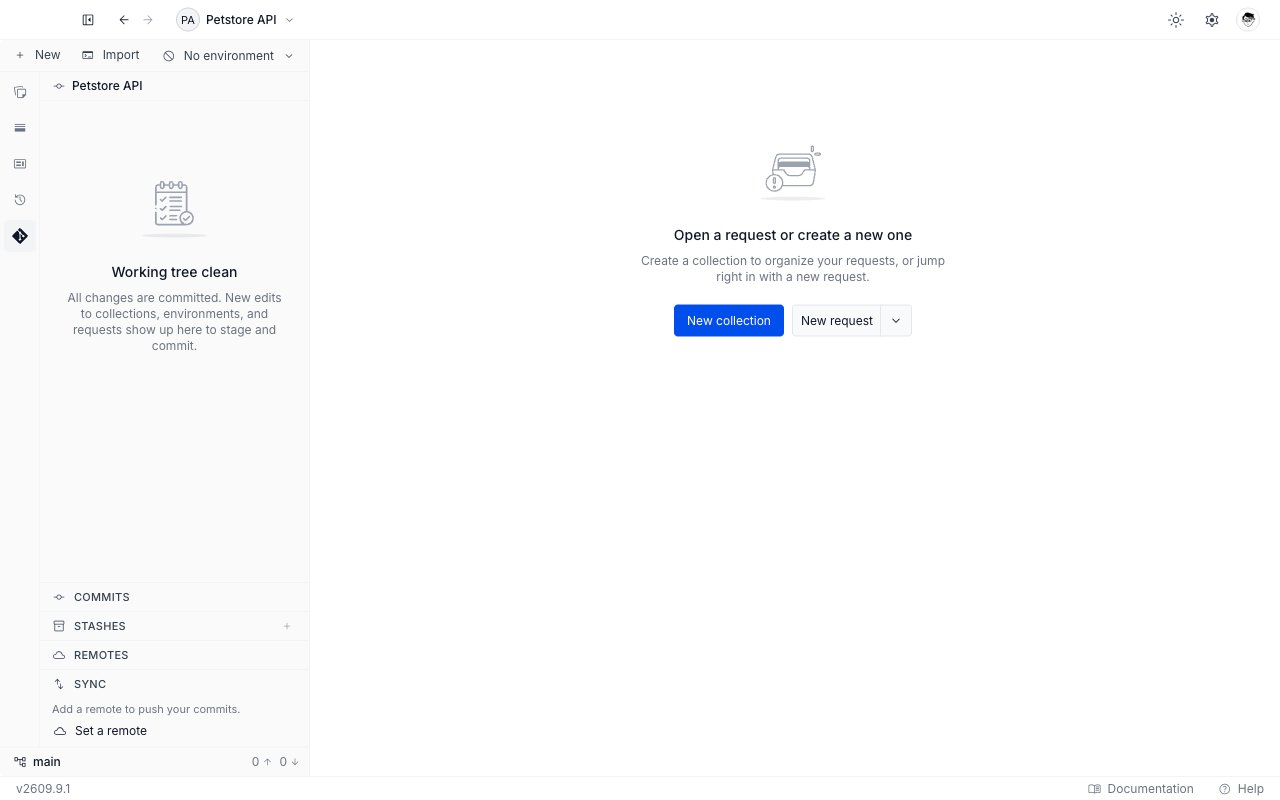
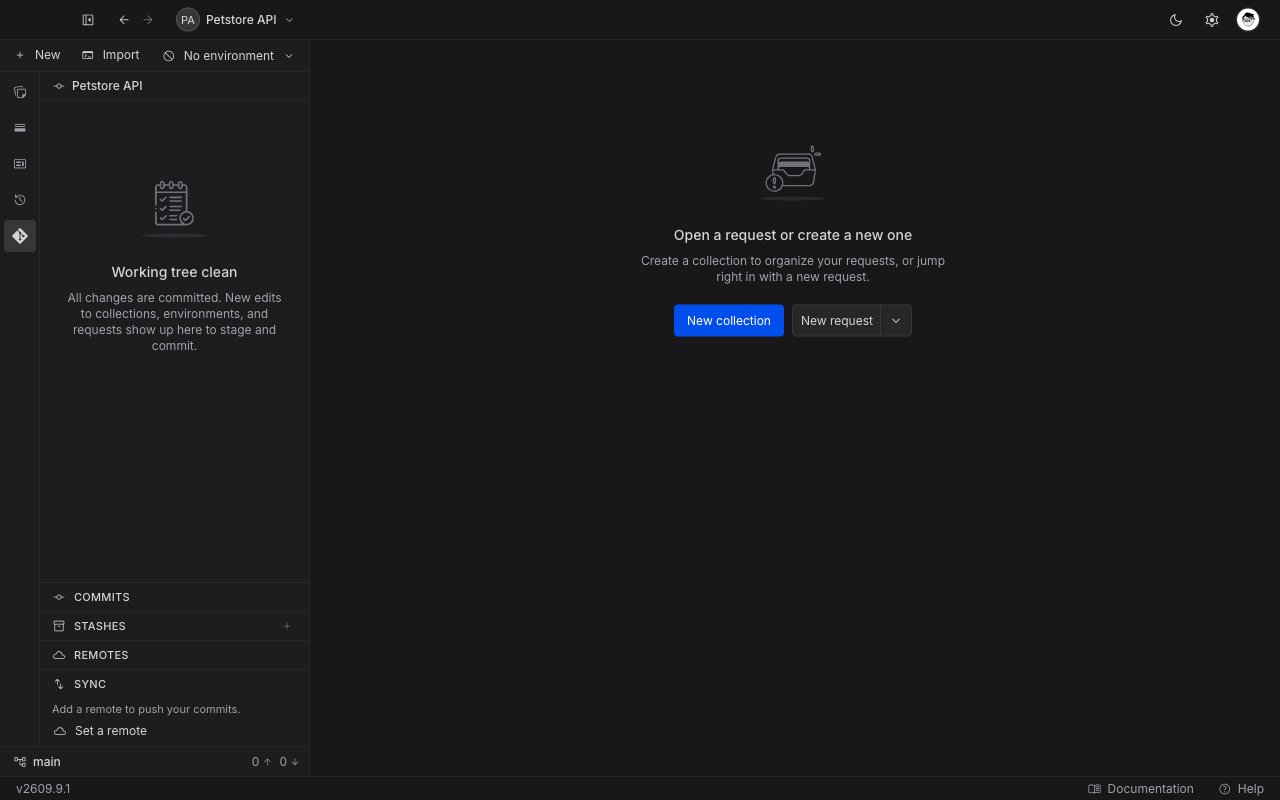
Open the **Git** tab to see the panel for the active project. The project name sits at the top. Below it, the panel shows one of four states.
| State | What you see |
| ----------------- | ----------------------------------------------------------------------------------------------------------- |
| No repository yet | The **No git repo** empty state, with an **Initialize git** button. |
| Clean | **Working tree clean**. Every change is committed. |
| Changes pending | The commit box, then the **Staged (N)** and **Changes (N)** sections. |
| Merge in progress | The [conflict resolution surface](/api-client/git/resolve-conflicts) replaces everything else in the panel. |
In the first three states the **Commits**, **Stashes**, and **Remotes** rows sit below the file area, followed by the collapsible **Sync** section. All four are there before you initialize anything, so even the **No git repo** panel shows the whole stack. A merge in progress hides all four and gives the panel's whole height to the conflict.
**Sync** has one exception. It is hidden on a repository you have just initialized, and comes back as soon as you make the first commit or add a remote.
### The Git panel
Open the **Git** tab to see the panel for the active project. The project name sits at the top. Below it, the panel shows one of four states.
| State | What you see |
| ----------------- | ----------------------------------------------------------------------------------------------------------- |
| No repository yet | The **No git repo** empty state, with an **Initialize git** button. |
| Clean | **Working tree clean**. Every change is committed. |
| Changes pending | The commit box, then the **Staged (N)** and **Changes (N)** sections. |
| Merge in progress | The [conflict resolution surface](/api-client/git/resolve-conflicts) replaces everything else in the panel. |
In the first three states the **Commits**, **Stashes**, and **Remotes** rows sit below the file area, followed by the collapsible **Sync** section. All four are there before you initialize anything, so even the **No git repo** panel shows the whole stack. A merge in progress hides all four and gives the panel's whole height to the conflict.
**Sync** has one exception. It is hidden on a repository you have just initialized, and comes back as soon as you make the first commit or add a remote.
 ### The status bar
A status bar sits at the bottom of the sidebar on every tab, not only on the **Git** tab. It shows:
* The current branch name. Click it to open the [branch picker](/api-client/git/branches).
* An amber dot when the working tree holds uncommitted changes.
* The number of commits to push and to pull, next to an up arrow and a down arrow. Hover them for "N to push" and "N to pull".
* A chevron that opens the **Sync** controls. On the **Git** tab the chevron expands the inline **Sync** section. On any other tab it opens the same controls in a small popover.
Hover the branch name for a summary such as `On branch main · uncommitted changes`. While a merge or a rebase is in progress, the bar shows `(locked)` in place of the counts, and the branch picker does not open.
### The status bar
A status bar sits at the bottom of the sidebar on every tab, not only on the **Git** tab. It shows:
* The current branch name. Click it to open the [branch picker](/api-client/git/branches).
* An amber dot when the working tree holds uncommitted changes.
* The number of commits to push and to pull, next to an up arrow and a down arrow. Hover them for "N to push" and "N to pull".
* A chevron that opens the **Sync** controls. On the **Git** tab the chevron expands the inline **Sync** section. On any other tab it opens the same controls in a small popover.
Hover the branch name for a summary such as `On branch main · uncommitted changes`. While a merge or a rebase is in progress, the bar shows `(locked)` in place of the counts, and the branch picker does not open.
 ### Multi-project view
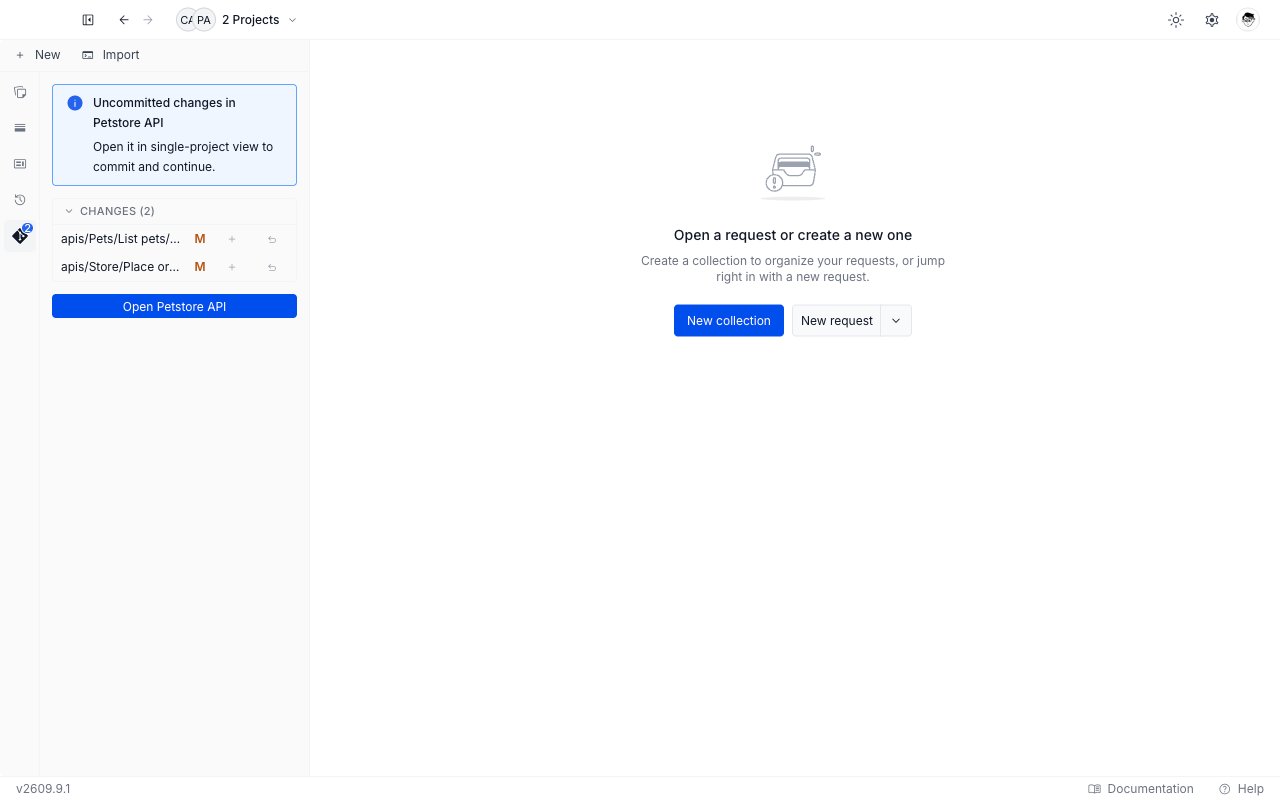
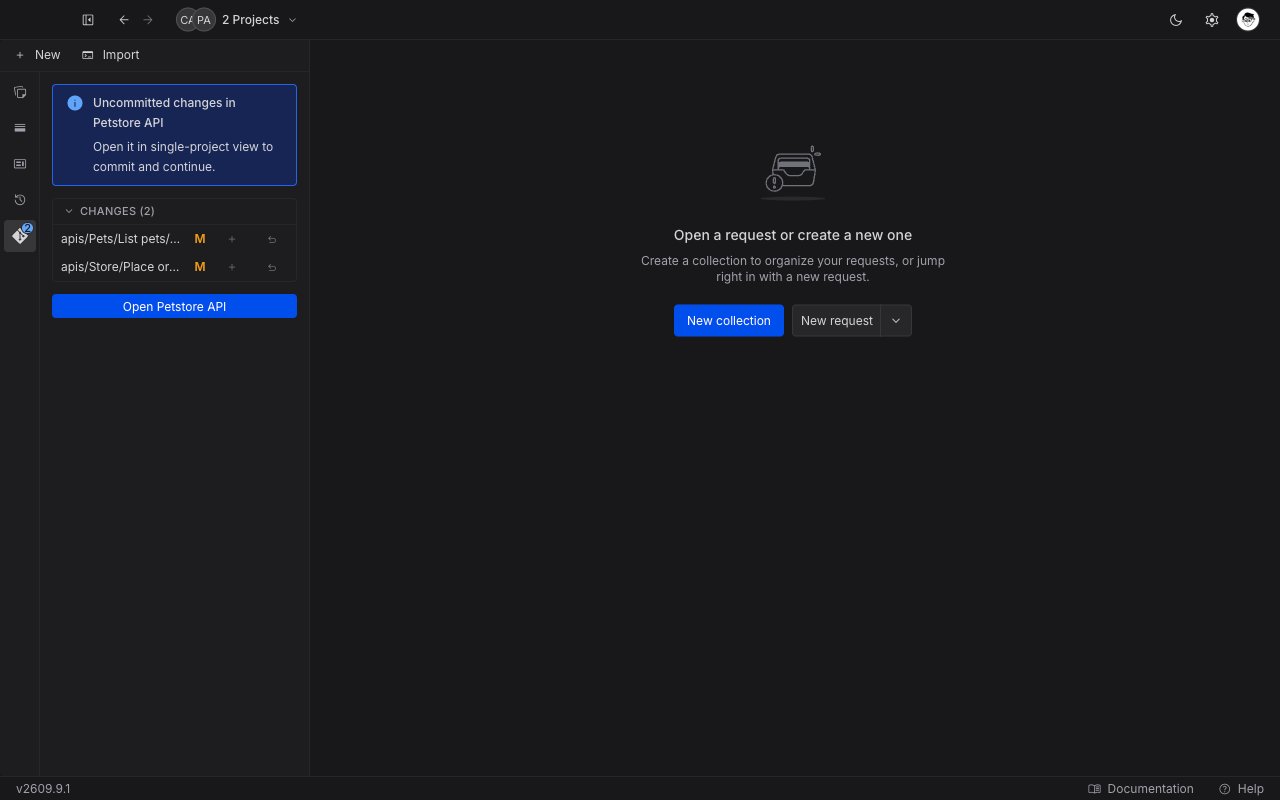
Git acts on one project at a time. In multi-project view the panel is informational only:
* With no pending changes it shows **Git isn't available in multi-project view** and a **Switch project** button.
* With one project holding changes it shows **Uncommitted changes in ``**, a **Changes** list, and an **Open ``** button.
* With several projects holding changes it shows **Uncommitted changes in N projects** and a **Switch project** button.
The **Changes** list is read-only. Each row still draws its plus and undo icons, but they are greyed out and do nothing here. Open a single project to stage, commit, push, or pull.
### Multi-project view
Git acts on one project at a time. In multi-project view the panel is informational only:
* With no pending changes it shows **Git isn't available in multi-project view** and a **Switch project** button.
* With one project holding changes it shows **Uncommitted changes in ``**, a **Changes** list, and an **Open ``** button.
* With several projects holding changes it shows **Uncommitted changes in N projects** and a **Switch project** button.
The **Changes** list is read-only. Each row still draws its plus and undo icons, but they are greyed out and do nothing here. Open a single project to stage, commit, push, or pull.
 ## What Requestly tracks
Requestly tracks the project folder as it sits on disk. That includes your collections and requests under `apis/`, your environments, the project's `__requestly.json` marker, and any API Design files the project holds. The change list groups files by the collection and request they belong to. Files that live outside `apis/`, such as the project's own configuration, appear as their own rows at the top level of the change list.
Requestly tracks everything in the project folder and does not create a `.gitignore` for you, so add one yourself for anything you do not want on the remote. Keep secrets in [Vault](/api-client/vault/vault) rather than in environment values.
## Messages you may see
Git failures appear as a toast in the corner of the app. Some toasts carry an action button that fixes the problem in one click.
| Message | What it means | What to do |
| ------------------------------------------------------------------------------------------------------------- | ---------------------------------------------------------------------------------------------------- | --------------------------------------------------------------------------------------- |
| "Git is not installed. Install Git, then restart Requestly." | Requestly could not find a `git` binary on your machine. | Click **Download Git**, install it, then restart Requestly. |
| "Network error. Check your connection and try the operation again." | The fetch, pull, or push could not reach the remote. | Check your connection, then run the operation again. |
| "Remote has commits you don't have locally. Pull first, then push." | Someone else pushed commits you do not have yet. | Click **Pull first**, resolve anything Git reports, then push. |
| "The local project and the remote have unrelated histories (started separately). Merge them to combine both." | You initialized the project locally and then linked it to a remote that already had its own commits. | Click **Merge anyway** to combine both histories. Requestly never does this on its own. |
| "Commit or stash your local changes before pulling." | The working tree is dirty, so the pull would overwrite your edits. | Commit the changes, or stash them, then pull. |
| "Another git operation is in progress. Try again in a moment." | Two Git operations overlapped. | Wait for the first one to finish, then retry. |
| "That remote URL isn’t supported. Use an https\:// or ssh remote URL." | The remote URL uses a transport Requestly refuses. | Enter an `https://` or `ssh` URL instead. |
| "Your saved token for this remote was rejected. Update the token and try again." | The stored access token expired or was revoked. | Click **Update token** and enter a current one. |
| "Resolve the remaining conflicts before continuing the merge." | The merge still has files you have not resolved. | Resolve every conflicted file, then continue. |
A missing credential raises its own message with an **Add token** action. That action opens the credential form for the remote's host.
### While connecting an account
Connecting a GitHub or GitLab account reports its failures in the dialog or panel you are working in, not as a toast. See [Providers and authentication](/api-client/git/providers-and-authentication) for the flows these belong to.
| Message | What it means | What to do |
| ----------------------------------------------------------------------------------- | ---------------------------------------------------------------------------------------------------------- | ---------------------------------------------------------- |
| "That token didn't work. Check it's correct and not expired." | The provider rejected the token you pasted. | Paste a current token, or create a new one. |
| "This token is missing the required scope." | The token is valid but lacks a scope Requestly needs. The provider's own scope advice follows the message. | Create a token with the scopes named, then paste that one. |
| "Could not validate the token. Try again." | The check could not complete. | Click **Validate & save** again. |
| "Too many attempts right now. Try again in a moment." | The provider is rate-limiting the checks. | Wait a moment, then retry. |
| "Couldn't reach the provider. Check your connection and try again." | The request to the provider failed. | Check your connection, then retry. |
| "Sign-in is not set up for this provider yet. Use a personal access token instead." | Sign-in is unavailable for that provider in this build. | Connect with a personal access token. |
| "Device sign-in is disabled for this app. Use a personal access token instead." | The provider has device sign-in switched off. | Connect with a personal access token. |
| "The sign-in code expired. Get a new code to try again." | The code lapsed before you approved it. | Click **Get a new code**. |
| "The sign-in was declined on the provider page." | The request was rejected on the provider's website. | Start the sign-in again and approve it. |
| "The sign-in session ended. Try again." | The sign-in stopped before it finished. | Click **Try again**. |
| "Something went wrong. Try again, or check your connection if it persists." | The provider answered in a way Requestly did not expect. | Retry. If it repeats, check your connection. |
### While browsing repositories
The **Browse my GitHub repos** and **Browse my GitLab repos** tabs of the clone dialog report their own failures above the list. Each message names the provider whose tab you are on, so the GitLab tab shows the GitLab wording of the same message.
| Message | What it means | What to do |
| -------------------------------------------------------------------------------- | ------------------------------------------------- | ----------------------------------------------------------------------------- |
| "Your GitHub token is missing a required scope. Reconnect with the right scope." | The saved token cannot read your repository list. | Reconnect the account with a token carrying the scopes the provider asks for. |
| "GitHub rate limit reached. Try again in a moment." | The provider is rate-limiting the listing. | Wait a moment, then search again. |
| "Couldn't reach GitHub. Check your connection and try again." | The request to the provider failed. | Check your connection, then retry. |
| "Could not load repositories. Try again." | The listing failed for another reason. | Retry. Paste the repository URL if it keeps failing. |
When no credential is saved, the tab shows a connect prompt instead of an error.
### While browsing branches, commits, and diffs
These report in the window, section, or tab you are working in, not as a toast.
| Message | What it means | What to do |
| --------------------------------------------------------------- | --------------------------------------------------------------------------------------------------------------------------- | ------------------------------------------------------------------------ |
| "Branch names cannot contain spaces." | The branch name you typed holds a space. | Remove the spaces. **Create** stays disabled until the name is valid. |
| "Invalid branch name." | The name holds a character Git refuses, or a shape it refuses such as `..`, a leading or trailing `/`, or a `.lock` ending. | Use letters, digits, hyphens, underscores, and slashes between segments. |
| "A branch with that name already exists." | The repository already has that branch. | Rename and create again. The composer stays open. |
| "Could not create the branch." | The create failed for another reason. | Try again. If it repeats, check that the repository is not mid-merge. |
| "Could not load commits. Check your connection and try again." | The **Commits** section could not read the history. | Click **Retry** on the section. |
| "Could not load the diff. Check your connection and try again." | A diff tab could not read the file. | Click **Retry** in the tab. |
### While stashing, resolving conflicts, and editing remotes
These report in the section, tab, or window you are working in, not as a toast.
| Message | What it means | What to do |
| -------------------------------------------------------------------------- | --------------------------------------------------------------------------------------------- | ------------------------------------------------------------------------ |
| "Enter a valid git remote URL (HTTPS or SSH)." | The URL in the **Add remote** or **Edit remote URL** window is not a shape Requestly accepts. | Correct it. **Add** and **Save** stay disabled until the URL is valid. |
| "Could not load the conflict" | A conflict editor tab could not read its file. The reason follows the heading. | Close the tab and open the file from the panel again. |
| "Could not load the conflicted file. Check your connection and try again." | The request for the file's contents failed. | Close the tab and open the file again. |
| "File too large to resolve here" | The file is binary, or larger than Requestly renders. | Click **Keep current version** to resolve the whole file with your copy. |
A stash that applies with conflicts raises no toast. The conflicted file lands in the **Changes** list with a **conflict** badge. See [Stash changes](/api-client/git/stashes#when-an-apply-hits-conflicts).
## Next steps
Initialize a repository in an existing local project, or clone one into a new project.
Read the change list, stage or discard files, and write a commit.
Fetch from the remote, read the ahead and behind counts, and sync your work.
Connect a GitHub or GitLab account, pick sign-in or a token, and reconnect when one is rejected.
Open the branch picker to switch, create, or delete a branch, and handle a switch with uncommitted changes.
Read the commit graph, and open a read-only diff for a commit or a changed file.
Park uncommitted work, apply it back later, drop it, and resolve an apply that conflicts.
Work through a merge that stopped on conflicting files, finish it, or abort it.
See the repository your project pushes to, add one, correct its URL, or remove it.
## What Requestly tracks
Requestly tracks the project folder as it sits on disk. That includes your collections and requests under `apis/`, your environments, the project's `__requestly.json` marker, and any API Design files the project holds. The change list groups files by the collection and request they belong to. Files that live outside `apis/`, such as the project's own configuration, appear as their own rows at the top level of the change list.
Requestly tracks everything in the project folder and does not create a `.gitignore` for you, so add one yourself for anything you do not want on the remote. Keep secrets in [Vault](/api-client/vault/vault) rather than in environment values.
## Messages you may see
Git failures appear as a toast in the corner of the app. Some toasts carry an action button that fixes the problem in one click.
| Message | What it means | What to do |
| ------------------------------------------------------------------------------------------------------------- | ---------------------------------------------------------------------------------------------------- | --------------------------------------------------------------------------------------- |
| "Git is not installed. Install Git, then restart Requestly." | Requestly could not find a `git` binary on your machine. | Click **Download Git**, install it, then restart Requestly. |
| "Network error. Check your connection and try the operation again." | The fetch, pull, or push could not reach the remote. | Check your connection, then run the operation again. |
| "Remote has commits you don't have locally. Pull first, then push." | Someone else pushed commits you do not have yet. | Click **Pull first**, resolve anything Git reports, then push. |
| "The local project and the remote have unrelated histories (started separately). Merge them to combine both." | You initialized the project locally and then linked it to a remote that already had its own commits. | Click **Merge anyway** to combine both histories. Requestly never does this on its own. |
| "Commit or stash your local changes before pulling." | The working tree is dirty, so the pull would overwrite your edits. | Commit the changes, or stash them, then pull. |
| "Another git operation is in progress. Try again in a moment." | Two Git operations overlapped. | Wait for the first one to finish, then retry. |
| "That remote URL isn’t supported. Use an https\:// or ssh remote URL." | The remote URL uses a transport Requestly refuses. | Enter an `https://` or `ssh` URL instead. |
| "Your saved token for this remote was rejected. Update the token and try again." | The stored access token expired or was revoked. | Click **Update token** and enter a current one. |
| "Resolve the remaining conflicts before continuing the merge." | The merge still has files you have not resolved. | Resolve every conflicted file, then continue. |
A missing credential raises its own message with an **Add token** action. That action opens the credential form for the remote's host.
### While connecting an account
Connecting a GitHub or GitLab account reports its failures in the dialog or panel you are working in, not as a toast. See [Providers and authentication](/api-client/git/providers-and-authentication) for the flows these belong to.
| Message | What it means | What to do |
| ----------------------------------------------------------------------------------- | ---------------------------------------------------------------------------------------------------------- | ---------------------------------------------------------- |
| "That token didn't work. Check it's correct and not expired." | The provider rejected the token you pasted. | Paste a current token, or create a new one. |
| "This token is missing the required scope." | The token is valid but lacks a scope Requestly needs. The provider's own scope advice follows the message. | Create a token with the scopes named, then paste that one. |
| "Could not validate the token. Try again." | The check could not complete. | Click **Validate & save** again. |
| "Too many attempts right now. Try again in a moment." | The provider is rate-limiting the checks. | Wait a moment, then retry. |
| "Couldn't reach the provider. Check your connection and try again." | The request to the provider failed. | Check your connection, then retry. |
| "Sign-in is not set up for this provider yet. Use a personal access token instead." | Sign-in is unavailable for that provider in this build. | Connect with a personal access token. |
| "Device sign-in is disabled for this app. Use a personal access token instead." | The provider has device sign-in switched off. | Connect with a personal access token. |
| "The sign-in code expired. Get a new code to try again." | The code lapsed before you approved it. | Click **Get a new code**. |
| "The sign-in was declined on the provider page." | The request was rejected on the provider's website. | Start the sign-in again and approve it. |
| "The sign-in session ended. Try again." | The sign-in stopped before it finished. | Click **Try again**. |
| "Something went wrong. Try again, or check your connection if it persists." | The provider answered in a way Requestly did not expect. | Retry. If it repeats, check your connection. |
### While browsing repositories
The **Browse my GitHub repos** and **Browse my GitLab repos** tabs of the clone dialog report their own failures above the list. Each message names the provider whose tab you are on, so the GitLab tab shows the GitLab wording of the same message.
| Message | What it means | What to do |
| -------------------------------------------------------------------------------- | ------------------------------------------------- | ----------------------------------------------------------------------------- |
| "Your GitHub token is missing a required scope. Reconnect with the right scope." | The saved token cannot read your repository list. | Reconnect the account with a token carrying the scopes the provider asks for. |
| "GitHub rate limit reached. Try again in a moment." | The provider is rate-limiting the listing. | Wait a moment, then search again. |
| "Couldn't reach GitHub. Check your connection and try again." | The request to the provider failed. | Check your connection, then retry. |
| "Could not load repositories. Try again." | The listing failed for another reason. | Retry. Paste the repository URL if it keeps failing. |
When no credential is saved, the tab shows a connect prompt instead of an error.
### While browsing branches, commits, and diffs
These report in the window, section, or tab you are working in, not as a toast.
| Message | What it means | What to do |
| --------------------------------------------------------------- | --------------------------------------------------------------------------------------------------------------------------- | ------------------------------------------------------------------------ |
| "Branch names cannot contain spaces." | The branch name you typed holds a space. | Remove the spaces. **Create** stays disabled until the name is valid. |
| "Invalid branch name." | The name holds a character Git refuses, or a shape it refuses such as `..`, a leading or trailing `/`, or a `.lock` ending. | Use letters, digits, hyphens, underscores, and slashes between segments. |
| "A branch with that name already exists." | The repository already has that branch. | Rename and create again. The composer stays open. |
| "Could not create the branch." | The create failed for another reason. | Try again. If it repeats, check that the repository is not mid-merge. |
| "Could not load commits. Check your connection and try again." | The **Commits** section could not read the history. | Click **Retry** on the section. |
| "Could not load the diff. Check your connection and try again." | A diff tab could not read the file. | Click **Retry** in the tab. |
### While stashing, resolving conflicts, and editing remotes
These report in the section, tab, or window you are working in, not as a toast.
| Message | What it means | What to do |
| -------------------------------------------------------------------------- | --------------------------------------------------------------------------------------------- | ------------------------------------------------------------------------ |
| "Enter a valid git remote URL (HTTPS or SSH)." | The URL in the **Add remote** or **Edit remote URL** window is not a shape Requestly accepts. | Correct it. **Add** and **Save** stay disabled until the URL is valid. |
| "Could not load the conflict" | A conflict editor tab could not read its file. The reason follows the heading. | Close the tab and open the file from the panel again. |
| "Could not load the conflicted file. Check your connection and try again." | The request for the file's contents failed. | Close the tab and open the file again. |
| "File too large to resolve here" | The file is binary, or larger than Requestly renders. | Click **Keep current version** to resolve the whole file with your copy. |
A stash that applies with conflicts raises no toast. The conflicted file lands in the **Changes** list with a **conflict** badge. See [Stash changes](/api-client/git/stashes#when-an-apply-hits-conflicts).
## Next steps
Initialize a repository in an existing local project, or clone one into a new project.
Read the change list, stage or discard files, and write a commit.
Fetch from the remote, read the ahead and behind counts, and sync your work.
Connect a GitHub or GitLab account, pick sign-in or a token, and reconnect when one is rejected.
Open the branch picker to switch, create, or delete a branch, and handle a switch with uncommitted changes.
Read the commit graph, and open a read-only diff for a commit or a changed file.
Park uncommitted work, apply it back later, drop it, and resolve an apply that conflicts.
Work through a merge that stopped on conflicting files, finish it, or abort it.
See the repository your project pushes to, add one, correct its URL, or remove it.