> ## Documentation Index
> Fetch the complete documentation index at: https://docs.requestly.com/llms.txt
> Use this file to discover all available pages before exploring further.
# From a Collection
> Turn a collection in the Requestly API Client into a running mock server, where every HTTP request becomes a route and every saved example becomes a served response.
If you already have a collection of requests and you have saved examples against them, you do not need to build a mock server by hand. Right-click the collection, choose **Create mock server**, and Requestly builds the whole mock for you: every HTTP request in the collection becomes a route, and every saved example response on those requests becomes a response that route can serve.
This is the fastest way to get a realistic stand-in for an API you already call. For the manual route-by-route approach, see [Mock Server](/api-client/mock-server).
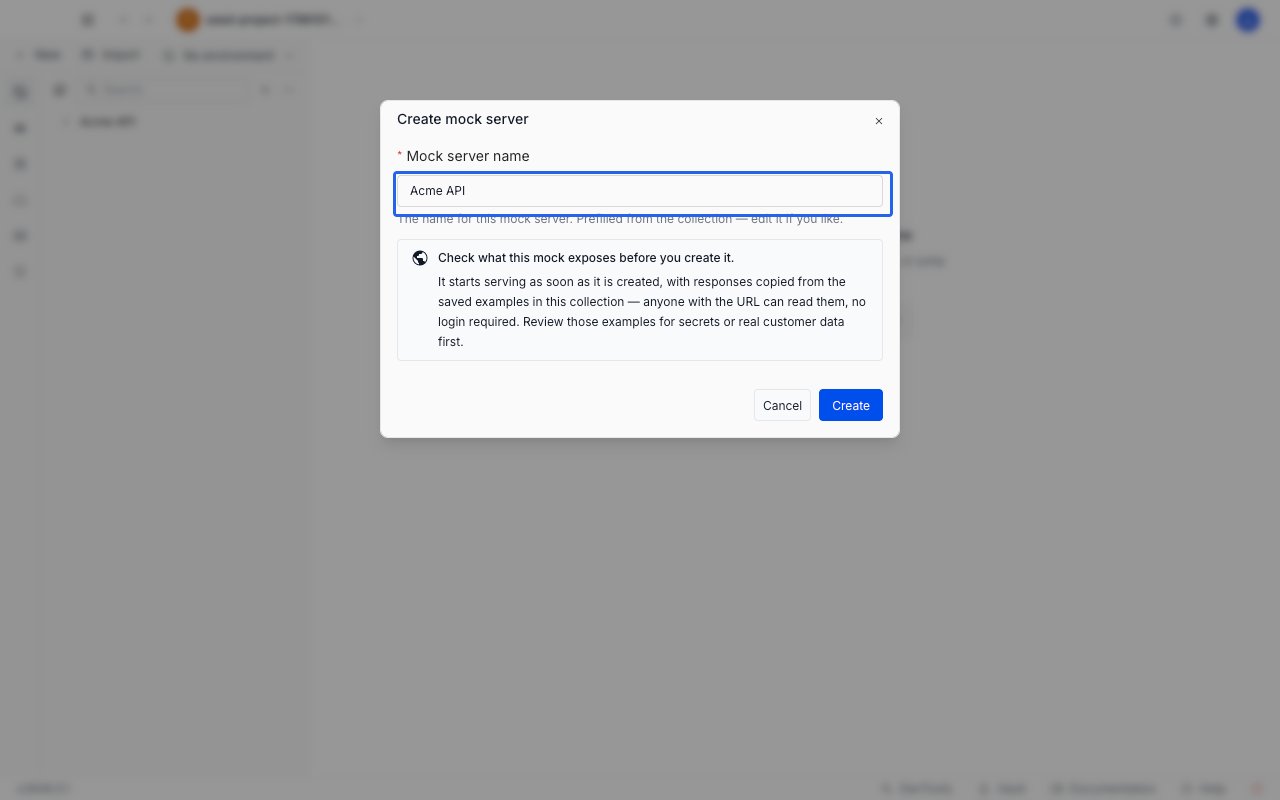
A generated mock starts serving the moment you create it, and anyone with its URL can call it without signing in. Check your saved examples for secrets or real customer data before you generate.
## Prerequisites
* You are signed in and a cloud project is active. Generation is not available in local projects, and the menu item does not appear there.
* Your role has permission to create mocks in the project. Without it the menu item is visible but disabled.
* The collection contains at least one HTTP request with at least one [saved example](/api-client/examples). Requests without examples still become routes, but those routes have nothing to serve.
## Generate the mock
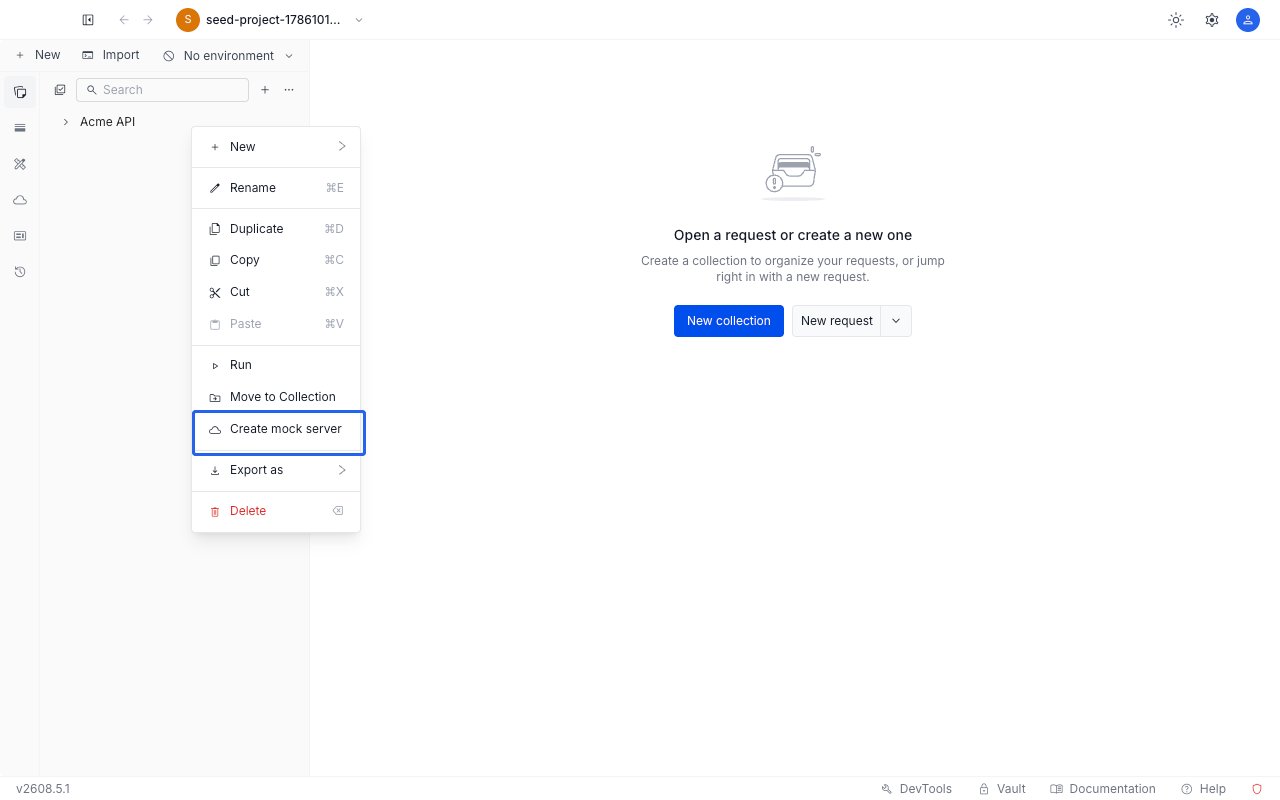
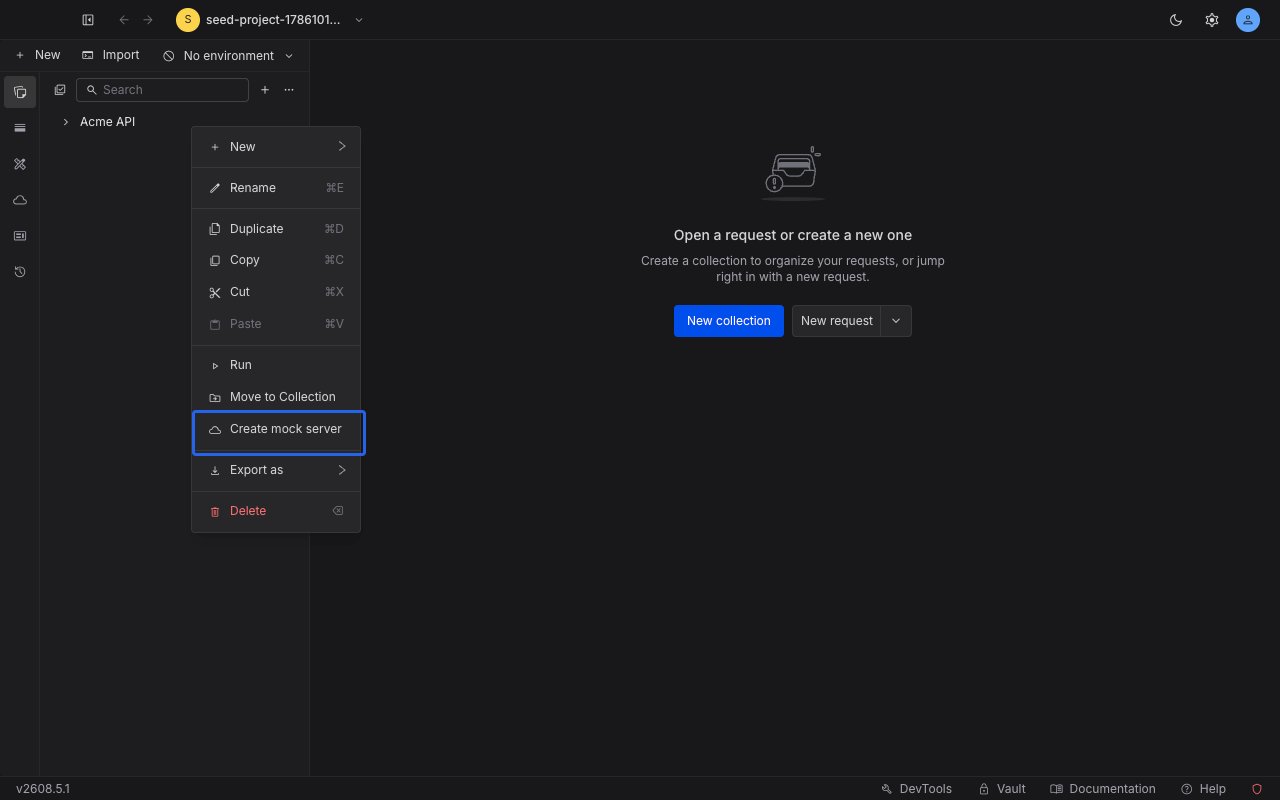
In the **Collections** section of the sidebar, right-click the collection or sub-collection you want to mock and choose **Create mock server**. Sub-collections work the same way as top-level collections, and everything nested beneath the one you pick is included. The item appears only on collections and sub-collections: requests and examples have their own menus and cannot be mocked on their own.
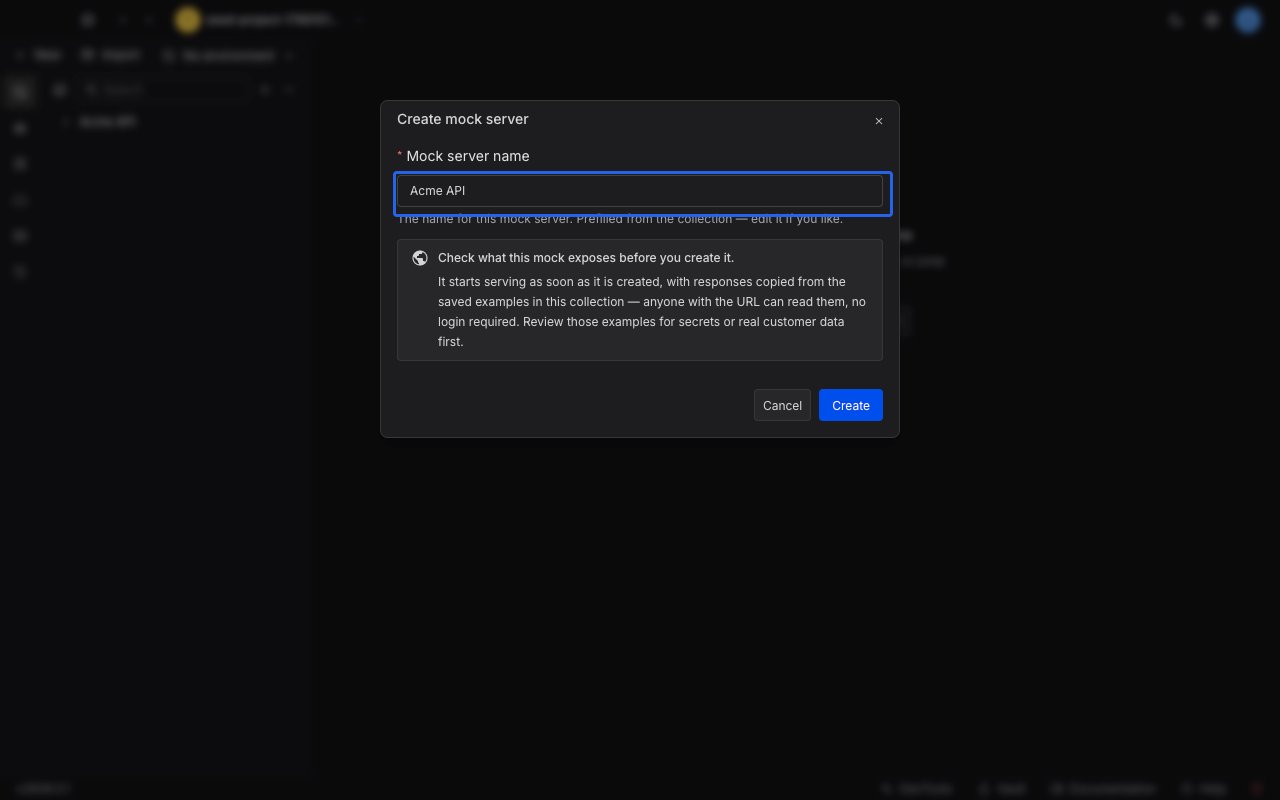
 The **Create mock server** dialog opens with the name already filled in from the collection you right-clicked. Keep it or type your own. The name is required, so clearing it disables **Create**.
 Click **Create**. Requestly reads the collection, builds the routes and responses, and writes them in one go. The dialog stays open and cannot be dismissed while this runs.
When generation finishes, the dialog reports what it produced: how many routes and responses were created, and any rows where something was skipped, dropped, or changed. See [Read the generation summary](#read-the-generation-summary) for what each row means.
Click **Create**. Requestly reads the collection, builds the routes and responses, and writes them in one go. The dialog stays open and cannot be dismissed while this runs.
When generation finishes, the dialog reports what it produced: how many routes and responses were created, and any rows where something was skipped, dropped, or changed. See [Read the generation summary](#read-the-generation-summary) for what each row means.
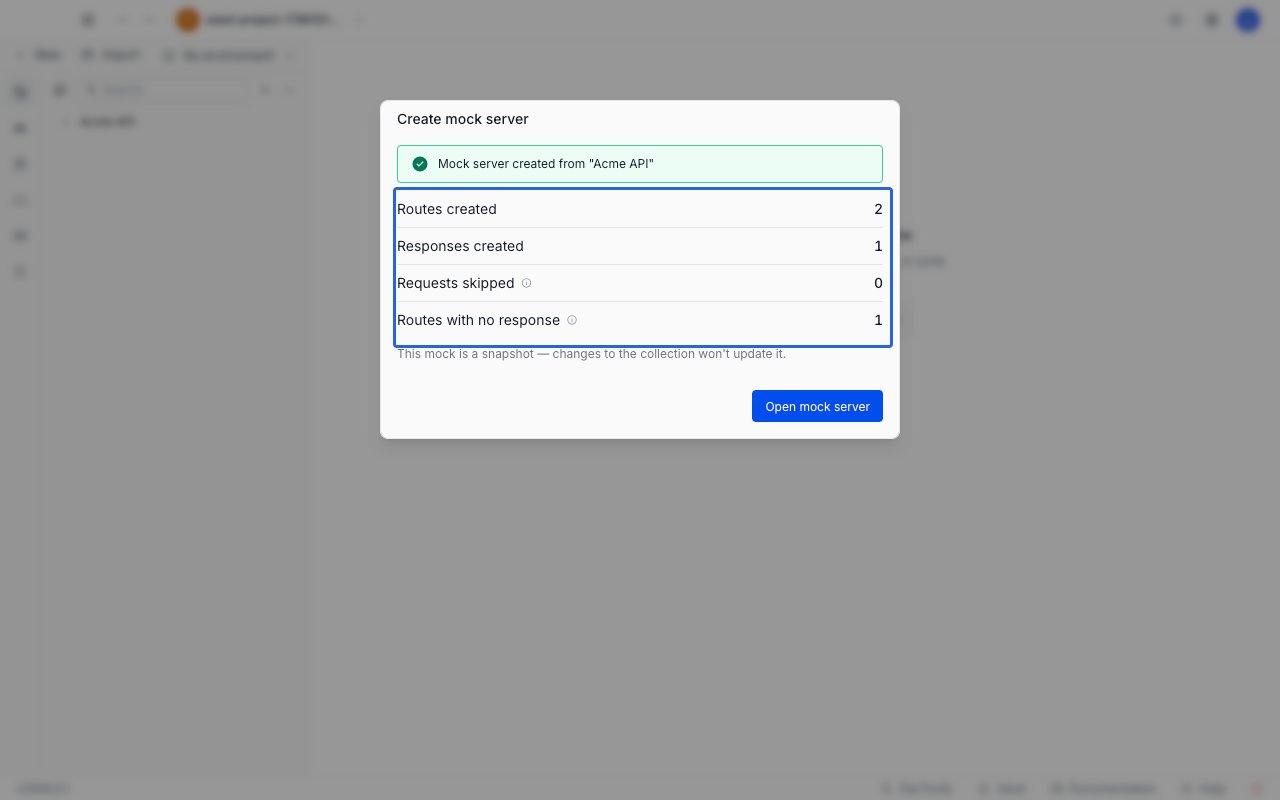
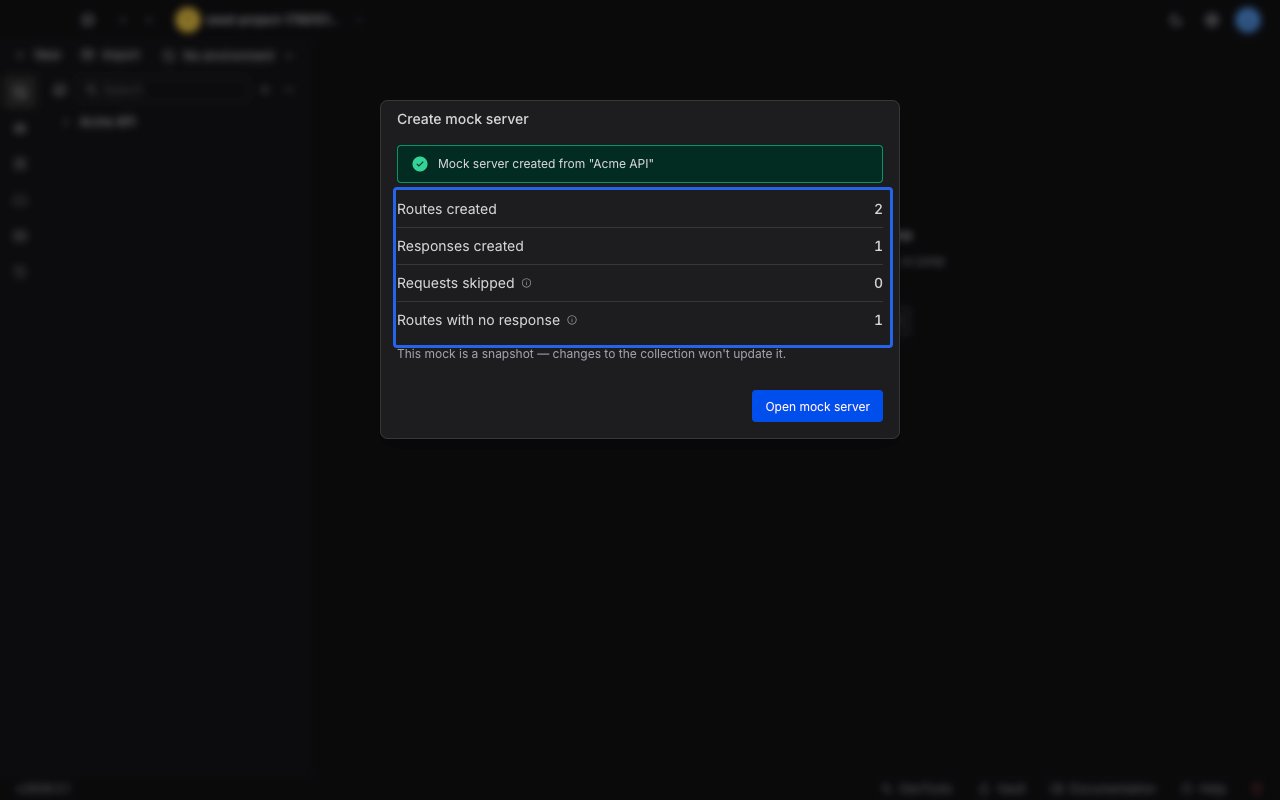 Click **Open mock server**. This is the only way out of the dialog, because the mock already exists and there is no Close button. The mock opens in an editor tab, already serving. Copy the mock URL from the strip at the top, append a route path, and call it:
```bash theme={null}
curl https://.mocks.requestly.cloud/users
```
You get back the saved example response that the route was built from.
## What gets generated
| In the collection | In the mock |
| -------------------------------------------------------------- | ------------------------------------------------------------------------- |
| An HTTP request, at any depth in the collection | One route, with the request's method and path |
| Each saved example response on that request | One response on that route |
| An ID-like path segment: a number, a UUID, or a `{{variable}}` | A path parameter, so the route matches any value in that position |
| A GraphQL, gRPC, MQTT, WebSocket, or Socket.IO request | Nothing. A mock server only serves HTTP, so these are skipped and counted |
Every generated route is set to the **Rules-based** [selection mode](/api-client/mock-server/responses#selection-modes), and one of its responses is marked as the default: the first successful (`2xx`) example, or the first example if none succeeded. A route with several examples therefore serves the default until you add [matching rules](/api-client/mock-server/rules) to pick between them.
Transport headers such as `content-length`, `content-encoding`, and `date` are not copied across, because the mock sets its own. `content-type` and your own custom headers are preserved. `set-cookie` is dropped as well, along with the other hop-by-hop headers, so a generated route never sets a cookie.
A generated mock is a snapshot. Editing the collection afterwards does not update the mock, and editing the mock does not touch the collection.
## Read the generation summary
The first three rows always appear, so a zero tells you nothing was quietly dropped. The rest appear only when they are non-zero. Most rows carry an information icon; hover or tab to it for the same explanation in the app. **Routes created** and **Responses created** have none, and neither does **Responses dropped**, because the reason differs from one response to the next.
| Row | What it means |
| --------------------------------- | -------------------------------------------------------------------------------------------------------------------------------------------------------------------------------------------------------------------- |
| **Routes created** | Routes written to the mock. |
| **Responses created** | Responses written across all of those routes. |
| **Requests skipped** | Requests that were not HTTP, so no route could serve them. |
| **Requests unmapped** | HTTP requests with no usable URL path, so no route could be built from them. |
| **Routes with no response** | Routes that exist but serve nothing. Each one returns `404` until you add a response. |
| **Responses dropped** | Saved examples that could not be turned into a response: a binary body, a status code outside `100` to `599`, or a body over the size limit. |
| **Extra endpoints from examples** | Saved examples captured against a different URL or method than their parent request. Each of those endpoints got its own route, which is why **Routes created** can exceed the number of requests in the collection. |
| **Paths wildcarded** | Routes where an ID-like segment was turned into a path parameter, so the route now matches any value in that position. |
| **Routes shadowed** | Routes that are unreachable because an earlier route matches the same requests first. See [ordering and shadowing](/api-client/mock-server/routes#ordering-and-shadowing). |
## After the mock is created
Unlike a mock you create from scratch, a generated mock is already running, so the URL strip offers **Stop** rather than **Start**. Click the copy icon at the end of the strip to copy the base URL.
From here the mock behaves like any other:
* Add, reorder, and delete [routes](/api-client/mock-server/routes).
* Edit the body, status, latency, and headers of each [response](/api-client/mock-server/responses).
* Add [matching rules](/api-client/mock-server/rules) so one route can answer differently depending on the request.
Routes built from a request that had no saved example are flagged with a **No response** badge in the routes list. Those routes return `404` until you give them something to serve.
## When generation cannot run
If the collection or the request is rejected, the dialog explains why and stays open so you can act on it. When the failure is transient, such as the server rejecting the request or being unreachable, nothing was created and the dialog offers **Try again**.
| Message | What to do |
| ------------------------------------------------------------------------------- | ------------------------------------------------------------------------------------------------------------------------------------------------------------------------------------------------ |
| Nothing to mock in this collection | Nothing could be turned into a route: the collection holds no HTTP requests, or none of them has a usable URL. Add HTTP requests with saved examples, then generate again from the context menu. |
| The collection, its saved examples, or a single route is too large | The message names the limit, or the route that exceeded it. Split the collection, or remove the largest saved example responses, then generate again. |
| Your role cannot create mock servers, or the source collection no longer exists | Ask a project admin for mock creation access. If the collection was deleted or moved out of the project, pick another one. |
| Generation is taking longer than expected | Requestly stopped waiting, but the mock may still have been created. No **Try again** is offered here: check the **Mocks** section before generating again. |
Generation is all or nothing on every failure except a timeout. Nothing partial is left behind for you to clean up.
Click **Open mock server**. This is the only way out of the dialog, because the mock already exists and there is no Close button. The mock opens in an editor tab, already serving. Copy the mock URL from the strip at the top, append a route path, and call it:
```bash theme={null}
curl https://.mocks.requestly.cloud/users
```
You get back the saved example response that the route was built from.
## What gets generated
| In the collection | In the mock |
| -------------------------------------------------------------- | ------------------------------------------------------------------------- |
| An HTTP request, at any depth in the collection | One route, with the request's method and path |
| Each saved example response on that request | One response on that route |
| An ID-like path segment: a number, a UUID, or a `{{variable}}` | A path parameter, so the route matches any value in that position |
| A GraphQL, gRPC, MQTT, WebSocket, or Socket.IO request | Nothing. A mock server only serves HTTP, so these are skipped and counted |
Every generated route is set to the **Rules-based** [selection mode](/api-client/mock-server/responses#selection-modes), and one of its responses is marked as the default: the first successful (`2xx`) example, or the first example if none succeeded. A route with several examples therefore serves the default until you add [matching rules](/api-client/mock-server/rules) to pick between them.
Transport headers such as `content-length`, `content-encoding`, and `date` are not copied across, because the mock sets its own. `content-type` and your own custom headers are preserved. `set-cookie` is dropped as well, along with the other hop-by-hop headers, so a generated route never sets a cookie.
A generated mock is a snapshot. Editing the collection afterwards does not update the mock, and editing the mock does not touch the collection.
## Read the generation summary
The first three rows always appear, so a zero tells you nothing was quietly dropped. The rest appear only when they are non-zero. Most rows carry an information icon; hover or tab to it for the same explanation in the app. **Routes created** and **Responses created** have none, and neither does **Responses dropped**, because the reason differs from one response to the next.
| Row | What it means |
| --------------------------------- | -------------------------------------------------------------------------------------------------------------------------------------------------------------------------------------------------------------------- |
| **Routes created** | Routes written to the mock. |
| **Responses created** | Responses written across all of those routes. |
| **Requests skipped** | Requests that were not HTTP, so no route could serve them. |
| **Requests unmapped** | HTTP requests with no usable URL path, so no route could be built from them. |
| **Routes with no response** | Routes that exist but serve nothing. Each one returns `404` until you add a response. |
| **Responses dropped** | Saved examples that could not be turned into a response: a binary body, a status code outside `100` to `599`, or a body over the size limit. |
| **Extra endpoints from examples** | Saved examples captured against a different URL or method than their parent request. Each of those endpoints got its own route, which is why **Routes created** can exceed the number of requests in the collection. |
| **Paths wildcarded** | Routes where an ID-like segment was turned into a path parameter, so the route now matches any value in that position. |
| **Routes shadowed** | Routes that are unreachable because an earlier route matches the same requests first. See [ordering and shadowing](/api-client/mock-server/routes#ordering-and-shadowing). |
## After the mock is created
Unlike a mock you create from scratch, a generated mock is already running, so the URL strip offers **Stop** rather than **Start**. Click the copy icon at the end of the strip to copy the base URL.
From here the mock behaves like any other:
* Add, reorder, and delete [routes](/api-client/mock-server/routes).
* Edit the body, status, latency, and headers of each [response](/api-client/mock-server/responses).
* Add [matching rules](/api-client/mock-server/rules) so one route can answer differently depending on the request.
Routes built from a request that had no saved example are flagged with a **No response** badge in the routes list. Those routes return `404` until you give them something to serve.
## When generation cannot run
If the collection or the request is rejected, the dialog explains why and stays open so you can act on it. When the failure is transient, such as the server rejecting the request or being unreachable, nothing was created and the dialog offers **Try again**.
| Message | What to do |
| ------------------------------------------------------------------------------- | ------------------------------------------------------------------------------------------------------------------------------------------------------------------------------------------------ |
| Nothing to mock in this collection | Nothing could be turned into a route: the collection holds no HTTP requests, or none of them has a usable URL. Add HTTP requests with saved examples, then generate again from the context menu. |
| The collection, its saved examples, or a single route is too large | The message names the limit, or the route that exceeded it. Split the collection, or remove the largest saved example responses, then generate again. |
| Your role cannot create mock servers, or the source collection no longer exists | Ask a project admin for mock creation access. If the collection was deleted or moved out of the project, pick another one. |
| Generation is taking longer than expected | Requestly stopped waiting, but the mock may still have been created. No **Try again** is offered here: check the **Mocks** section before generating again. |
Generation is all or nothing on every failure except a timeout. Nothing partial is left behind for you to clean up.