> ## Documentation Index
> Fetch the complete documentation index at: https://docs.requestly.com/llms.txt
> Use this file to discover all available pages before exploring further.
# From an OpenAPI File
> Import an OpenAPI or Swagger file in the Requestly API Client and generate a running mock server from it in the same step, keeping the imported collection either way.
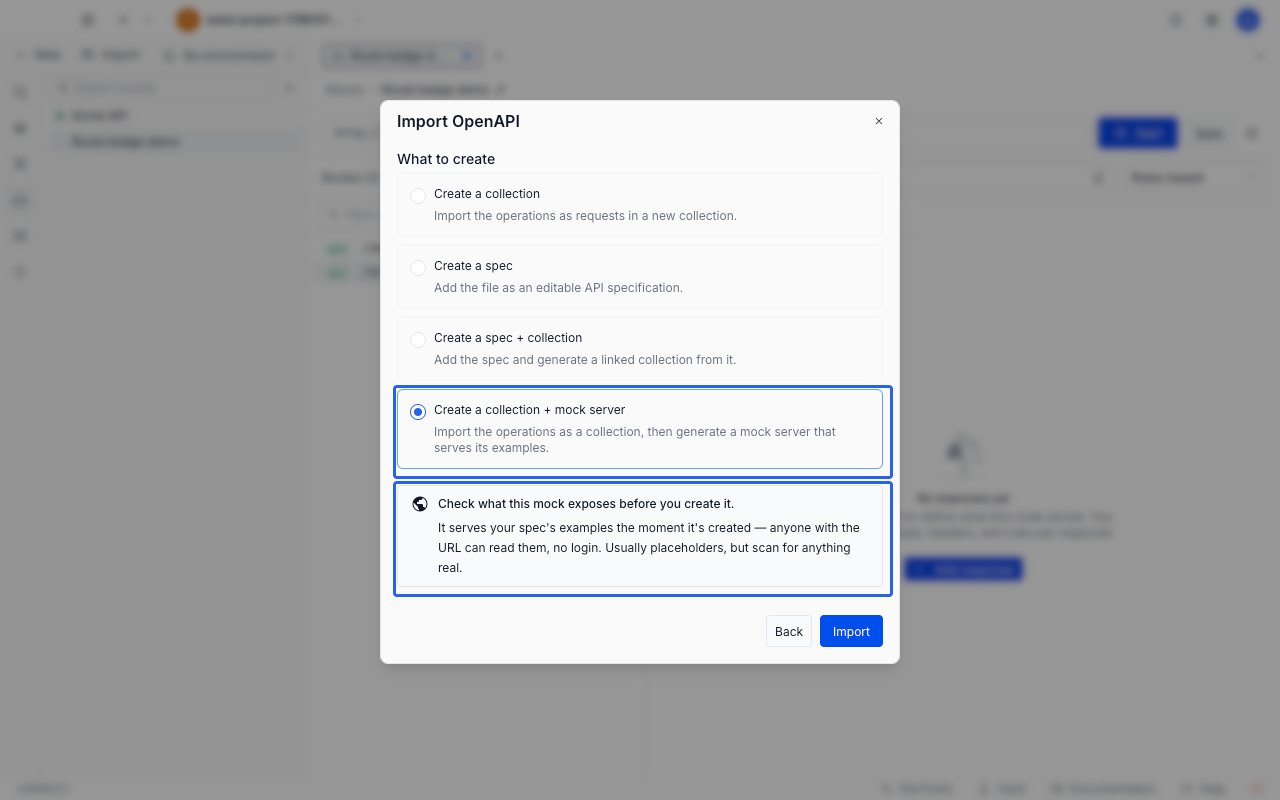
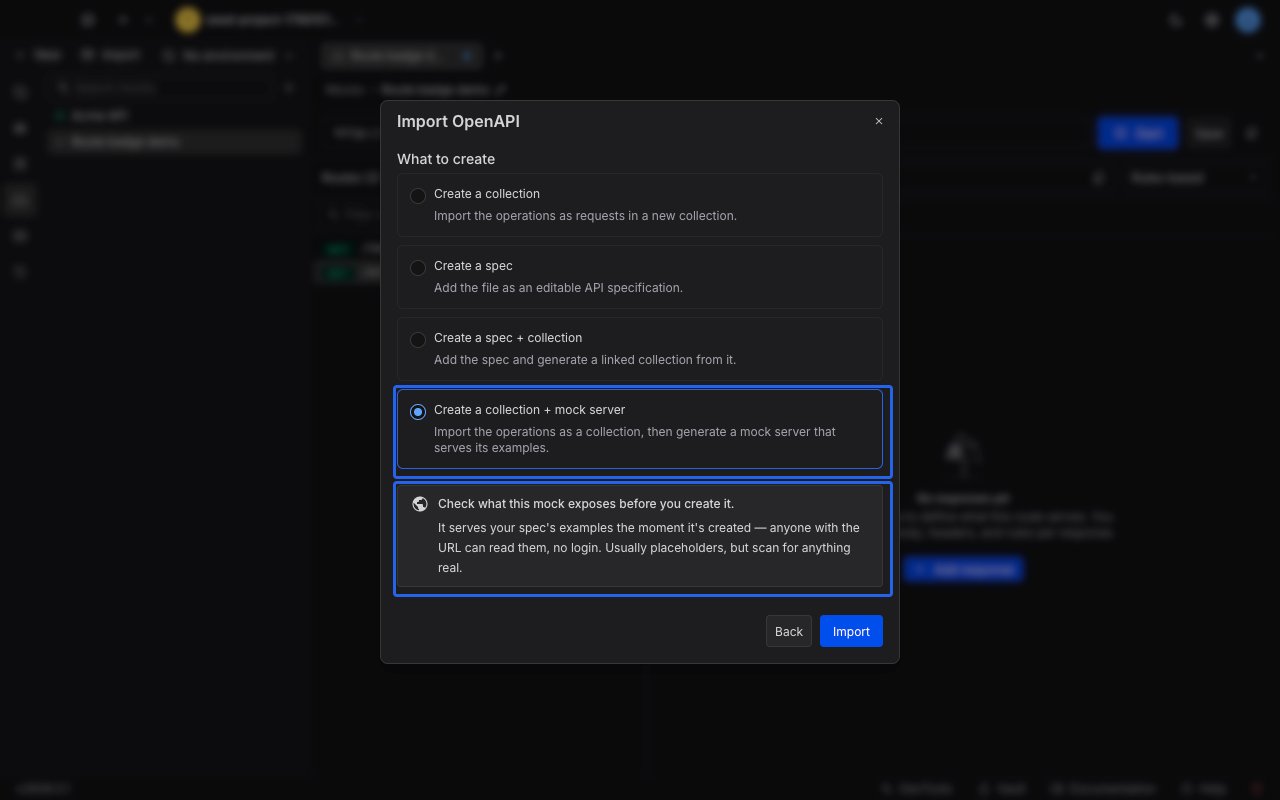
When you import an OpenAPI file, you can ask Requestly to build a mock server from it in the same step. Pick **Create a collection + mock server** in the import preview and Requestly does two things in order: it imports the file as a collection of requests, then generates a mock server from that collection. You keep both.
Under the hood this is the same generator that runs when you [create a mock from a collection](/api-client/mock-server/create-from-collection), so the routes, responses, and summary counts mean the same thing. The difference is that you never have to import first and generate second.
The generated mock starts serving the moment it is created, and anyone with its URL can call it without signing in. Scan your spec's example responses for anything real before you import.
## Prerequisites
* You are signed in and a cloud project is active. Mock servers are cloud-only, so in a local project the option is not shown at all.
* Your role has permission to create mocks in the project. Without it the option appears greyed out, and the reason takes the place of its description.
* The spec defines at least one operation. A spec with no paths cannot be mocked, and the option is greyed out before you import rather than failing afterwards.
* The spec is small enough to mock. If it would produce a collection with more requests than mock generation supports, the option is greyed out and the reason names the limit and the count that exceeded it.
Unlike **Create a spec** and **Create a spec + collection**, this option is not restricted to OpenAPI 3.x, to a single file, or to files up to 16 MB. Swagger 2.0 files, multi-file imports, and files above the 16 MB spec ceiling all work, because no API specification is created: the mock is built from the imported collection. The importer's own 100 MB per-file limit still applies.
A greyed-out option never blocks the import. Leave **Create a collection** selected, import the file, and generate the mock later from the collection's **Create mock server** menu item.
## Generate the mock
Click **Import** in the API Client and choose **OpenAPI**, then select your `.yaml` or `.json` file. Requestly parses the file and shows the import preview.
In the **What to create** list, select **Create a collection + mock server**. It is the last of the four options.
Selecting it reveals a notice about what the mock will expose. The notice is informational: it does not block the import and there is nothing to acknowledge.
 Click **Import**. The collection is imported first, and then the window switches to **Creating the mock server** while the mock is built.
Large specs are generated in the background and can take a few minutes. You can close the window while that runs: it does not cancel anything, and Requestly notifies you when the mock is ready. A mock created while the window was closed is already serving and publicly reachable, so open it from the **Mocks** section and click **Stop** if you are not ready for that.
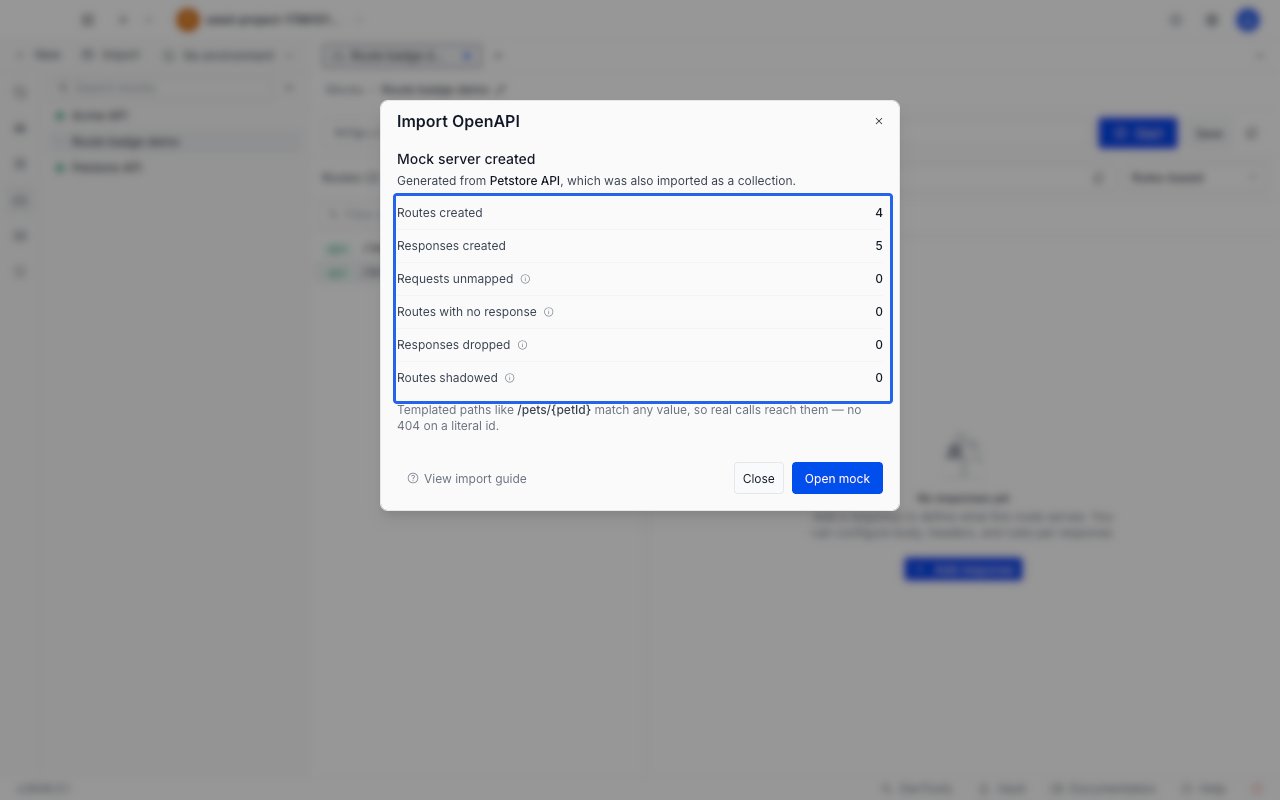
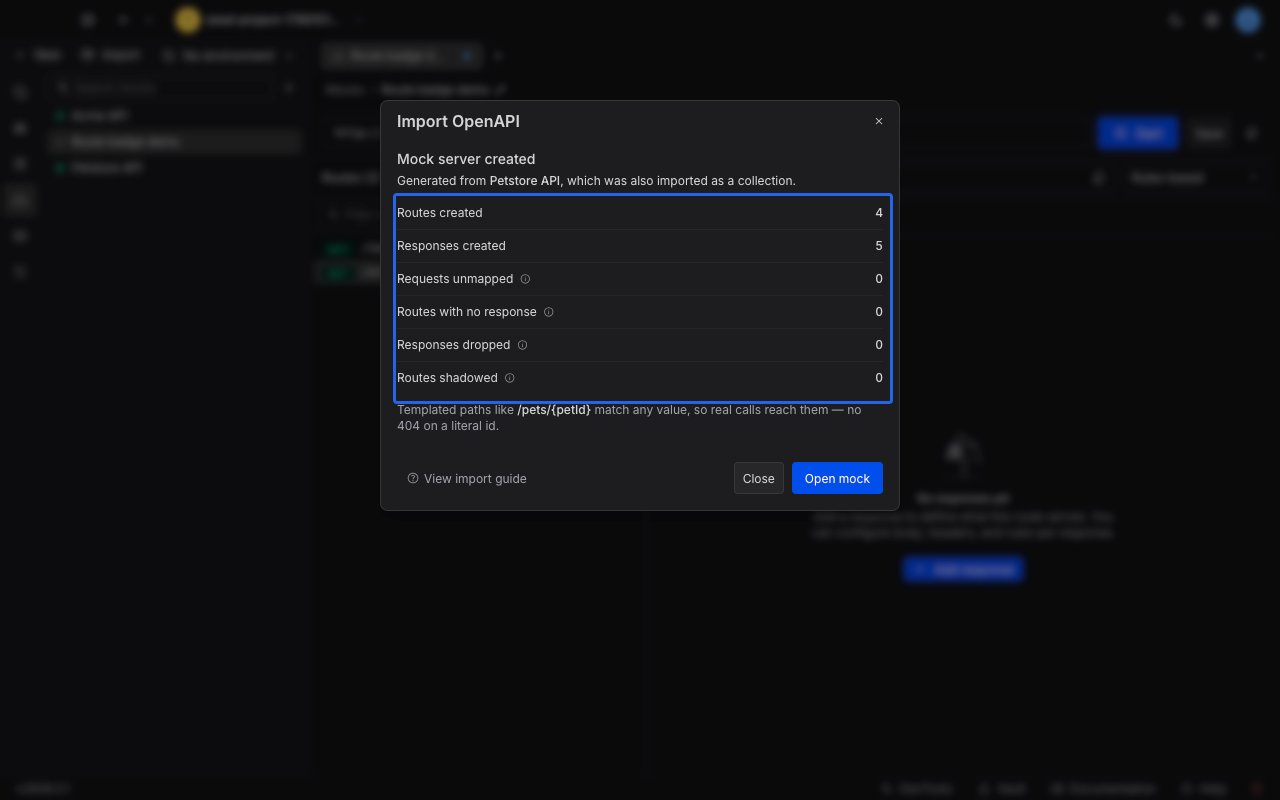
When generation finishes, the window reports what was produced: how many routes and responses were created, and what was dropped or could not be mapped. See [Read the generation summary](#read-the-generation-summary) for what each row means.
Click **Import**. The collection is imported first, and then the window switches to **Creating the mock server** while the mock is built.
Large specs are generated in the background and can take a few minutes. You can close the window while that runs: it does not cancel anything, and Requestly notifies you when the mock is ready. A mock created while the window was closed is already serving and publicly reachable, so open it from the **Mocks** section and click **Stop** if you are not ready for that.
When generation finishes, the window reports what was produced: how many routes and responses were created, and what was dropped or could not be mapped. See [Read the generation summary](#read-the-generation-summary) for what each row means.
 Click **Open mock**. The mock opens in an editor tab and is already serving, so the URL strip offers **Stop** rather than **Start**. Copy the base URL, append a route path, and call it:
```bash theme={null}
curl https://.mocks.requestly.cloud/pets
```
You get back the example response that the spec declared for that operation.
## What gets generated
| In the OpenAPI file | In the mock |
| ------------------------------------------------ | ---------------------------------------------------------------------------------- |
| An operation (a method on a path) | One route, with that method and path |
| Each example response declared for the operation | One response on that route |
| A templated path segment such as `/pets/{petId}` | A path parameter, so the route matches any value in that position |
| An operation with no example response | A route that exists but serves nothing, and returns `404` until you add a response |
The imported collection is created alongside the mock and stays in your sidebar. The mock takes its name from that collection, which comes from the spec's `info.title`. Names longer than 120 characters are shortened, and a file with no title falls back to `OpenAPI Import`.
The mock is a snapshot. Re-importing the spec does not update an existing mock, and editing the collection afterwards does not change the mock either. Each import creates a fresh collection and a fresh mock.
Every generated route is set to the **Rules-based** [selection mode](/api-client/mock-server/responses#selection-modes), and one response per route is marked as the default. Add [matching rules](/api-client/mock-server/rules) when you want a route to answer differently depending on the request.
## Read the generation summary
All six rows always appear, zeros included, so a zero is a statement that nothing was quietly lost. The four rows that report a loss carry an information icon; hover or tab to it for the same explanation inside the app.
| Row | What it means |
| --------------------------- | ------------------------------------------------------------------------------------------------------------------------------------------------------------------------------------------------------------------------ |
| **Routes created** | Routes written to the mock. |
| **Responses created** | Responses written across all of those routes. |
| **Requests unmapped** | Operations that could not be turned into a route, usually because of a path the mock cannot express. Anything counted here is missing from the mock. |
| **Routes with no response** | Operations with no example response in the spec. Those routes return `404` until you add a response. |
| **Responses dropped** | Example bodies over the size limit, which are not copied. Those responses return an empty body. This row counts bodies dropped during the import as well as during generation, because both drop against the same limit. |
| **Routes shadowed** | Two operations that end up matching the same requests. Where that happens, the first one wins at call time. See [ordering and shadowing](/api-client/mock-server/routes#ordering-and-shadowing). |
Below the counts, the summary states that templated paths match any value, so a call to `/pets/42` reaches the route built from `/pets/{petId}`.
This summary is shorter than the one you get when you [generate from a collection](/api-client/mock-server/create-from-collection#read-the-generation-summary). **Requests skipped**, **Paths wildcarded**, and **Extra endpoints from examples** are not shown, because an OpenAPI file cannot produce any of them: it holds only HTTP operations, its templated paths are already parameters, and its examples always belong to the operation they are declared under.
If some of the spec failed to import, the summary says so above the counts and tells you how many items failed. The mock covers less than the spec does in that case. Fix the failures in the collection, then generate a new mock from it through the collection's menu.
## Importing several spec files at once
You can select more than one OpenAPI file in a single import. Each file becomes its own root collection, and each root collection gets its own mock.
The summary reports the first mock in full, and lists the rest under **Other specs in this import** with their route and response counts. A spec that produced no mock is listed there as `no mock`, and a warning above the counts names it. Its collection is still imported, so you can generate its mock later from the collection's menu.
## When the mock is not created
The collection is imported and committed before generation starts, so a failure here never costs you the import. The window reports what happened, names the collection that landed, and the button reads **Keep collection**.
There is no retry button. To try again, use the imported collection's own **Create mock server** menu item, which re-runs generation against the collection you already have.
| What the message says | What to do |
| ------------------------------------------------------------------------------ | -------------------------------------------------------------------------------------------------------------------------------------------------------------------- |
| You do not have permission to create a mock in this project | Ask a project admin for the mock creation permission. |
| The spec, its example responses, or one route is too large to mock | The message names the limit, or the route that exceeded it. Split the file, or remove the largest examples from the imported collection, then create a mock from it. |
| Nothing in this spec could be turned into mock routes | No operation produced a usable route. Fix the paths in the collection, then create a mock from it. |
| The imported collection could not be found, or the server could not be reached | Create a mock from the imported collection to try again. If it was deleted or moved while the mock was being created, use another collection. |
One message reads **Mock creation is still finishing**: generation ran longer than Requestly waits for and is probably still running. Check the **Mocks** section before creating another one.
Click **Open mock**. The mock opens in an editor tab and is already serving, so the URL strip offers **Stop** rather than **Start**. Copy the base URL, append a route path, and call it:
```bash theme={null}
curl https://.mocks.requestly.cloud/pets
```
You get back the example response that the spec declared for that operation.
## What gets generated
| In the OpenAPI file | In the mock |
| ------------------------------------------------ | ---------------------------------------------------------------------------------- |
| An operation (a method on a path) | One route, with that method and path |
| Each example response declared for the operation | One response on that route |
| A templated path segment such as `/pets/{petId}` | A path parameter, so the route matches any value in that position |
| An operation with no example response | A route that exists but serves nothing, and returns `404` until you add a response |
The imported collection is created alongside the mock and stays in your sidebar. The mock takes its name from that collection, which comes from the spec's `info.title`. Names longer than 120 characters are shortened, and a file with no title falls back to `OpenAPI Import`.
The mock is a snapshot. Re-importing the spec does not update an existing mock, and editing the collection afterwards does not change the mock either. Each import creates a fresh collection and a fresh mock.
Every generated route is set to the **Rules-based** [selection mode](/api-client/mock-server/responses#selection-modes), and one response per route is marked as the default. Add [matching rules](/api-client/mock-server/rules) when you want a route to answer differently depending on the request.
## Read the generation summary
All six rows always appear, zeros included, so a zero is a statement that nothing was quietly lost. The four rows that report a loss carry an information icon; hover or tab to it for the same explanation inside the app.
| Row | What it means |
| --------------------------- | ------------------------------------------------------------------------------------------------------------------------------------------------------------------------------------------------------------------------ |
| **Routes created** | Routes written to the mock. |
| **Responses created** | Responses written across all of those routes. |
| **Requests unmapped** | Operations that could not be turned into a route, usually because of a path the mock cannot express. Anything counted here is missing from the mock. |
| **Routes with no response** | Operations with no example response in the spec. Those routes return `404` until you add a response. |
| **Responses dropped** | Example bodies over the size limit, which are not copied. Those responses return an empty body. This row counts bodies dropped during the import as well as during generation, because both drop against the same limit. |
| **Routes shadowed** | Two operations that end up matching the same requests. Where that happens, the first one wins at call time. See [ordering and shadowing](/api-client/mock-server/routes#ordering-and-shadowing). |
Below the counts, the summary states that templated paths match any value, so a call to `/pets/42` reaches the route built from `/pets/{petId}`.
This summary is shorter than the one you get when you [generate from a collection](/api-client/mock-server/create-from-collection#read-the-generation-summary). **Requests skipped**, **Paths wildcarded**, and **Extra endpoints from examples** are not shown, because an OpenAPI file cannot produce any of them: it holds only HTTP operations, its templated paths are already parameters, and its examples always belong to the operation they are declared under.
If some of the spec failed to import, the summary says so above the counts and tells you how many items failed. The mock covers less than the spec does in that case. Fix the failures in the collection, then generate a new mock from it through the collection's menu.
## Importing several spec files at once
You can select more than one OpenAPI file in a single import. Each file becomes its own root collection, and each root collection gets its own mock.
The summary reports the first mock in full, and lists the rest under **Other specs in this import** with their route and response counts. A spec that produced no mock is listed there as `no mock`, and a warning above the counts names it. Its collection is still imported, so you can generate its mock later from the collection's menu.
## When the mock is not created
The collection is imported and committed before generation starts, so a failure here never costs you the import. The window reports what happened, names the collection that landed, and the button reads **Keep collection**.
There is no retry button. To try again, use the imported collection's own **Create mock server** menu item, which re-runs generation against the collection you already have.
| What the message says | What to do |
| ------------------------------------------------------------------------------ | -------------------------------------------------------------------------------------------------------------------------------------------------------------------- |
| You do not have permission to create a mock in this project | Ask a project admin for the mock creation permission. |
| The spec, its example responses, or one route is too large to mock | The message names the limit, or the route that exceeded it. Split the file, or remove the largest examples from the imported collection, then create a mock from it. |
| Nothing in this spec could be turned into mock routes | No operation produced a usable route. Fix the paths in the collection, then create a mock from it. |
| The imported collection could not be found, or the server could not be reached | Create a mock from the imported collection to try again. If it was deleted or moved while the mock was being created, use another collection. |
One message reads **Mock creation is still finishing**: generation ran longer than Requestly waits for and is probably still running. Check the **Mocks** section before creating another one.