> ## Documentation Index
> Fetch the complete documentation index at: https://docs.requestly.com/llms.txt
> Use this file to discover all available pages before exploring further.
# Request Logs
> See every call a Requestly cloud mock received, why each one matched or did not, and the full request and response behind it.
When a caller gets an unexpected `404` from your mock, the mock editor alone cannot tell you why. The route looks right, the rule looks right, and yet something on the other end is sending a path, a header, or a method you did not expect.
The **Logs** tab answers that. Every call your cloud mock receives is recorded with the method and path that arrived, the status that went back, and a plain reason for the outcome: which route and response served it, or exactly why nothing did. You can expand any call to read the headers and bodies on both sides.
Request logs are rolling out gradually. If you do not see a **Logs** tab on your mocks, it is not enabled for your account yet.
## Prerequisites
* You are signed in and a cloud project is active. Only cloud mocks are recorded. A mock served locally by the desktop app shows an empty state instead, headed "Logs are available for cloud mocks": that mock is served locally, so its calls are not recorded.
* Your role has permission to view the logs. Without it the **Logs** tab still appears, but opening it shows "You don't have access to these logs" and asks you to request access from a project admin. The tab is not hidden, so you can tell the difference between "no permission" and "no such feature".
## Open the logs
Open the mock from the **Mocks** section in the sidebar. Above the editor is a tab strip with two tabs: **Routes** and **Logs**. The routes and responses editor you already know lives under **Routes**.
Click **Logs**. Requestly loads the calls this mock has received, newest first.
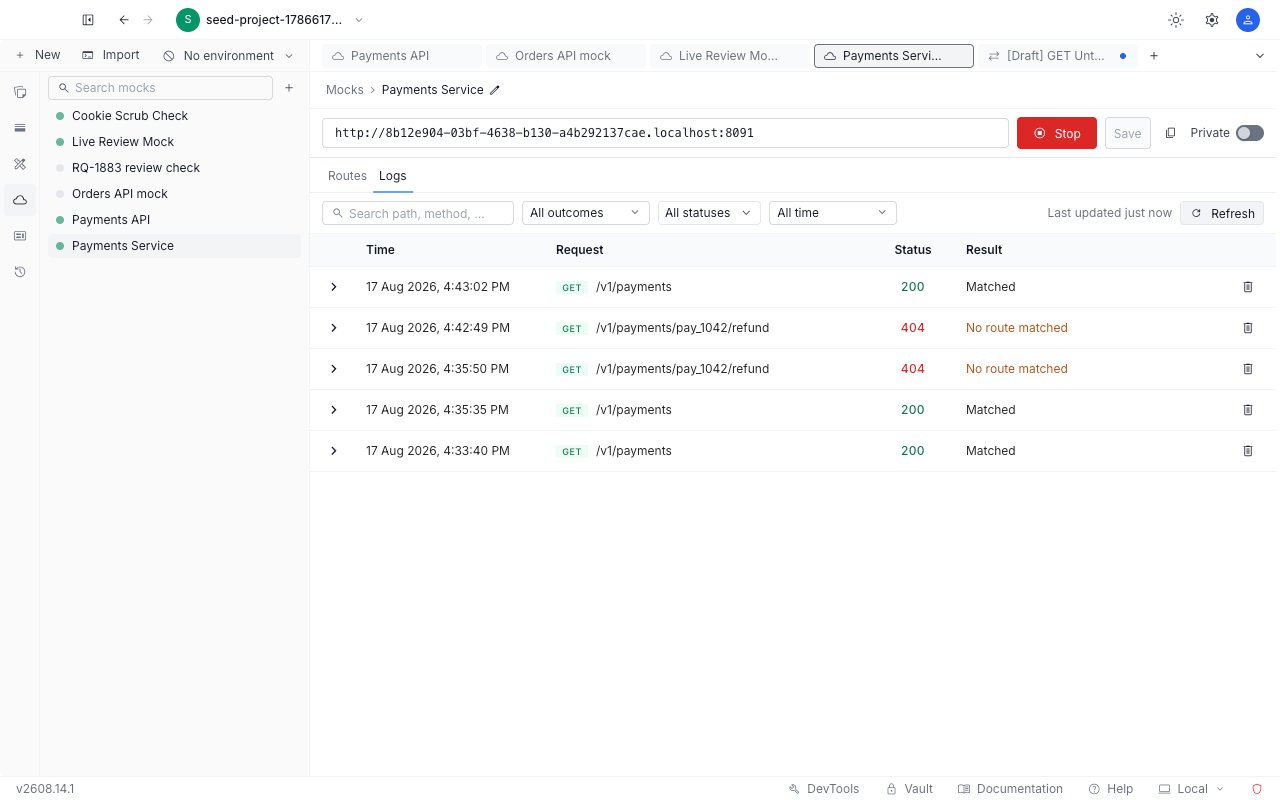
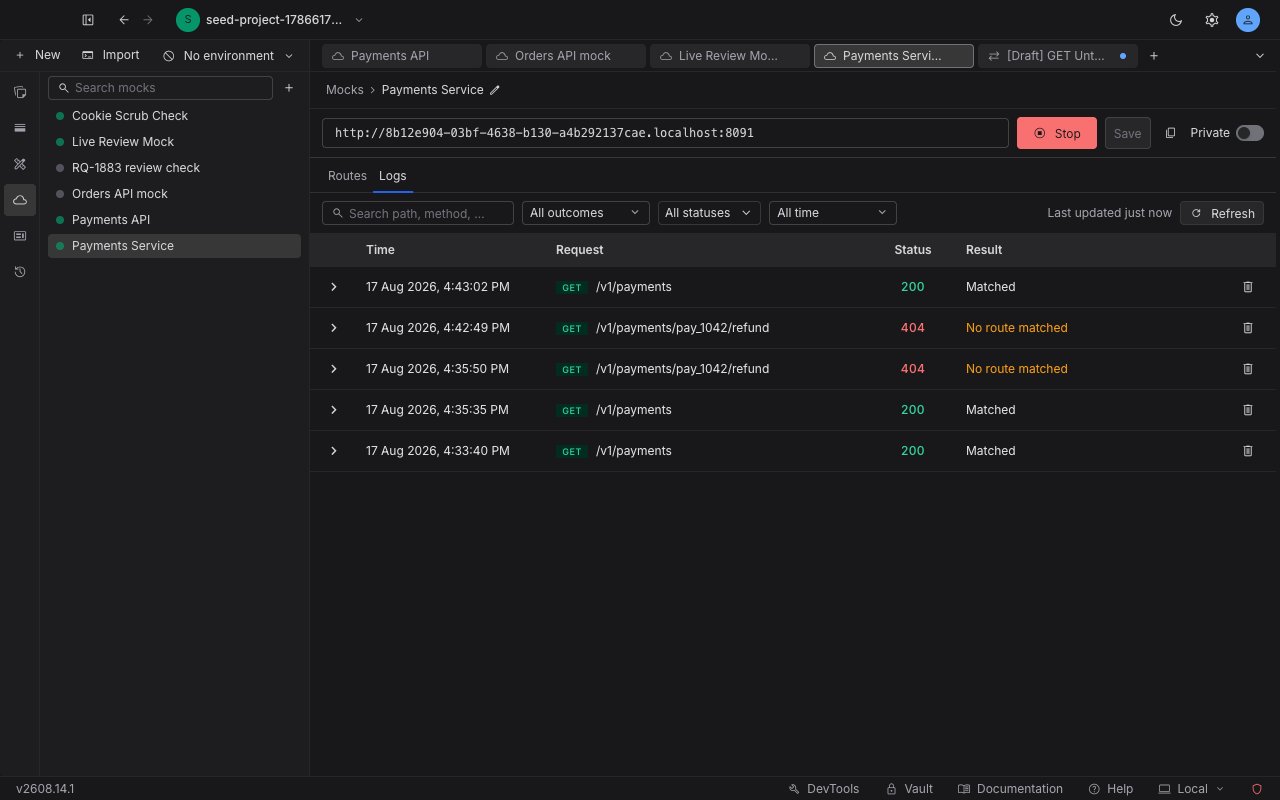 If the mock has not been called yet, the table shows "No calls yet" with a **Copy mock URL** button. Copy the URL, send a request to it, then click **Refresh** to see the call appear.
## Read a row
Each row is one call the mock received.
* **Time**: when the call arrived, as one absolute instant at every age, in the shape `13 Aug 2026, 3:55:43 PM`. There is no "2 minutes ago" that you have to convert in your head.
* **Request**: the method and path the caller actually sent, not the route pattern it was tested against.
* **Status**: the HTTP status the mock returned.
* **Result**: the headline. Whether the mock matched, or why it did not.
Hover the **Time** cell to see the time zone the numbers are stated in. That is what you need to line a call up against your own server logs, which are usually in UTC.
**Result** is the column you will read first, and it is the one that tells you where to go next.
| Result | What it means | What to do |
| ------------------------------------ | ---------------------------------------------------------------------------------------------------------------------------------------------------------------------------------------------------------------------------------- | -------------------------------------------------------------------------------------------------------------------------------------------------------------------------------------------------------------------------------- |
| **Matched** | A route and one of its responses served the call. When the matched route's path differs from the path that was called, because of a path parameter or a wildcard, the cell names the route that won: `Matched · /v1/payments/:id`. | Nothing. This is the healthy row. |
| **No route matched** | No route on this mock has that method and path, so the caller got a `404`. | Add a route for this method and path, or widen an existing route's path. The row offers a shortcut, described below. |
| **No response matched** | A route matched, but none of its responses did. | Check this route's rules. If the route uses **Fallback** selection, no later route matched either. See [matching rules](/api-client/mock-server/rules) and [selection modes](/api-client/mock-server/responses#selection-modes). |
| **Overridden response not found** | The call asked for one specific response by name, using a `_rq_*` query parameter or an `x-rq-mock-*` header, and no response on that route carries that name. | Check the name against the route's response list, or drop the override and let the rules choose. |
| **Mock server is stopped** | The mock was not running when the call arrived. | Click **Start** in the URL strip, then send the call again. |
| **No mock server matches this URL** | Either the mock was deleted, or the id in the host is not a valid mock id. | Check the URL your caller is using. Read the warning below before you conclude anything was deleted. |
| **Not a Requestly mock URL** | The request did not arrive on a mock host at all. Mock hosts have the form `.mocks.requestly.cloud`. | Point your caller at the base URL shown in the mock's URL strip. |
| **Response was deleted mid-request** | The response was removed between the moment it matched and the moment its body was read. | Send the call again. |
| **Response body too large** | The body, or the size it expands to once dynamic values are filled in, is over the limit. | Shorten the body, or trim what the [dynamic values](/api-client/mock-server/responses#dynamic-values) expand to. |
| **Mock server error** | Requestly failed while serving the call and returned a `500`. | Send the call again. Contact support if it keeps happening. |
| **Never sent - response lost** | A route matched, but the response never reached the caller. | Send the call again. |
A [private mock](/api-client/mock-server/private-mocks) rejecting a caller for a missing or wrong token records the same "No mock server matches this URL" row, deliberately, because that is the same `404` the caller received. On a private mock, check the `x-api-key` header before you assume the mock was deleted.
## Fix a call that did not match
A "No route matched" row carries the fix inside it. The words **Add a route** in the row are a link.
Requestly switches to the **Routes** tab with a new route already filled in with that call's exact method and path, unsaved and editable.
The seeded path is the literal one that was called, not a guessed pattern. A call on `/v1/payments/1001` seeds `/v1/payments/1001`, so turning it into `/v1/payments/:id` is one edit you make before saving. See [path parameters](/api-client/mock-server/routes#path-parameters) for what the pattern can express.
Configure the [response](/api-client/mock-server/responses) you want the route to serve, then click **Save** in the URL strip, like any other route edit.
Send the same call again, go back to **Logs**, and click **Refresh**. The new row should read **Matched**.
## Inspect the full request and response
Click the expand control on a row to pull in everything that was stored for that call. It opens four collapsible sections: **Request headers**, which is open by default, **Request body**, **Response headers**, and **Response body**. A section with nothing in it reads "None" for headers or "No body" for bodies.
If the mock has not been called yet, the table shows "No calls yet" with a **Copy mock URL** button. Copy the URL, send a request to it, then click **Refresh** to see the call appear.
## Read a row
Each row is one call the mock received.
* **Time**: when the call arrived, as one absolute instant at every age, in the shape `13 Aug 2026, 3:55:43 PM`. There is no "2 minutes ago" that you have to convert in your head.
* **Request**: the method and path the caller actually sent, not the route pattern it was tested against.
* **Status**: the HTTP status the mock returned.
* **Result**: the headline. Whether the mock matched, or why it did not.
Hover the **Time** cell to see the time zone the numbers are stated in. That is what you need to line a call up against your own server logs, which are usually in UTC.
**Result** is the column you will read first, and it is the one that tells you where to go next.
| Result | What it means | What to do |
| ------------------------------------ | ---------------------------------------------------------------------------------------------------------------------------------------------------------------------------------------------------------------------------------- | -------------------------------------------------------------------------------------------------------------------------------------------------------------------------------------------------------------------------------- |
| **Matched** | A route and one of its responses served the call. When the matched route's path differs from the path that was called, because of a path parameter or a wildcard, the cell names the route that won: `Matched · /v1/payments/:id`. | Nothing. This is the healthy row. |
| **No route matched** | No route on this mock has that method and path, so the caller got a `404`. | Add a route for this method and path, or widen an existing route's path. The row offers a shortcut, described below. |
| **No response matched** | A route matched, but none of its responses did. | Check this route's rules. If the route uses **Fallback** selection, no later route matched either. See [matching rules](/api-client/mock-server/rules) and [selection modes](/api-client/mock-server/responses#selection-modes). |
| **Overridden response not found** | The call asked for one specific response by name, using a `_rq_*` query parameter or an `x-rq-mock-*` header, and no response on that route carries that name. | Check the name against the route's response list, or drop the override and let the rules choose. |
| **Mock server is stopped** | The mock was not running when the call arrived. | Click **Start** in the URL strip, then send the call again. |
| **No mock server matches this URL** | Either the mock was deleted, or the id in the host is not a valid mock id. | Check the URL your caller is using. Read the warning below before you conclude anything was deleted. |
| **Not a Requestly mock URL** | The request did not arrive on a mock host at all. Mock hosts have the form `.mocks.requestly.cloud`. | Point your caller at the base URL shown in the mock's URL strip. |
| **Response was deleted mid-request** | The response was removed between the moment it matched and the moment its body was read. | Send the call again. |
| **Response body too large** | The body, or the size it expands to once dynamic values are filled in, is over the limit. | Shorten the body, or trim what the [dynamic values](/api-client/mock-server/responses#dynamic-values) expand to. |
| **Mock server error** | Requestly failed while serving the call and returned a `500`. | Send the call again. Contact support if it keeps happening. |
| **Never sent - response lost** | A route matched, but the response never reached the caller. | Send the call again. |
A [private mock](/api-client/mock-server/private-mocks) rejecting a caller for a missing or wrong token records the same "No mock server matches this URL" row, deliberately, because that is the same `404` the caller received. On a private mock, check the `x-api-key` header before you assume the mock was deleted.
## Fix a call that did not match
A "No route matched" row carries the fix inside it. The words **Add a route** in the row are a link.
Requestly switches to the **Routes** tab with a new route already filled in with that call's exact method and path, unsaved and editable.
The seeded path is the literal one that was called, not a guessed pattern. A call on `/v1/payments/1001` seeds `/v1/payments/1001`, so turning it into `/v1/payments/:id` is one edit you make before saving. See [path parameters](/api-client/mock-server/routes#path-parameters) for what the pattern can express.
Configure the [response](/api-client/mock-server/responses) you want the route to serve, then click **Save** in the URL strip, like any other route edit.
Send the same call again, go back to **Logs**, and click **Refresh**. The new row should read **Matched**.
## Inspect the full request and response
Click the expand control on a row to pull in everything that was stored for that call. It opens four collapsible sections: **Request headers**, which is open by default, **Request body**, **Response headers**, and **Response body**. A section with nothing in it reads "None" for headers or "No body" for bodies.
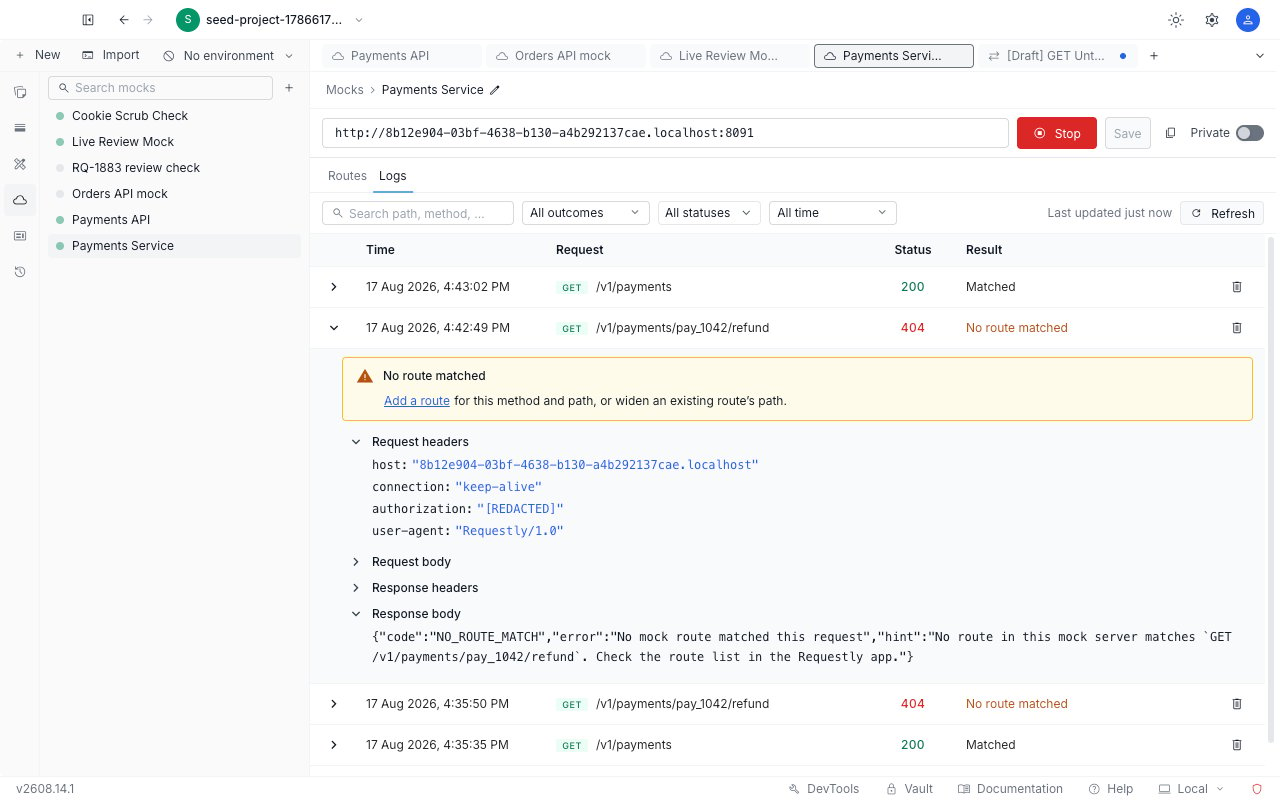
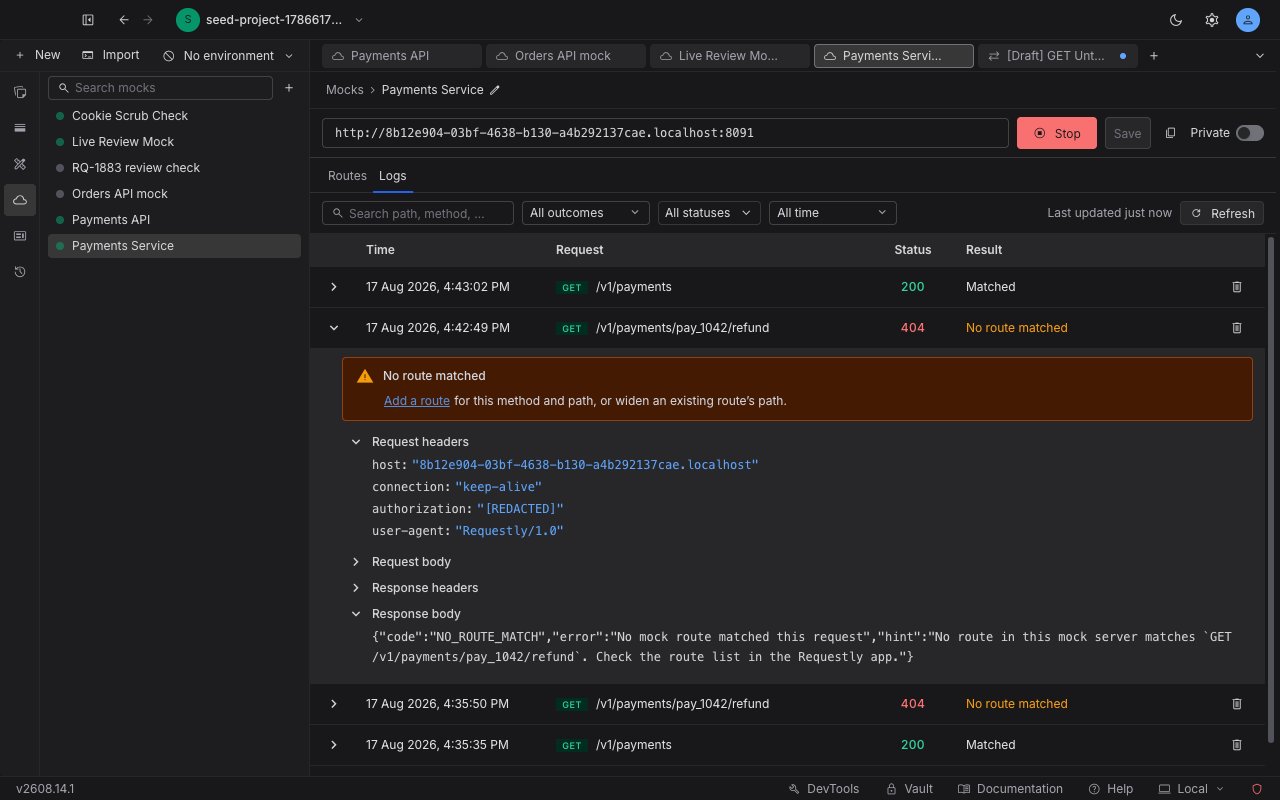 Sensitive request header values are replaced with `[REDACTED]` before anything is stored. That covers `Authorization`, `x-api-key`, `Cookie`, any header whose name contains `token`, `secret`, or `password`, and the remaining auth headers such as `proxy-authorization`. Hovering a redacted value confirms that it was redacted when the call was captured and was never stored.
`Cookie` is redacted one pair at a time, so the cookie names survive and only the values are destroyed:
```text theme={null}
Cookie: sails.sid=[REDACTED]; theme=[REDACTED]
```
That is deliberately more useful than blanking the whole header: you can still see which cookies the caller sent, which is usually the question you are actually asking, without the logs holding a live session.
Redaction happens at capture, not at display. There is no setting that reveals the original values later, because they were never written down.
Response headers and bodies are stored exactly as served and are not redacted. They are your own configured output rather than someone else's inbound data, so hiding them would only hide what you wrote. Long bodies are truncated, and the section says so along with the size cap it applied.
## Narrow the list
Four controls sit above the table, and they combine.
* **Search**, with the placeholder "Search path, method, or status". It matches the requested path and method, the matched route's method and path, the response label, and the status code.
* **Outcome**: "All outcomes", "Matched", or "Non-match". Use "Non-match" to see only the calls that went wrong.
* **Status**: a multi-select that reads "All statuses" until you narrow it, with checkboxes for "1xx Informational", "2xx Success", "3xx Redirect", "4xx Client Error", and "5xx Server Error".
* **Time range**: "All time", "Last hour", "Last 24 hours", "Last 7 days", or "Last 30 days". The longest option never exceeds the retention window, so the list cannot ask for calls that have already been deleted.
A **Clear filters** link appears in the bar only while a filter is active, so its presence tells you the list is narrowed. If the combination matches nothing, the table says "No calls match these filters" and suggests widening the time range or clearing a facet, with a **Clear filters** button.
## The log is a snapshot
Nothing streams. A call your app made a second ago is not in the table until you click **Refresh**. This is the behaviour that surprises people most, so check the staleness indicator before you conclude a call was never recorded: the bar tells you how old the list is, for example "Last updated 5 mins ago", and hovering it gives the exact clock time.
Long logs page rather than loading in one go. Click **Load more** at the bottom to pull in the next batch. There is no total count, so the way to know you have reached the end is that **Load more** stops offering more.
Recording never sits on the served request's critical path, so keeping logs on does not slow your mock down. The trade is that under heavy load Requestly drops log records rather than delaying a response, which means a very busy mock can show fewer calls than it actually served.
If the read itself fails, the tab says "Could not load logs" and confirms that the mock and its routes are unaffected. Your mock keeps serving traffic normally while the log view is down.
## Retention and deletion
The top of the list states the window it covers: "Showing calls from the last 30 days".
Calls older than the retention window are deleted by Requestly and cannot be recovered. If you need a call as evidence beyond that, copy what you need out of the expanded row while it is still there.
Each mock also has a storage limit of its own. When a mock reaches it, the oldest calls are removed to make room, and the view tells you it happened: "Showing the most recent calls. Older calls were removed to stay within this mock's storage limit." A busy mock can therefore hit its limit well before the 30 days are up.
You can also delete a single call yourself from its row action. Requestly asks "Delete this log entry?" and warns that it cannot be undone. The entry is gone for the whole project, so everyone else working on the mock sees it disappear on their next refresh.
Sensitive request header values are replaced with `[REDACTED]` before anything is stored. That covers `Authorization`, `x-api-key`, `Cookie`, any header whose name contains `token`, `secret`, or `password`, and the remaining auth headers such as `proxy-authorization`. Hovering a redacted value confirms that it was redacted when the call was captured and was never stored.
`Cookie` is redacted one pair at a time, so the cookie names survive and only the values are destroyed:
```text theme={null}
Cookie: sails.sid=[REDACTED]; theme=[REDACTED]
```
That is deliberately more useful than blanking the whole header: you can still see which cookies the caller sent, which is usually the question you are actually asking, without the logs holding a live session.
Redaction happens at capture, not at display. There is no setting that reveals the original values later, because they were never written down.
Response headers and bodies are stored exactly as served and are not redacted. They are your own configured output rather than someone else's inbound data, so hiding them would only hide what you wrote. Long bodies are truncated, and the section says so along with the size cap it applied.
## Narrow the list
Four controls sit above the table, and they combine.
* **Search**, with the placeholder "Search path, method, or status". It matches the requested path and method, the matched route's method and path, the response label, and the status code.
* **Outcome**: "All outcomes", "Matched", or "Non-match". Use "Non-match" to see only the calls that went wrong.
* **Status**: a multi-select that reads "All statuses" until you narrow it, with checkboxes for "1xx Informational", "2xx Success", "3xx Redirect", "4xx Client Error", and "5xx Server Error".
* **Time range**: "All time", "Last hour", "Last 24 hours", "Last 7 days", or "Last 30 days". The longest option never exceeds the retention window, so the list cannot ask for calls that have already been deleted.
A **Clear filters** link appears in the bar only while a filter is active, so its presence tells you the list is narrowed. If the combination matches nothing, the table says "No calls match these filters" and suggests widening the time range or clearing a facet, with a **Clear filters** button.
## The log is a snapshot
Nothing streams. A call your app made a second ago is not in the table until you click **Refresh**. This is the behaviour that surprises people most, so check the staleness indicator before you conclude a call was never recorded: the bar tells you how old the list is, for example "Last updated 5 mins ago", and hovering it gives the exact clock time.
Long logs page rather than loading in one go. Click **Load more** at the bottom to pull in the next batch. There is no total count, so the way to know you have reached the end is that **Load more** stops offering more.
Recording never sits on the served request's critical path, so keeping logs on does not slow your mock down. The trade is that under heavy load Requestly drops log records rather than delaying a response, which means a very busy mock can show fewer calls than it actually served.
If the read itself fails, the tab says "Could not load logs" and confirms that the mock and its routes are unaffected. Your mock keeps serving traffic normally while the log view is down.
## Retention and deletion
The top of the list states the window it covers: "Showing calls from the last 30 days".
Calls older than the retention window are deleted by Requestly and cannot be recovered. If you need a call as evidence beyond that, copy what you need out of the expanded row while it is still there.
Each mock also has a storage limit of its own. When a mock reaches it, the oldest calls are removed to make room, and the view tells you it happened: "Showing the most recent calls. Older calls were removed to stay within this mock's storage limit." A busy mock can therefore hit its limit well before the 30 days are up.
You can also delete a single call yourself from its row action. Requestly asks "Delete this log entry?" and warns that it cannot be undone. The entry is gone for the whole project, so everyone else working on the mock sees it disappear on their next refresh.