> ## Documentation Index
> Fetch the complete documentation index at: https://docs.requestly.com/llms.txt
> Use this file to discover all available pages before exploring further.
# Matching rules
> Add request-matching rules to a Requestly mock response so it is served only when the incoming request's query, header, body, cookie, or URL parameter matches.
Rules let one route return different responses depending on the incoming request, without writing any code. On the **Rules** sub-tab of a response, you add one or more conditions; the response is served only when they are satisfied. Rules are how [Rules-based and Fallback selection](/api-client/mock-server/responses#selection-modes) decide which response to pick.
A response with no rules is served unconditionally, which is exactly what you want for the catch-all **default** response.
## Anatomy of a rule
Each rule has five parts:
* A **target**: what part of the request to inspect. Method, Path, Query, Header, Body (matched with a JSONPath expression), Cookie, or URL Param.
* A **property**: which key or path within the target to read, for example a header name, a query key, or a `$.json.path` into the body.
* An **operator**: `equals`, `contains`, `regex`, `>`, `<`, `in`, `exists`, or `jsonpath`.
* A **value** to compare against.
* An **invert** toggle to negate the match (NOT).
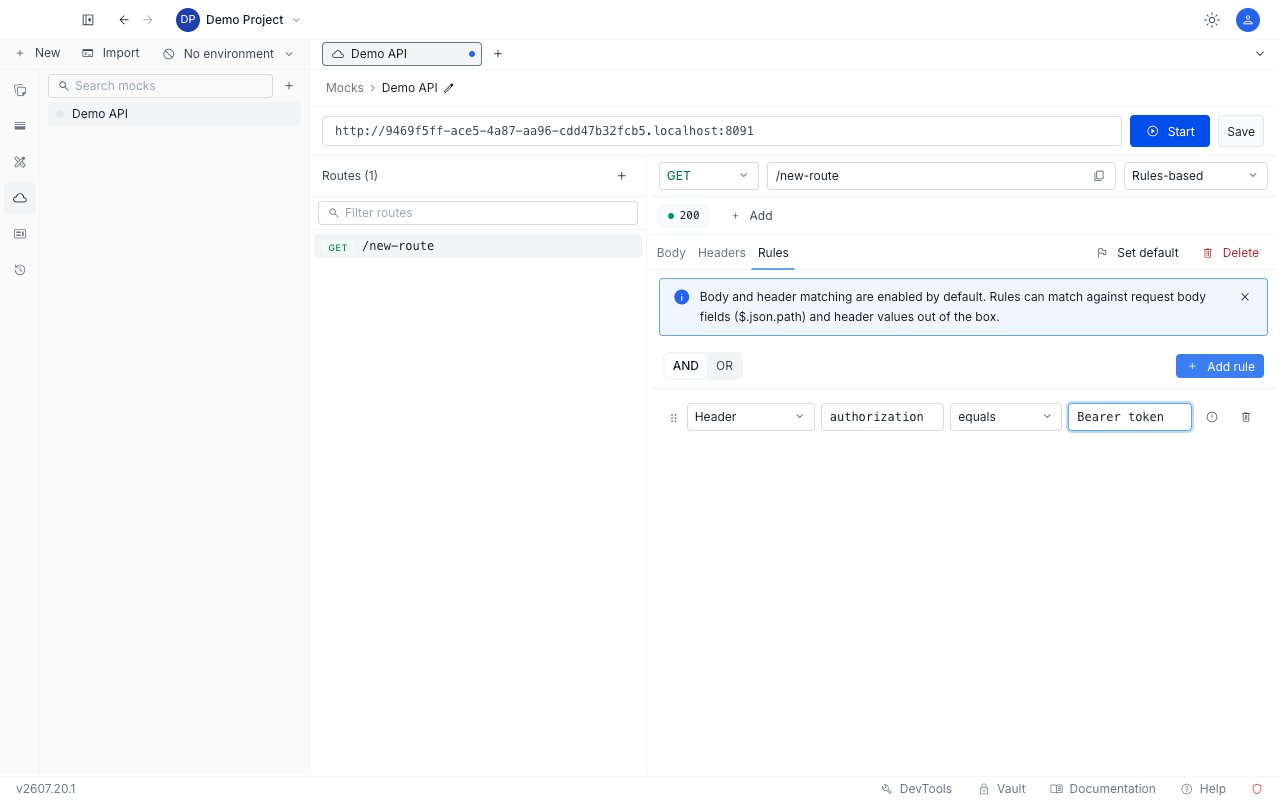
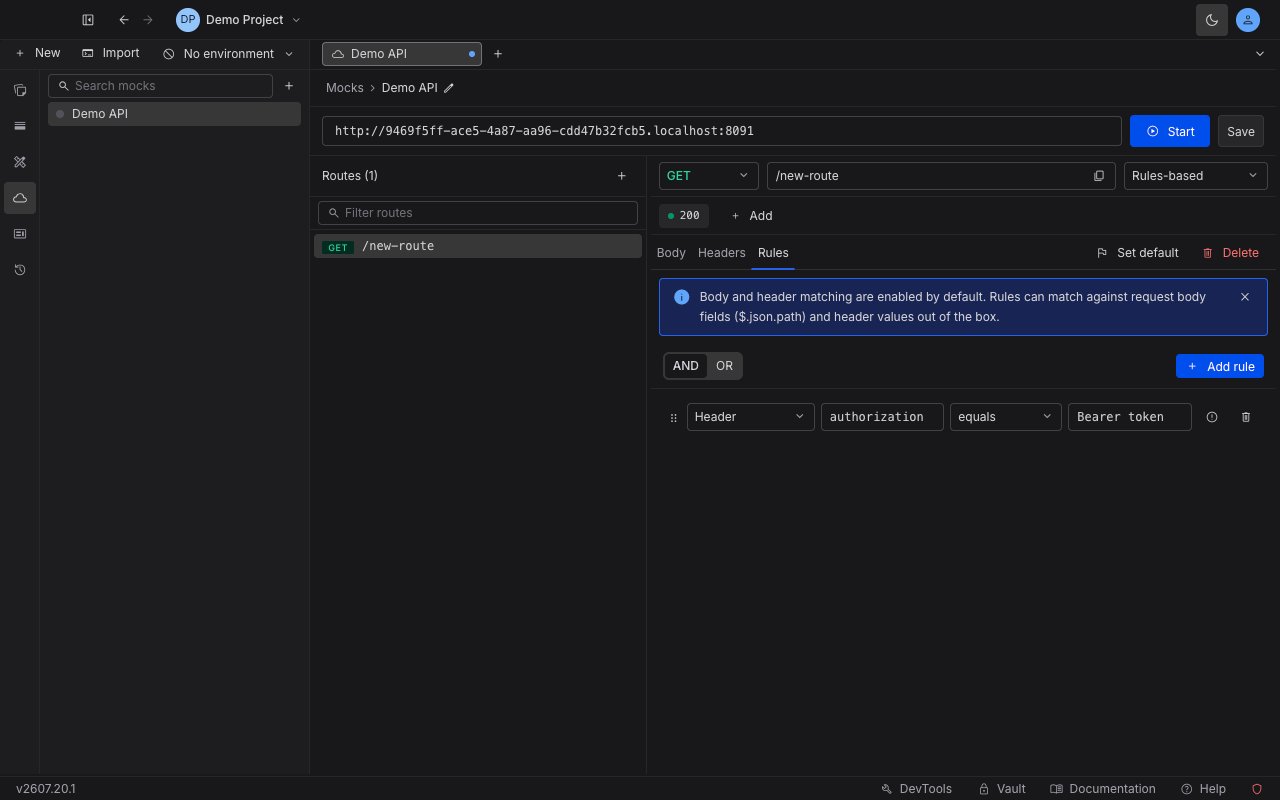 When a response has more than one rule, combine them with the **AND / OR** toggle. With AND, every rule must pass; with OR, any one passing is enough. You set one combinator per response.
Body and header matching are on by default, so you can match against request body fields and header values out of the box without any extra setup. The Body target uses a dot-path existence check (for example, does `user.role` exist), not full JSONPath filters.
## Add a rule
In the response pane, select the response you want to gate, then open its **Rules** sub-tab.
Add a rule, then set its target, property, operator, and value. Turn on **invert** if you want the rule to match when the condition is not met.
If you added more than one rule, set the **AND / OR** toggle to decide whether all of them or any of them must pass.
Click **Save**, make sure the mock is running, then call the endpoint with and without the matching condition to confirm the right response is served.
## Worked examples
Each example below gates a response on a real condition and shows the served result.
### Require a header (exists + invert)
To return a `403` only when the `Authorization` header is missing, add a `403` response with one rule: target **Header**, property `authorization`, operator **exists**, invert **on**. Mark the normal `200` response as default.
```bash theme={null}
curl https://.mocks.requestly.cloud/secure
```
```json theme={null}
{"error":"Authorization header required"}
```
```bash theme={null}
curl -H "Authorization: Bearer token123" https://.mocks.requestly.cloud/secure
```
```json theme={null}
{"data":"secret payload"}
```
The missing header matches the inverted `exists` rule and returns `403`; a present header falls through to the default `200`.
### Match on the request body (JSONPath)
To branch on the shape of a JSON body, use the **Body** target with the `jsonpath` operator. Here a `POST /orders` response is gated on `$.user.role` existing, with a `422` default:
```bash theme={null}
curl -X POST -H "Content-Type: application/json" \
-d '{"user":{"role":"admin"}}' https://.mocks.requestly.cloud/orders
```
```json theme={null}
{"matched":"body has user.role (JSONPath)"}
```
```bash theme={null}
curl -X POST -H "Content-Type: application/json" \
-d '{"item":"x"}' https://.mocks.requestly.cloud/orders
```
```json theme={null}
{"error":"missing user.role"}
```
### Read a URL parameter (equals)
A **URL Param** rule reads a value captured by a `:param` in the path. Here `GET /accounts/:id` serves a special response only when `id` equals `42`:
```bash theme={null}
curl https://.mocks.requestly.cloud/accounts/42
```
```json theme={null}
{"you":"account 42 (matched via urlParam rule)"}
```
```bash theme={null}
curl https://.mocks.requestly.cloud/accounts/7
```
```json theme={null}
{"you":"some other account"}
```
### Combine rules with AND
With the combinator set to **AND**, every rule must pass. Here a response on `GET /and` requires both `?a=1` and `?b=2`:
```bash theme={null}
curl "https://.mocks.requestly.cloud/and?a=1&b=2"
```
```json theme={null}
{"combinator":"AND matched (a=1 AND b=2)"}
```
```bash theme={null}
curl "https://.mocks.requestly.cloud/and?a=1"
```
```json theme={null}
{"combinator":"AND default (not both matched)"}
```
### Combine rules with OR
With the combinator set to **OR**, any one rule passing is enough. Here a response on `GET /or` matches when either `?a=1` or `?b=2`:
```bash theme={null}
curl "https://.mocks.requestly.cloud/or?a=1"
```
```json theme={null}
{"combinator":"OR matched (a=1 OR b=2)"}
```
```bash theme={null}
curl "https://.mocks.requestly.cloud/or?c=9"
```
```json theme={null}
{"combinator":"OR default (neither matched)"}
```
When a response has more than one rule, combine them with the **AND / OR** toggle. With AND, every rule must pass; with OR, any one passing is enough. You set one combinator per response.
Body and header matching are on by default, so you can match against request body fields and header values out of the box without any extra setup. The Body target uses a dot-path existence check (for example, does `user.role` exist), not full JSONPath filters.
## Add a rule
In the response pane, select the response you want to gate, then open its **Rules** sub-tab.
Add a rule, then set its target, property, operator, and value. Turn on **invert** if you want the rule to match when the condition is not met.
If you added more than one rule, set the **AND / OR** toggle to decide whether all of them or any of them must pass.
Click **Save**, make sure the mock is running, then call the endpoint with and without the matching condition to confirm the right response is served.
## Worked examples
Each example below gates a response on a real condition and shows the served result.
### Require a header (exists + invert)
To return a `403` only when the `Authorization` header is missing, add a `403` response with one rule: target **Header**, property `authorization`, operator **exists**, invert **on**. Mark the normal `200` response as default.
```bash theme={null}
curl https://.mocks.requestly.cloud/secure
```
```json theme={null}
{"error":"Authorization header required"}
```
```bash theme={null}
curl -H "Authorization: Bearer token123" https://.mocks.requestly.cloud/secure
```
```json theme={null}
{"data":"secret payload"}
```
The missing header matches the inverted `exists` rule and returns `403`; a present header falls through to the default `200`.
### Match on the request body (JSONPath)
To branch on the shape of a JSON body, use the **Body** target with the `jsonpath` operator. Here a `POST /orders` response is gated on `$.user.role` existing, with a `422` default:
```bash theme={null}
curl -X POST -H "Content-Type: application/json" \
-d '{"user":{"role":"admin"}}' https://.mocks.requestly.cloud/orders
```
```json theme={null}
{"matched":"body has user.role (JSONPath)"}
```
```bash theme={null}
curl -X POST -H "Content-Type: application/json" \
-d '{"item":"x"}' https://.mocks.requestly.cloud/orders
```
```json theme={null}
{"error":"missing user.role"}
```
### Read a URL parameter (equals)
A **URL Param** rule reads a value captured by a `:param` in the path. Here `GET /accounts/:id` serves a special response only when `id` equals `42`:
```bash theme={null}
curl https://.mocks.requestly.cloud/accounts/42
```
```json theme={null}
{"you":"account 42 (matched via urlParam rule)"}
```
```bash theme={null}
curl https://.mocks.requestly.cloud/accounts/7
```
```json theme={null}
{"you":"some other account"}
```
### Combine rules with AND
With the combinator set to **AND**, every rule must pass. Here a response on `GET /and` requires both `?a=1` and `?b=2`:
```bash theme={null}
curl "https://.mocks.requestly.cloud/and?a=1&b=2"
```
```json theme={null}
{"combinator":"AND matched (a=1 AND b=2)"}
```
```bash theme={null}
curl "https://.mocks.requestly.cloud/and?a=1"
```
```json theme={null}
{"combinator":"AND default (not both matched)"}
```
### Combine rules with OR
With the combinator set to **OR**, any one rule passing is enough. Here a response on `GET /or` matches when either `?a=1` or `?b=2`:
```bash theme={null}
curl "https://.mocks.requestly.cloud/or?a=1"
```
```json theme={null}
{"combinator":"OR matched (a=1 OR b=2)"}
```
```bash theme={null}
curl "https://.mocks.requestly.cloud/or?c=9"
```
```json theme={null}
{"combinator":"OR default (neither matched)"}
```