> ## Documentation Index
> Fetch the complete documentation index at: https://docs.requestly.com/llms.txt
> Use this file to discover all available pages before exploring further.
# Pre-request & Post-response Scripts
> Learn how to use JavaScript in Requestly to customize API requests, process responses, and interact with variables, with examples.
***
Scripts in Requestly allow you to extend and customize your API requests and responses dynamically using JavaScript. These scripts enable you to manipulate requests before they are sent (Pre-request scripts) or process responses after they are received (Post-response scripts). With access to the full request and response objects, you can achieve advanced automation, validations, and transformations.
## **Pre-Request Scripts**
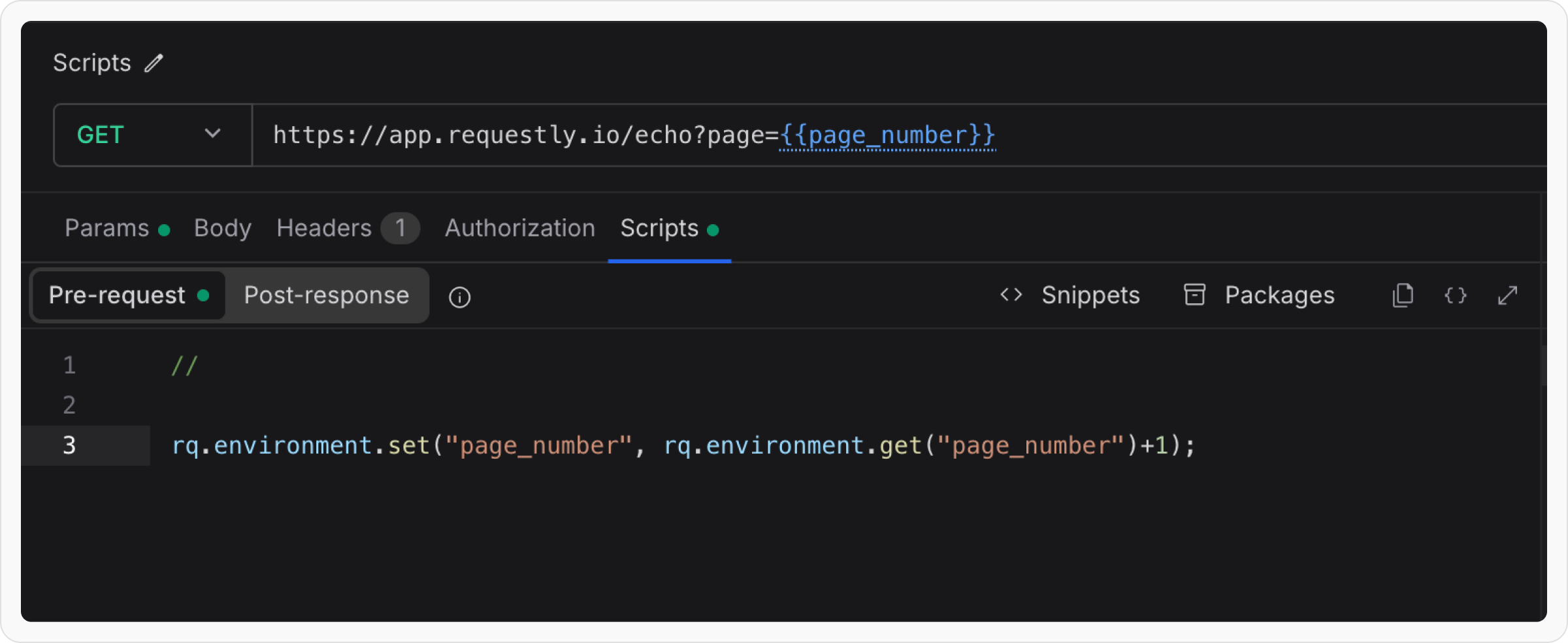
**Pre-Request Scripts** run before the API request is sent to the server. They allow you to modify request attributes, such as headers, body, query parameters, or even the URL. Pre Scripts are useful for adding authentication tokens, generating timestamps, or altering the request dynamically based on certain conditions.
Let’s try to understand the workings of pre-script using easy-to-follow examples.
**Auto Increment Page Numbers**
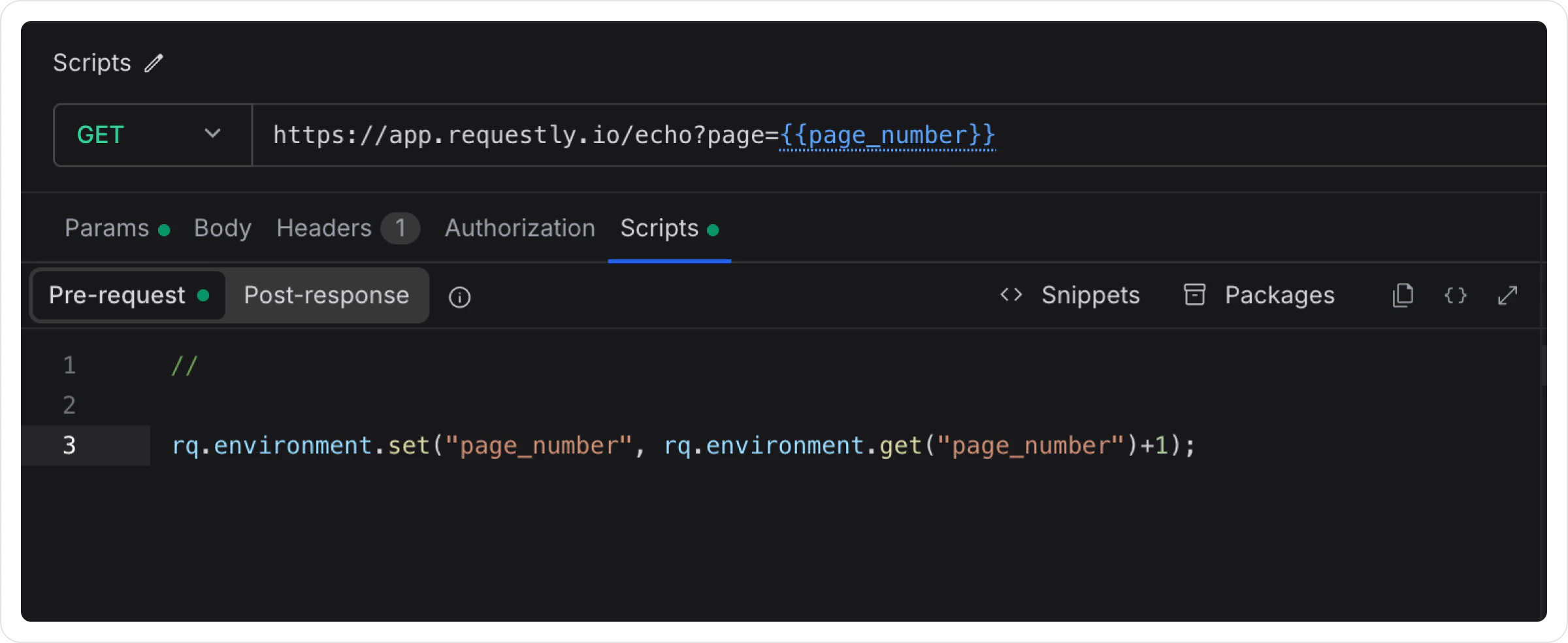
Let’s assume you have an endpoint that takes page number as query parameter, we use environment variable `{{page_number}}` to get value of page number.
```json theme={null}
https://app.requestly.io/echo?page={{page_number}}
```
We can get current page number from environment variables and set it back with an increment.
```json theme={null}
rq.environment.set("page_number", rq.environment.get("page_number")+1);
```
Now every time you click the Send button of this request it would send incremented page number.
**Test APIs by Randomising Values**
During development hitting an API with new data every time can be a pain, we can use Pre-Script to randomise the values and call the same API without getting duplicate entry error.
Let’s setup our request with body as follows:
```json theme={null}
POST:
```
```json theme={null}
{
"name": "{{name}}",
"email": "{{email}}",
"phone_number": "{{phone_number}}"
}
```
We will use below pre-script to create random values and update them in environment variables.
```jsx theme={null}
var name = (+new Date).toString(36).slice(-5);
var phone = Math.round((Math.random())*(10**10));
rq.environment.set("name", name);
rq.environment.set("email", name+"@example.com");
rq.environment.set("phone_number", phone);
```
You can also use pre-script to generate access tokens, validate the requests, generate some random data for the request.
You can also access elements of the request, collection variables and environment variables, checkout Requestly’s JavaScript API.
## **Post-Response Scripts**
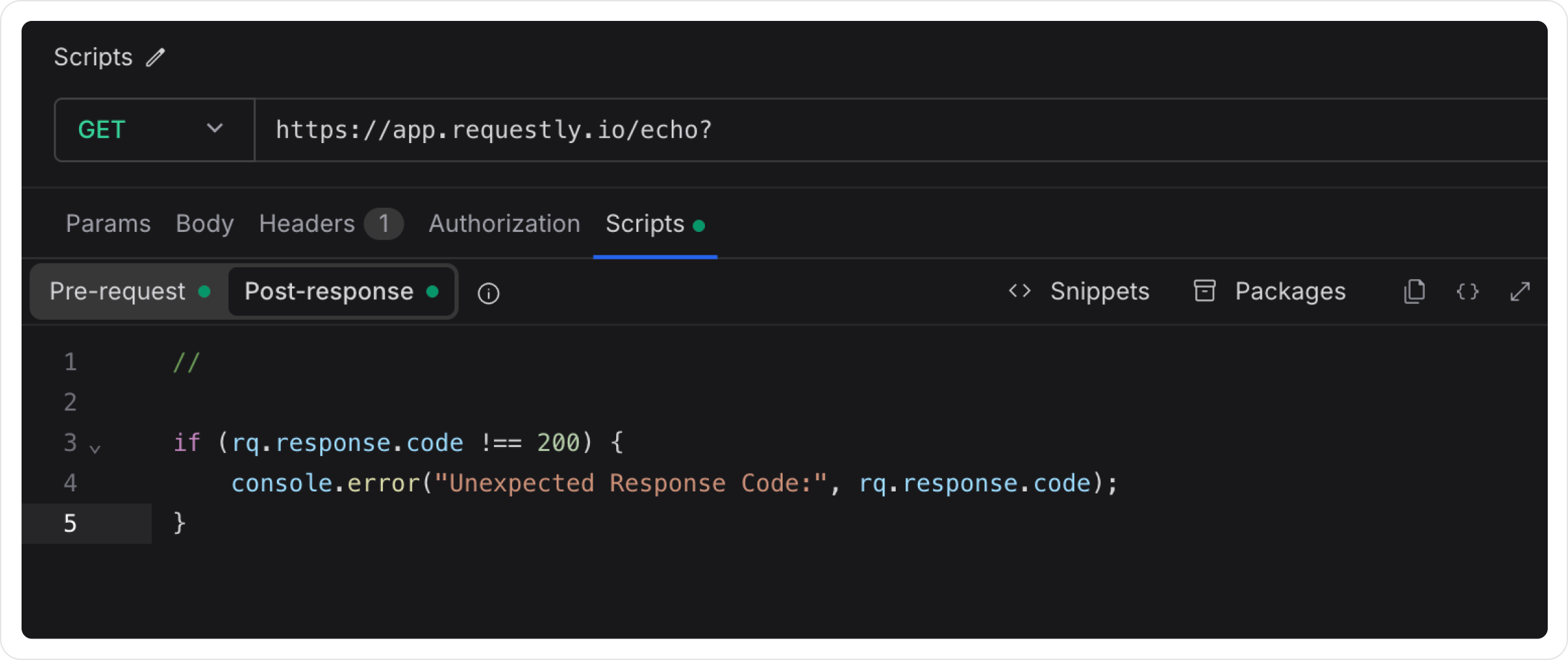
**Post-Response Scripts** run after the API response is received. They allow you to process response data, validate outputs, or log details for debugging. Post Scripts are useful for transforming the response body, validating response codes, or storing results for further use.
Let’s try to understand the working of post script using easy to follow examples.
**Validate Response Code**
```jsx theme={null}
if (rq.response.code !== 200) {
console.error("Unexpected Response Code:", rq.response.code);
}
```
We can also fetch and set API Keys or auth tokens, id, and other data from response of an API and use it in other APIs.
You can access elements of the request, response, collection variables and environment variables, checkout Requestly's JavaScript API.
***
## Viewing Console Logs from Scripts
You can use `console.log()` or `console.error()` in your Pre-Request and Post-Response Scripts to debug your logic and inspect values at runtime. The logs appear in Requestly's built-in **DevTools** panel and are tagged with **#script** so you can filter them quickly.
Click the **DevTools** button in the application footer at the bottom of the window. The panel docks to the bottom of the workspace with a **Console** tab selected by default.
To see logs for just one request, send the request and open the **Debug** tab in the response area instead. It shows DevTools scoped to that request's most recent execution.
In the Console tab's search box, type **#script** to show only logs produced by your Pre-Request and Post-Response Scripts and hide system events and network summaries.
For everything DevTools can show you, including the Network tab and per-request inspection, see the [DevTools page](/api-client/devtools).
## Requestly JavaScript API `rq`
Requestly provides a robust set of JavaScript properties and methods to interact with API requests, responses, environments, and global variables. The `rq` object is available in all pre-request and post-response scripts, giving you full control over your API workflow.
### Available Objects
The Requestly JavaScript API consists of the following main objects:
#### `rq.request`
Access and manipulate API request details including method, headers, body, URL, and query parameters. Use this in both pre-request and post-response scripts to read or modify request data.
**Quick Example:**
```jsx theme={null}
console.log("Request Method:", rq.request.method);
console.log("Request URL:", rq.request.url);
```
[View complete rq.request documentation →](/api-client/rq-api-reference/rq-request)
***
#### `rq.response`
Access API response details including body, headers, status code, and response time. Primarily used in post-response scripts to process and validate API responses.
**Quick Example:**
```jsx theme={null}
console.log("Response Code:", rq.response.code);
const data = rq.response.json();
```
[View complete rq.response documentation →](/api-client/rq-api-reference/rq-response)
***
#### `rq.sendRequest`
Send an HTTP request from inside a script and read its response. Use it to fetch a token before the main request runs, call a second endpoint, or poll a status URL. Available in both pre-request and post-response scripts.
**Quick Example:**
```jsx theme={null}
const res = await rq.sendRequest("https://api.example.com/health");
console.log("Status:", res.code);
```
[View complete rq.sendRequest documentation →](/api-client/rq-api-reference/rq-send-request)
***
#### `rq.execution`
Control how a request runs: read where it sits in your collection, skip it, set which request the collection runner goes to next, and run another saved request.
**Quick Example:**
```jsx theme={null}
if (!rq.environment.get("authToken")) {
rq.execution.skipRequest();
}
```
[View complete rq.execution documentation →](/api-client/rq-api-reference/rq-execution)
***
#### `rq.environment`
Manage environment-specific variables dynamically. Environment variables are scoped to a specific environment (dev, staging, production) and can be used across multiple requests.
**Quick Example:**
```jsx theme={null}
rq.environment.set("authToken", "Bearer ");
const token = rq.environment.get("authToken");
```
[View complete rq.environment documentation →](/api-client/rq-api-reference/rq-environment)
***
#### `rq.collectionVariables`
Manage collection-scoped variables. Collection variables are only accessible within requests that belong to a specific collection and persist across all environments.
**Quick Example:**
```jsx theme={null}
rq.collectionVariables.set("basePath", "/v1/users");
const path = rq.collectionVariables.get("basePath");
```
[View complete rq.collectionVariables documentation →](/api-client/rq-api-reference/rq-collection-variables)
***
#### `rq.globals`
Manage global variables accessible across all collections and environments. Use for truly universal configuration and state.
**Quick Example:**
```jsx theme={null}
rq.globals.set("appVersion", "1.0.0");
const version = rq.globals.get("appVersion");
```
[View complete rq.globals documentation →](/api-client/rq-api-reference/rq-globals)
***
#### `rq.test`
Write tests to validate API responses and ensure your APIs work as expected. Tests help automate quality assurance in post-response scripts.
**Quick Example:**
```jsx theme={null}
rq.test("Status code is 200", function() {
rq.expect(rq.response.code).to.equal(200);
});
```
[View complete rq.test documentation →](/api-client/rq-api-reference/rq-test)
***
#### `rq.expect`
Write assertions for API testing using the powerful Chai.js assertion library. Use with `rq.test` to validate response data.
**Quick Example:**
```jsx theme={null}
rq.test("Response has user data", function() {
const data = rq.response.json();
rq.expect(data).to.have.property("id");
rq.expect(data.name).to.be.a("string");
});
```
[View complete rq.expect documentation →](/api-client/rq-api-reference/rq-expect)
#### `rq.info`
Access execution metadata including request name, iteration index, and event name. Useful for tracking progress in collection runs and implementing iteration-specific logic.
**Quick Example:**
```jsx theme={null}
console.log(`Running ${rq.info.requestName}`);
console.log(`Iteration ${rq.info.iteration + 1} of ${rq.info.iterationCount}`);
```
[View complete rq.info documentation →](/api-client/rq-api-reference/rq-info)
***
#### `rq.iterationData`
Access data from CSV or JSON files during collection runs. Each iteration receives different data from the file, enabling data-driven testing.
**Quick Example:**
```jsx theme={null}
const city = rq.iterationData.get("city");
const temp = rq.iterationData.get("temperature");
console.log(`Weather in ${city}: ${temp}°C`);
```
[View complete rq.iterationData documentation →](/api-client/rq-api-reference/rq-iteration-data)
***
### Using Dynamic Variables in Scripts
Requestly provides dynamic variables, which are built in values that automatically generate common data such as timestamps, UUIDs, and random values. You can access them in scripts using the rq.\$variableName() syntax.
**Quick Example:**
```jsx theme={null}
const uniqueId = rq.$randomUUID();
const timestamp = rq.$timestamp();
const email = rq.$randomEmail();
console.log("Generated User ID:", uniqueId);
console.log("Request Timestamp:", timestamp);
```
**Common Dynamic Variables:**
* `rq.$randomUUID()` - Generate unique identifiers
* `rq.$timestamp()` - Current Unix timestamp
* `rq.$isoTimestamp()` - ISO 8601 timestamp
* `rq.$randomInt()` - Random integer
* `rq.$randomEmail()` - Random email address
* `rq.$randomFirstName()` - Random first name
* `rq.$randomCompanyName()` - Random company name
**With Arguments:**
```jsx theme={null}
// Generate random integer between 1-100
const age = rq.$randomInt(1, 100);
// Generate alphanumeric string of length 10
const code = rq.$randomAlphaNumeric(10);
// Generate password with specific length
const password = rq.$randomPassword("20");
// Generate email with custom name
const email = rq.$randomEmail("John", "Doe");
```
[View complete Dynamic Variables documentation →](/api-client/environments-and-variables/dynamic-variables)
***
## Chaining API requests
When one request depends on the output of another, use a post-response script on the first request to extract the values you need, then reference them from the second request using `{{variable_name}}` placeholders. The same pattern covers auth-token flows, "create then update" sequences, and conditional logic that decides what the next call should send.
The flow has three pieces:
1. **Post-response script on the prerequisite request.** Parse the response and write the values into a variable scope.
2. **Reference the variables** from the next request's URL, headers, query params, or body using `{{variable_name}}` syntax. See [Using variables in API requests](/api-client/environments-and-variables/using-variables-in-api-requests).
3. **Run the requests in order**, either manually or by adding them to a collection and using the [Collection Runner](/api-client/collection-runner).
### Example: pass dynamic data from one request to the next
A collection with two requests: `Get Users` followed by `Add User`. The post-response script on `Get Users` checks whether the target user already exists. If they don't, it stages fresh data for the second request to consume.
**Post-response script on `Get Users`:**
```javascript theme={null}
const body = rq.response.json();
const users = Array.isArray(body) ? body : body.users;
const targetEmail = rq.environment.get("new_user_email");
const existing = users.find(user => user.email === targetEmail);
if (existing) {
rq.variables.set("user_exists", "true");
rq.variables.set("existing_user_id", existing.id);
} else {
rq.variables.set("user_exists", "false");
rq.variables.set("new_user_name", "User_" + Date.now());
}
```
**Request body on `Add User`:**
```json theme={null}
{
"name": "{{new_user_name}}",
"email": "{{new_user_email}}"
}
```
When the collection runs, Requestly substitutes `{{new_user_name}}` and `{{new_user_email}}` with whatever the post-response script wrote. Anything the next request needs (an id from a `POST` to feed a follow-up `PATCH`, an auth token from a login call, an order number returned by a checkout step) follows the same shape.
### Picking a variable scope
| Scope | Setter | Lives for |
| :---------- | :--------------------------- | :---------------------------------------------------------------------------------------------------------- |
| Runtime | `rq.variables.set` | The current session. Available across all workspaces, local-only, optionally persisted across app restarts. |
| Environment | `rq.environment.set` | The active environment. Persists across runs. |
| Collection | `rq.collectionVariables.set` | The collection. Persists across runs. |
| Global | `rq.globals.set` | Everywhere. Persists across runs. |
For values that exist only to bridge one request to the next, prefer **runtime** scope. It stays local to your device and does not pollute your saved environment with one-off state. Reach for environment or collection scope when the value (an auth token, a tenant id) is meaningful beyond the immediate chain.
For the full per-scope reference, see [Runtime variables](/api-client/environments-and-variables/runtime-variables), [rq.environment](/api-client/rq-api-reference/rq-environment), [rq.collectionVariables](/api-client/rq-api-reference/rq-collection-variables), and [rq.globals](/api-client/rq-api-reference/rq-globals).
***
## Encoding request payloads
Some APIs require the body to be transformed before it goes on the wire, for example Base64-encoding a JSON envelope or signing it with an HMAC. The request body is read-only inside scripts, so you compute the transformed value in a pre-request script, store it in a variable, and reference that variable as the body. Requestly resolves the variable just before the request is sent. (Request headers, unlike the body, can be changed directly from a pre-request script. See [rq.request](/api-client/rq-api-reference/rq-request).)
### Base64 encoding with `Buffer`
`require('buffer')` is available in scripts. It is the recommended path because it handles non-ASCII characters correctly.
**Pre-request script:**
```javascript theme={null}
const { Buffer } = require('buffer');
const payload = {
username: rq.environment.get("username"),
password: rq.environment.get("password"),
};
const encoded = Buffer.from(JSON.stringify(payload), 'utf8').toString('base64');
rq.variables.set("encoded_body", encoded);
```
**Request body:**
```text theme={null}
{{encoded_body}}
```
Set `Content-Type` to whatever the server expects, typically `text/plain` or `application/octet-stream` when the body is a raw Base64 string, or `application/json` if the encoded value is wrapped inside a JSON envelope.
### Base64 encoding with `btoa`
`btoa` and `atob` are available as globals. They are convenient when the payload is plain ASCII:
```javascript theme={null}
const jsonString = JSON.stringify({ token: rq.environment.get("token") });
rq.variables.set("encoded_body", btoa(jsonString));
```
Prefer `Buffer` over `btoa` when the payload may contain non-ASCII characters. `btoa` throws on anything outside the Latin-1 range.
### Decoding a Base64 response
Mirror the encoding pattern in a post-response script:
```javascript theme={null}
const { Buffer } = require('buffer');
const decoded = Buffer.from(rq.response.body, 'base64').toString('utf8');
const data = JSON.parse(decoded);
rq.test("Decoded response contains an access token", () => {
rq.expect(data).to.have.property("access_token");
});
```
When the response itself is binary (an image, PDF, or archive), Requestly already hands you the body as Base64. Check [`rq.response.bodyEncoding`](/api-client/rq-api-reference/rq-response) to tell binary from text before decoding:
```javascript theme={null}
const { Buffer } = require('buffer');
if (rq.response.bodyEncoding === 'base64') {
const bytes = Buffer.from(rq.response.body, 'base64');
rq.test("Response is a non-empty binary payload", () => {
rq.expect(bytes.length).to.be.above(0);
});
}
```
### Signing and hashing with `crypto`
For HMAC signatures, hashes, or AES, Node's `crypto` module is available via `require('crypto')`:
```javascript theme={null}
const crypto = require('crypto');
const body = JSON.stringify({ amount: 100, currency: "USD" });
const signature = crypto
.createHmac('sha256', rq.environment.get("api_secret"))
.update(body)
.digest('hex');
rq.variables.set("body", body);
rq.variables.set("signature", signature);
```
Reference `{{body}}` in the request body and `{{signature}}` in a header such as `X-Signature`. See [Import packages into your scripts](/api-client/import-packages-into-your-scripts) for the full list of built-in packages available to `require()`, including `crypto`, `buffer`, `uuid`, `lodash`, `moment`, `chai`, `ajv`, `cheerio`, `xml2js`, and `csv-parse`.
***
## Code Snippets
The script editor includes a built-in snippets library with ready-to-use patterns for tests, variable operations, and logging. Click **Snippets** in the editor toolbar to browse and insert them.
[View all available snippets →](/api-client/script-snippets)
 Let’s try to understand the workings of pre-script using easy-to-follow examples.
**Auto Increment Page Numbers**
Let’s assume you have an endpoint that takes page number as query parameter, we use environment variable `{{page_number}}` to get value of page number.
```json theme={null}
https://app.requestly.io/echo?page={{page_number}}
```
We can get current page number from environment variables and set it back with an increment.
```json theme={null}
rq.environment.set("page_number", rq.environment.get("page_number")+1);
```
Now every time you click the Send button of this request it would send incremented page number.
**Test APIs by Randomising Values**
During development hitting an API with new data every time can be a pain, we can use Pre-Script to randomise the values and call the same API without getting duplicate entry error.
Let’s setup our request with body as follows:
```json theme={null}
POST:
Let’s try to understand the workings of pre-script using easy-to-follow examples.
**Auto Increment Page Numbers**
Let’s assume you have an endpoint that takes page number as query parameter, we use environment variable `{{page_number}}` to get value of page number.
```json theme={null}
https://app.requestly.io/echo?page={{page_number}}
```
We can get current page number from environment variables and set it back with an increment.
```json theme={null}
rq.environment.set("page_number", rq.environment.get("page_number")+1);
```
Now every time you click the Send button of this request it would send incremented page number.
**Test APIs by Randomising Values**
During development hitting an API with new data every time can be a pain, we can use Pre-Script to randomise the values and call the same API without getting duplicate entry error.
Let’s setup our request with body as follows:
```json theme={null}
POST: 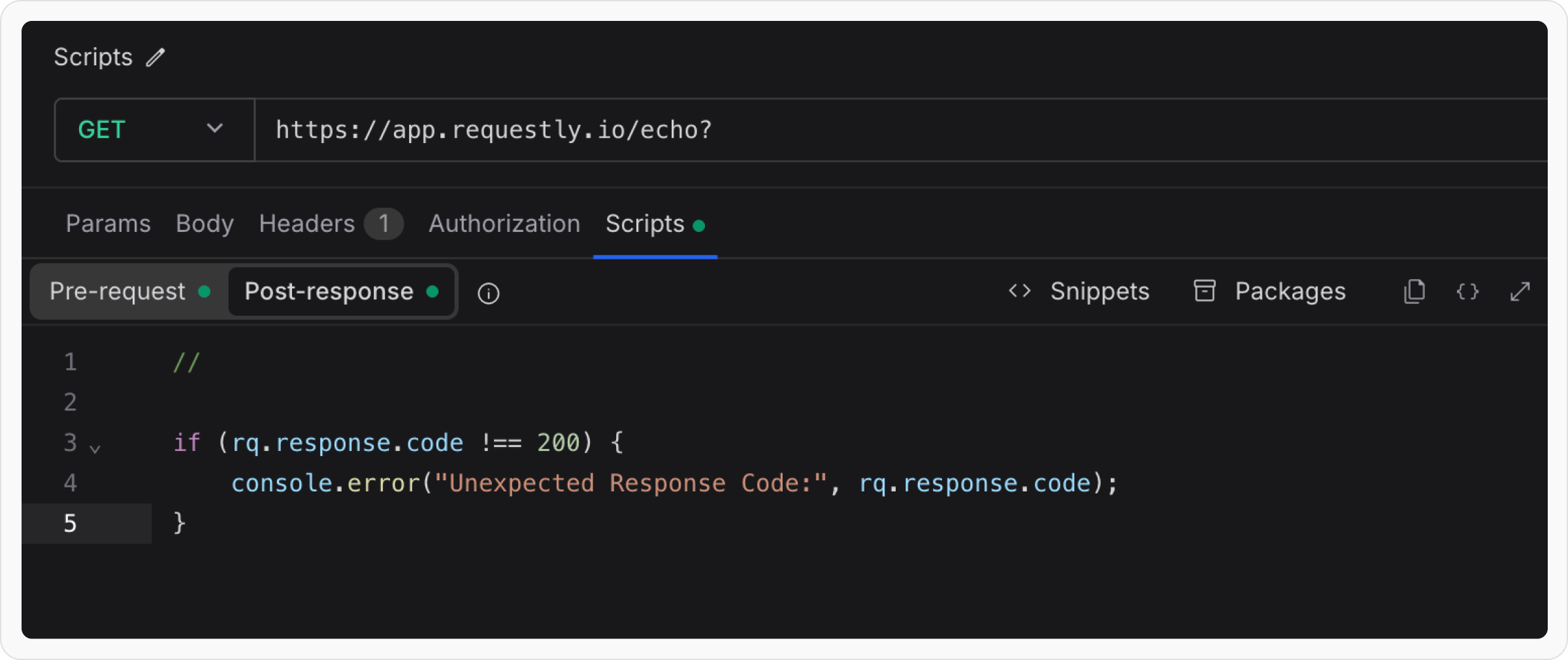
 Let’s try to understand the working of post script using easy to follow examples.
**Validate Response Code**
```jsx theme={null}
if (rq.response.code !== 200) {
console.error("Unexpected Response Code:", rq.response.code);
}
```
We can also fetch and set API Keys or auth tokens, id, and other data from response of an API and use it in other APIs.
You can access elements of the request, response, collection variables and environment variables, checkout Requestly's JavaScript API.
***
## Viewing Console Logs from Scripts
You can use `console.log()` or `console.error()` in your Pre-Request and Post-Response Scripts to debug your logic and inspect values at runtime. The logs appear in Requestly's built-in **DevTools** panel and are tagged with **#script** so you can filter them quickly.
Let’s try to understand the working of post script using easy to follow examples.
**Validate Response Code**
```jsx theme={null}
if (rq.response.code !== 200) {
console.error("Unexpected Response Code:", rq.response.code);
}
```
We can also fetch and set API Keys or auth tokens, id, and other data from response of an API and use it in other APIs.
You can access elements of the request, response, collection variables and environment variables, checkout Requestly's JavaScript API.
***
## Viewing Console Logs from Scripts
You can use `console.log()` or `console.error()` in your Pre-Request and Post-Response Scripts to debug your logic and inspect values at runtime. The logs appear in Requestly's built-in **DevTools** panel and are tagged with **#script** so you can filter them quickly.