> ## Documentation Index
> Fetch the complete documentation index at: https://docs.requestly.com/llms.txt
> Use this file to discover all available pages before exploring further.
# Generate Client Code
> Export any API request as ready-to-run code in cURL, Python, JavaScript, Go, Java, C#, Swift, PHP, and 20+ other language/library combinations.
Requestly can convert any configured API request into a ready-to-paste code snippet. Use this to move from manual testing to implementation without rewriting the request from scratch.
## How to Generate Client Code
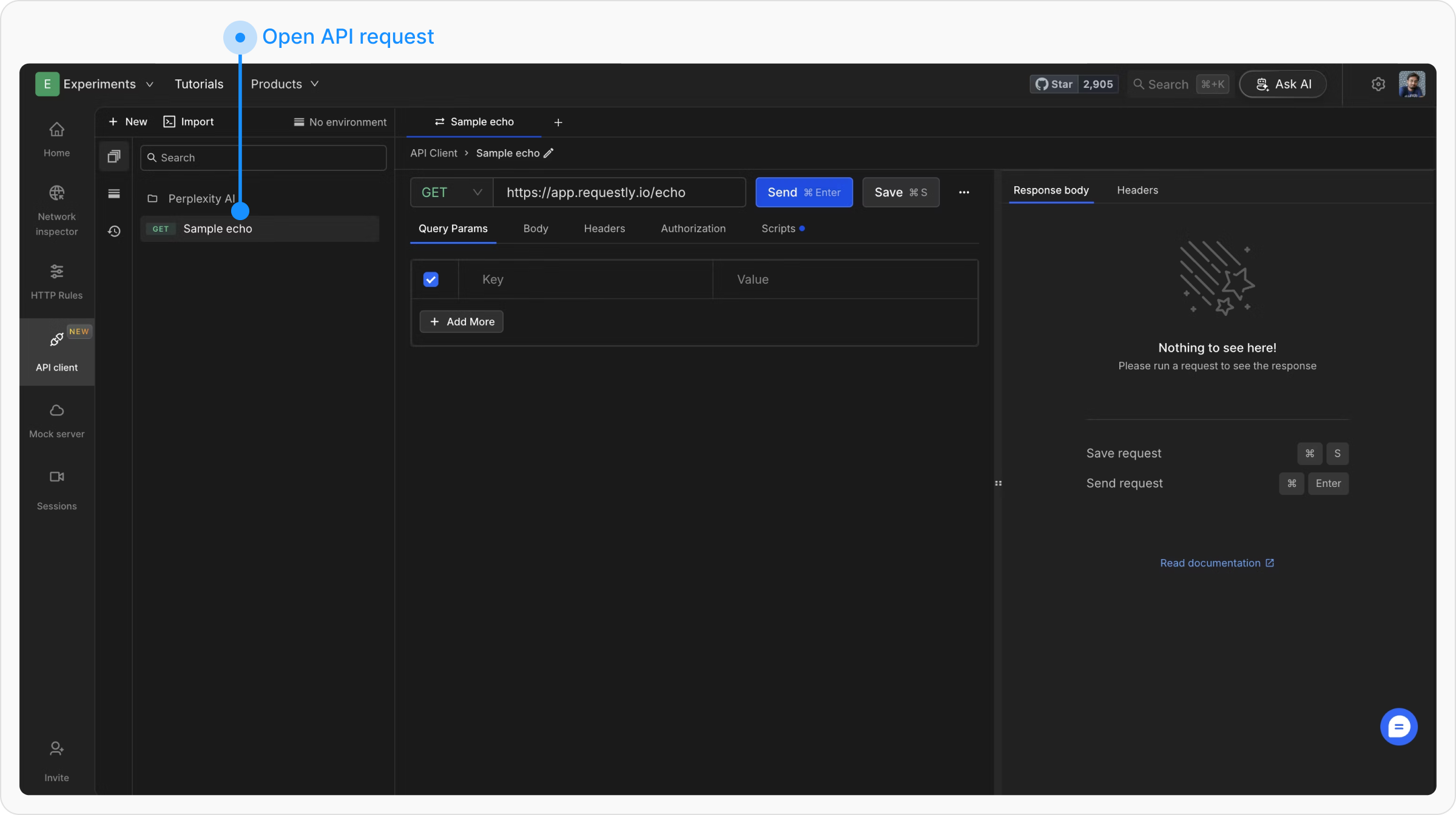
Navigate to the API request for which you want to generate code.
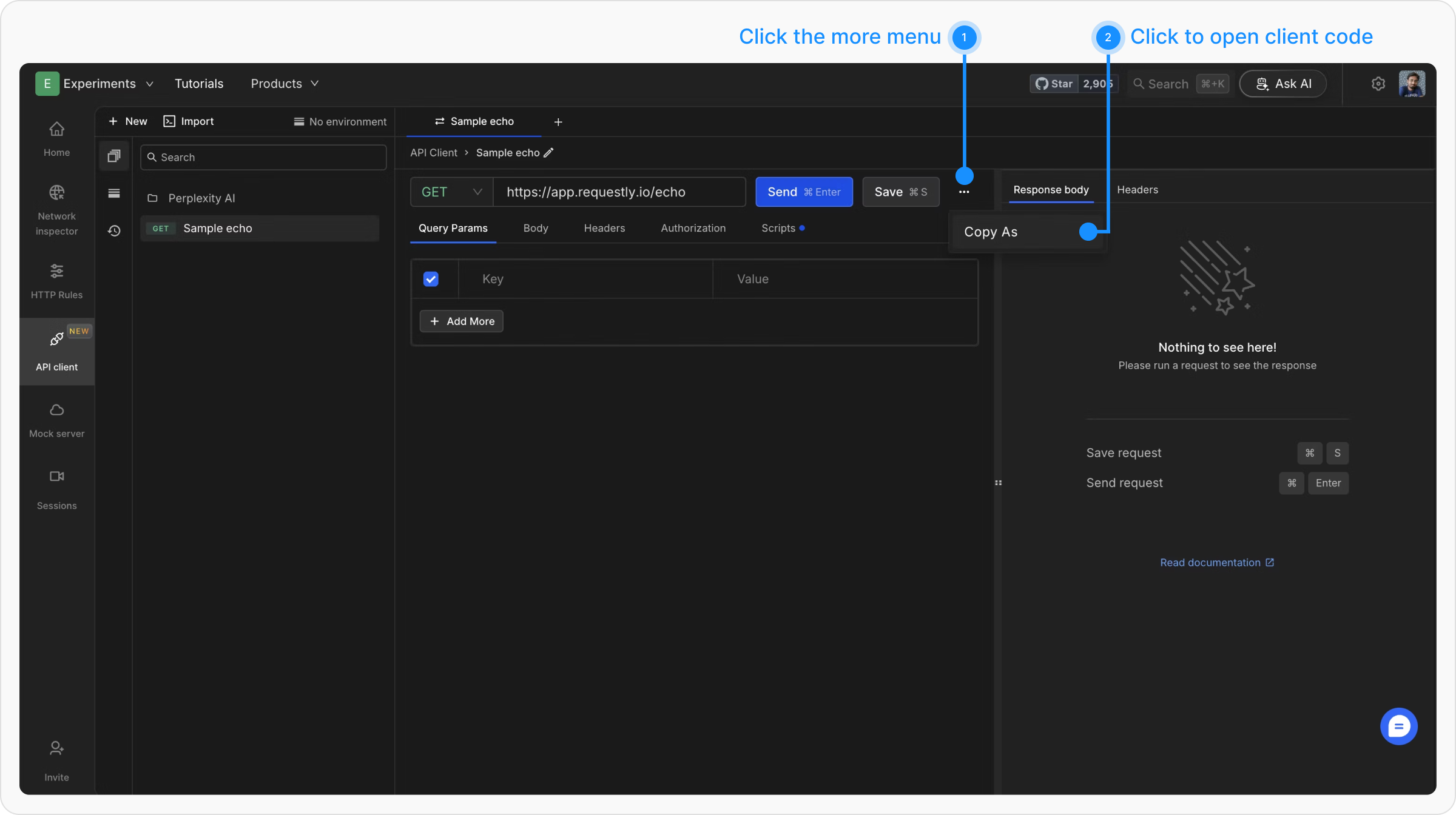
 Click the **three dots** next to the **Save** button, then select **Copy As** from the dropdown.
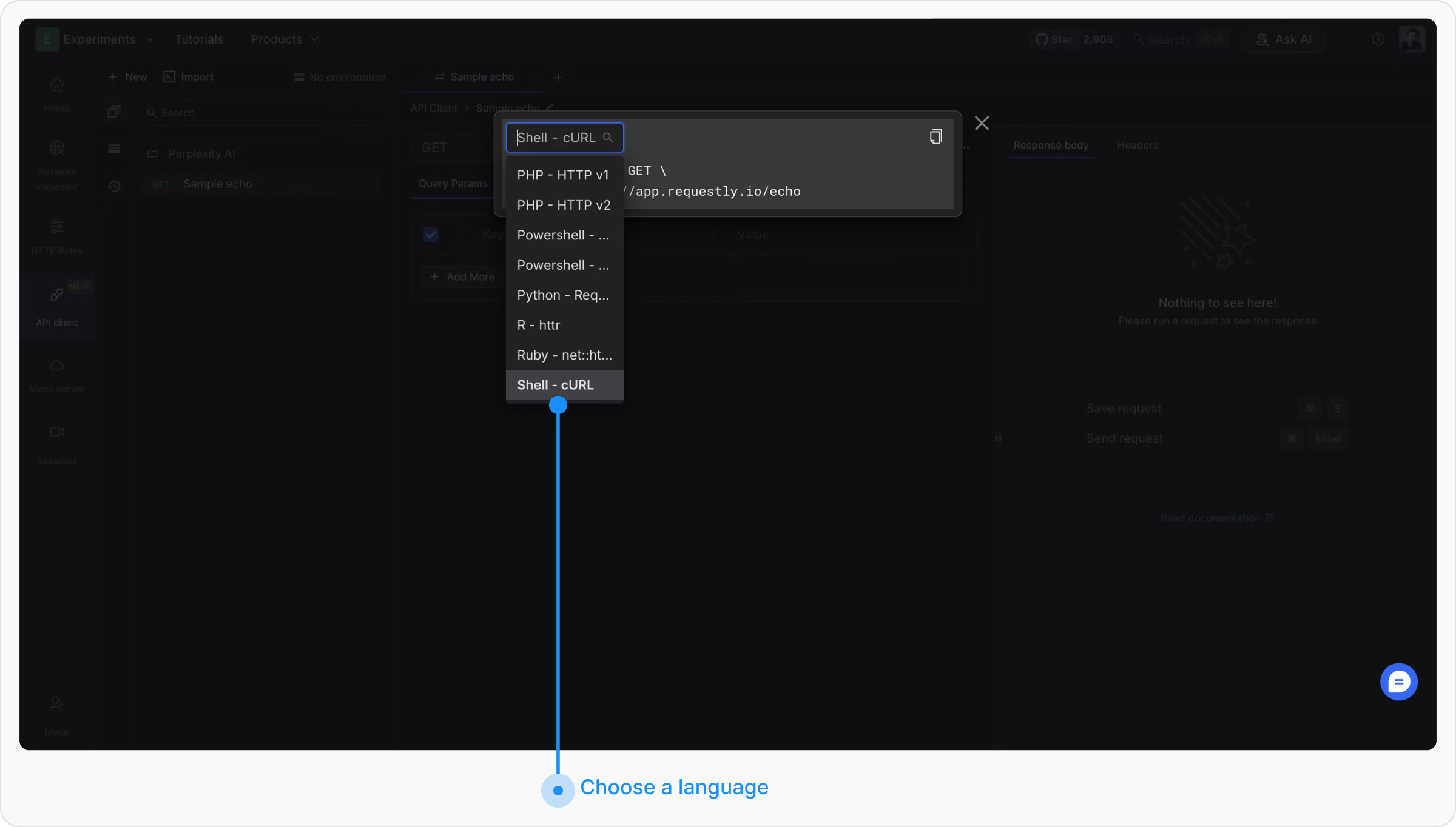
 A modal opens with the generated code. Use the dropdown at the top left to switch languages.
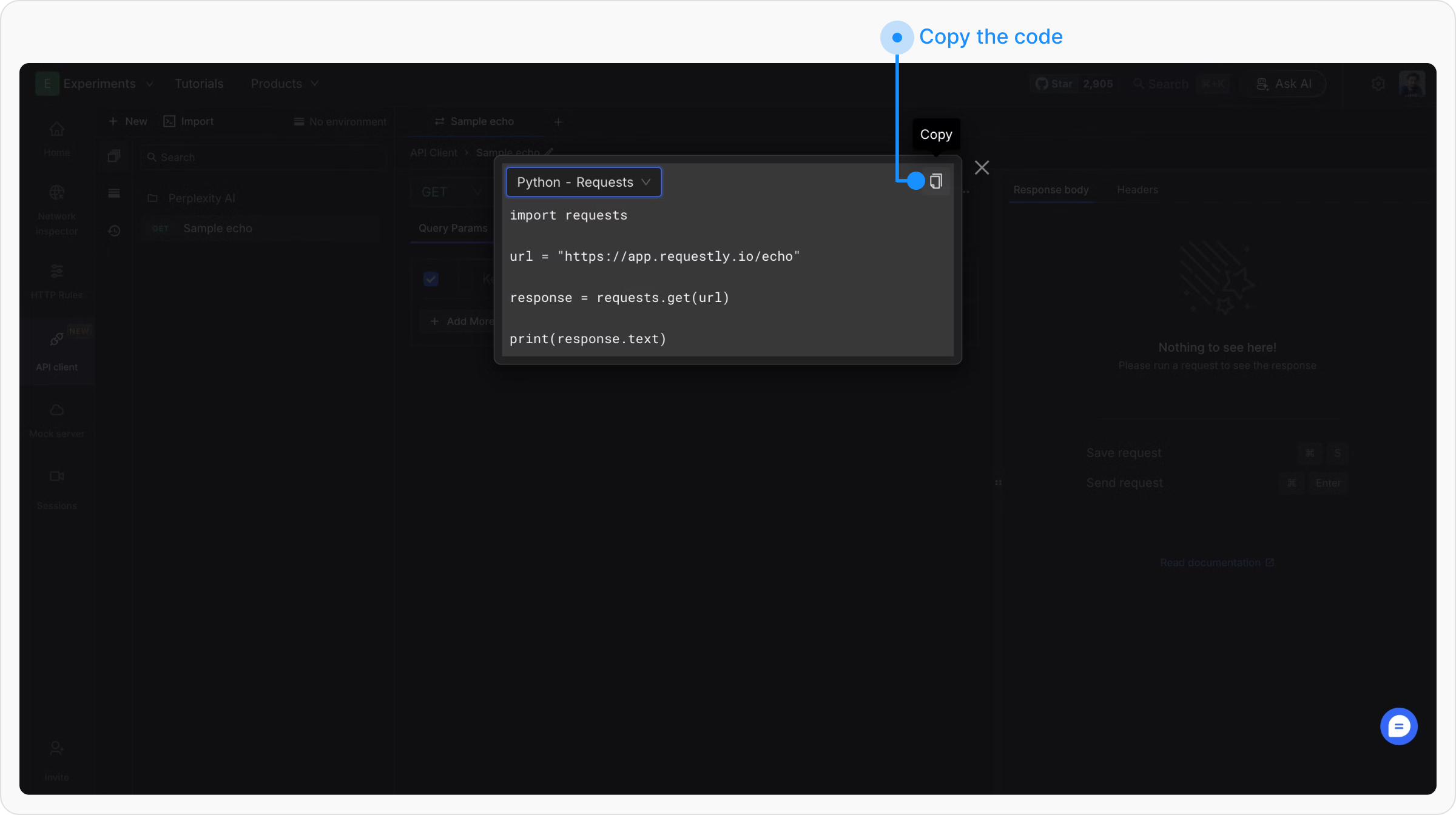
 Click **Copy** in the top right corner to copy the snippet to your clipboard.
 ## Example Output
For a `POST https://api.example.com/users` request with a JSON body and a Bearer token, here is what the generated code looks like per language:
```bash theme={null}
curl --request POST \
--url https://api.example.com/users \
--header 'Authorization: Bearer YOUR_TOKEN' \
--header 'Content-Type: application/json' \
--data '{"name":"Jane Doe","email":"jane@example.com"}'
```
```javascript theme={null}
const response = await fetch("https://api.example.com/users", {
method: "POST",
headers: {
"Authorization": "Bearer YOUR_TOKEN",
"Content-Type": "application/json"
},
body: JSON.stringify({ name: "Jane Doe", email: "jane@example.com" })
});
const data = await response.json();
console.log(data);
```
```python theme={null}
import requests
url = "https://api.example.com/users"
headers = {
"Authorization": "Bearer YOUR_TOKEN",
"Content-Type": "application/json"
}
payload = {"name": "Jane Doe", "email": "jane@example.com"}
response = requests.post(url, json=payload, headers=headers)
print(response.status_code, response.json())
```
```go theme={null}
package main
import (
"bytes"
"fmt"
"io"
"net/http"
)
func main() {
body := bytes.NewBufferString(`{"name":"Jane Doe","email":"jane@example.com"}`)
req, _ := http.NewRequest("POST", "https://api.example.com/users", body)
req.Header.Set("Authorization", "Bearer YOUR_TOKEN")
req.Header.Set("Content-Type", "application/json")
resp, _ := http.DefaultClient.Do(req)
defer resp.Body.Close()
data, _ := io.ReadAll(resp.Body)
fmt.Println(string(data))
}
```
```java theme={null}
OkHttpClient client = new OkHttpClient();
MediaType mediaType = MediaType.parse("application/json");
RequestBody body = RequestBody.create(mediaType,
"{\"name\":\"Jane Doe\",\"email\":\"jane@example.com\"}");
Request request = new Request.Builder()
.url("https://api.example.com/users")
.post(body)
.addHeader("Authorization", "Bearer YOUR_TOKEN")
.addHeader("Content-Type", "application/json")
.build();
Response response = client.newCall(request).execute();
System.out.println(response.body().string());
```
```csharp theme={null}
using var client = new HttpClient();
client.DefaultRequestHeaders.Add("Authorization", "Bearer YOUR_TOKEN");
var content = new StringContent(
"{\"name\":\"Jane Doe\",\"email\":\"jane@example.com\"}",
System.Text.Encoding.UTF8, "application/json");
var response = await client.PostAsync("https://api.example.com/users", content);
Console.WriteLine(await response.Content.ReadAsStringAsync());
```
```swift theme={null}
var request = URLRequest(url: URL(string: "https://api.example.com/users")!)
request.httpMethod = "POST"
request.setValue("Bearer YOUR_TOKEN", forHTTPHeaderField: "Authorization")
request.setValue("application/json", forHTTPHeaderField: "Content-Type")
request.httpBody = #"{"name":"Jane Doe","email":"jane@example.com"}"#.data(using: .utf8)
let (data, response) = try await URLSession.shared.data(for: request)
print(String(data: data, encoding: .utf8)!)
```
```php theme={null}
```powershell theme={null}
$headers = @{
"Authorization" = "Bearer YOUR_TOKEN"
"Content-Type" = "application/json"
}
$body = '{"name":"Jane Doe","email":"jane@example.com"}'
Invoke-RestMethod -Method Post `
-Uri "https://api.example.com/users" `
-Headers $headers `
-Body $body
```
```ruby theme={null}
require 'net/http'
require 'json'
uri = URI('https://api.example.com/users')
http = Net::HTTP.new(uri.host, uri.port)
http.use_ssl = true
request = Net::HTTP::Post.new(uri)
request['Authorization'] = 'Bearer YOUR_TOKEN'
request['Content-Type'] = 'application/json'
request.body = { name: 'Jane Doe', email: 'jane@example.com' }.to_json
response = http.request(request)
puts response.code, response.body
```
## Supported Languages
| Language | Library / Variant |
| ----------- | ------------------------------------ |
| C | libcurl |
| C# | HttpClient, RestSharp |
| Clojure | clj-http |
| Go | Native |
| HTTP | Raw HTTP message |
| Java | AsyncHttp, NetHttp, OkHttp, Unirest |
| JavaScript | Axios, Fetch, jQuery, XHR |
| Kotlin | OkHttp |
| Node.js | Axios, Fetch, HTTP, Request, Unirest |
| Objective-C | NSURLSession |
| OCaml | CoHTTP |
| PHP | cURL, Guzzle, HTTP v1, HTTP v2 |
| PowerShell | Invoke-WebRequest, Invoke-RestMethod |
| Python | Requests |
| R | httr |
| Ruby | net::http |
| Shell | cURL, HTTPie, Wget |
| Swift | URLSession |
## Example Output
For a `POST https://api.example.com/users` request with a JSON body and a Bearer token, here is what the generated code looks like per language:
```bash theme={null}
curl --request POST \
--url https://api.example.com/users \
--header 'Authorization: Bearer YOUR_TOKEN' \
--header 'Content-Type: application/json' \
--data '{"name":"Jane Doe","email":"jane@example.com"}'
```
```javascript theme={null}
const response = await fetch("https://api.example.com/users", {
method: "POST",
headers: {
"Authorization": "Bearer YOUR_TOKEN",
"Content-Type": "application/json"
},
body: JSON.stringify({ name: "Jane Doe", email: "jane@example.com" })
});
const data = await response.json();
console.log(data);
```
```python theme={null}
import requests
url = "https://api.example.com/users"
headers = {
"Authorization": "Bearer YOUR_TOKEN",
"Content-Type": "application/json"
}
payload = {"name": "Jane Doe", "email": "jane@example.com"}
response = requests.post(url, json=payload, headers=headers)
print(response.status_code, response.json())
```
```go theme={null}
package main
import (
"bytes"
"fmt"
"io"
"net/http"
)
func main() {
body := bytes.NewBufferString(`{"name":"Jane Doe","email":"jane@example.com"}`)
req, _ := http.NewRequest("POST", "https://api.example.com/users", body)
req.Header.Set("Authorization", "Bearer YOUR_TOKEN")
req.Header.Set("Content-Type", "application/json")
resp, _ := http.DefaultClient.Do(req)
defer resp.Body.Close()
data, _ := io.ReadAll(resp.Body)
fmt.Println(string(data))
}
```
```java theme={null}
OkHttpClient client = new OkHttpClient();
MediaType mediaType = MediaType.parse("application/json");
RequestBody body = RequestBody.create(mediaType,
"{\"name\":\"Jane Doe\",\"email\":\"jane@example.com\"}");
Request request = new Request.Builder()
.url("https://api.example.com/users")
.post(body)
.addHeader("Authorization", "Bearer YOUR_TOKEN")
.addHeader("Content-Type", "application/json")
.build();
Response response = client.newCall(request).execute();
System.out.println(response.body().string());
```
```csharp theme={null}
using var client = new HttpClient();
client.DefaultRequestHeaders.Add("Authorization", "Bearer YOUR_TOKEN");
var content = new StringContent(
"{\"name\":\"Jane Doe\",\"email\":\"jane@example.com\"}",
System.Text.Encoding.UTF8, "application/json");
var response = await client.PostAsync("https://api.example.com/users", content);
Console.WriteLine(await response.Content.ReadAsStringAsync());
```
```swift theme={null}
var request = URLRequest(url: URL(string: "https://api.example.com/users")!)
request.httpMethod = "POST"
request.setValue("Bearer YOUR_TOKEN", forHTTPHeaderField: "Authorization")
request.setValue("application/json", forHTTPHeaderField: "Content-Type")
request.httpBody = #"{"name":"Jane Doe","email":"jane@example.com"}"#.data(using: .utf8)
let (data, response) = try await URLSession.shared.data(for: request)
print(String(data: data, encoding: .utf8)!)
```
```php theme={null}
```powershell theme={null}
$headers = @{
"Authorization" = "Bearer YOUR_TOKEN"
"Content-Type" = "application/json"
}
$body = '{"name":"Jane Doe","email":"jane@example.com"}'
Invoke-RestMethod -Method Post `
-Uri "https://api.example.com/users" `
-Headers $headers `
-Body $body
```
```ruby theme={null}
require 'net/http'
require 'json'
uri = URI('https://api.example.com/users')
http = Net::HTTP.new(uri.host, uri.port)
http.use_ssl = true
request = Net::HTTP::Post.new(uri)
request['Authorization'] = 'Bearer YOUR_TOKEN'
request['Content-Type'] = 'application/json'
request.body = { name: 'Jane Doe', email: 'jane@example.com' }.to_json
response = http.request(request)
puts response.code, response.body
```
## Supported Languages
| Language | Library / Variant |
| ----------- | ------------------------------------ |
| C | libcurl |
| C# | HttpClient, RestSharp |
| Clojure | clj-http |
| Go | Native |
| HTTP | Raw HTTP message |
| Java | AsyncHttp, NetHttp, OkHttp, Unirest |
| JavaScript | Axios, Fetch, jQuery, XHR |
| Kotlin | OkHttp |
| Node.js | Axios, Fetch, HTTP, Request, Unirest |
| Objective-C | NSURLSession |
| OCaml | CoHTTP |
| PHP | cURL, Guzzle, HTTP v1, HTTP v2 |
| PowerShell | Invoke-WebRequest, Invoke-RestMethod |
| Python | Requests |
| R | httr |
| Ruby | net::http |
| Shell | cURL, HTTPie, Wget |
| Swift | URLSession |