> ## Documentation Index
> Fetch the complete documentation index at: https://docs.requestly.com/llms.txt
> Use this file to discover all available pages before exploring further.
# gRPC Request
> Learn how to create and invoke gRPC requests in Requestly using server reflection or a proto file, with support for unary and streaming methods.
gRPC is a high-performance RPC framework that uses Protocol Buffers to define services and messages. Instead of hitting REST-style URLs, you connect to a gRPC server, pick a service method, and invoke it with a structured message. Requestly discovers your services automatically through server reflection or from a `.proto` file, and supports unary as well as all three streaming method types.
 ## Create your first gRPC request
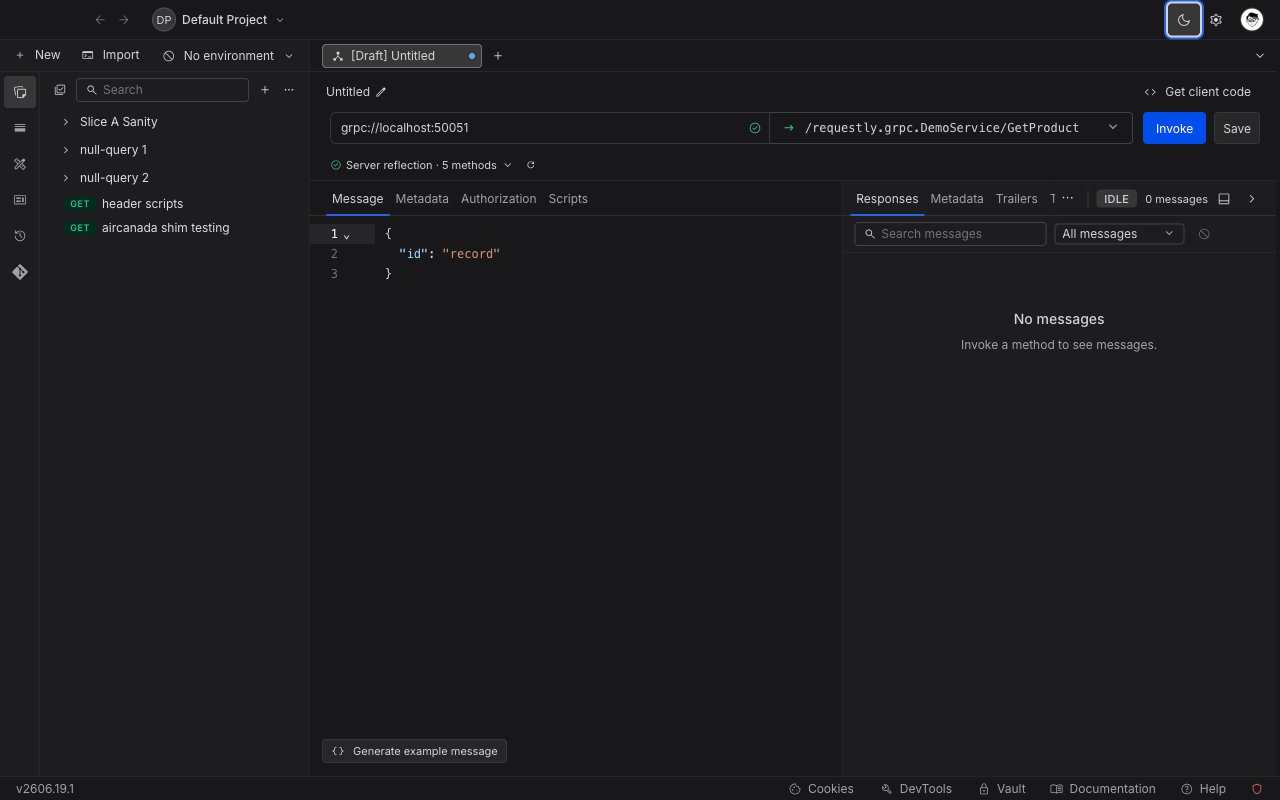
Open the **Requestly Desktop App**, click the `+ New` button, and select **gRPC request** from the menu.
Give your request a clear, descriptive name so it's easy to identify later.
In the address bar, enter your gRPC server address in `host:port` format, for example `localhost:50051`.
As soon as you enter a reachable address, Requestly performs **server reflection** to discover the services and methods the server exposes. No extra setup is required if your server has reflection enabled.
Open the **Select method** dropdown and choose the service method you want to call. Each method shows an icon indicating its type:
* **Unary**: a single request, a single response.
* **Server streaming**: a single request, a stream of responses.
* **Client streaming**: a stream of requests, a single response.
* **Bidirectional**: streams of requests and responses at the same time.
Go to the **Message** tab and enter your request message as JSON. To start from a ready-made template, click **Generate example message** (see below).
Click **Invoke** to call the method. The response panel opens with the received messages, response metadata, and trailers.
## Generate an example message
Writing a request message by hand means knowing every field, its type, and its nesting. The **Generate example message** button, at the bottom of the **Message** tab, does this for you. It reads the selected method's input message definition and writes a complete, correctly shaped JSON skeleton into the editor, so you only have to replace the placeholder values.
The generated message includes every field in the request type, with a placeholder value chosen to match each field's type:
* **Strings** get a sample word, **numbers** get a small sample number, and **booleans** get `true` or `false`.
* **Nested messages** are expanded into nested objects, and **repeated fields** become single-element arrays so you can see the shape.
* **Enums** use one of the defined values, and well-known types are filled with valid examples (for instance, a `google.protobuf.Timestamp` becomes an ISO date such as `2024-01-01T00:00:00Z`).
Generating an example replaces the current contents of the Message editor. Generate first, then edit the values.
## Discover services with a proto file
If your server does not support reflection, or you want to work against a local contract, you can load services from a `.proto` file instead.
## Create your first gRPC request
Open the **Requestly Desktop App**, click the `+ New` button, and select **gRPC request** from the menu.
Give your request a clear, descriptive name so it's easy to identify later.
In the address bar, enter your gRPC server address in `host:port` format, for example `localhost:50051`.
As soon as you enter a reachable address, Requestly performs **server reflection** to discover the services and methods the server exposes. No extra setup is required if your server has reflection enabled.
Open the **Select method** dropdown and choose the service method you want to call. Each method shows an icon indicating its type:
* **Unary**: a single request, a single response.
* **Server streaming**: a single request, a stream of responses.
* **Client streaming**: a stream of requests, a single response.
* **Bidirectional**: streams of requests and responses at the same time.
Go to the **Message** tab and enter your request message as JSON. To start from a ready-made template, click **Generate example message** (see below).
Click **Invoke** to call the method. The response panel opens with the received messages, response metadata, and trailers.
## Generate an example message
Writing a request message by hand means knowing every field, its type, and its nesting. The **Generate example message** button, at the bottom of the **Message** tab, does this for you. It reads the selected method's input message definition and writes a complete, correctly shaped JSON skeleton into the editor, so you only have to replace the placeholder values.
The generated message includes every field in the request type, with a placeholder value chosen to match each field's type:
* **Strings** get a sample word, **numbers** get a small sample number, and **booleans** get `true` or `false`.
* **Nested messages** are expanded into nested objects, and **repeated fields** become single-element arrays so you can see the shape.
* **Enums** use one of the defined values, and well-known types are filled with valid examples (for instance, a `google.protobuf.Timestamp` becomes an ISO date such as `2024-01-01T00:00:00Z`).
Generating an example replaces the current contents of the Message editor. Generate first, then edit the values.
## Discover services with a proto file
If your server does not support reflection, or you want to work against a local contract, you can load services from a `.proto` file instead.
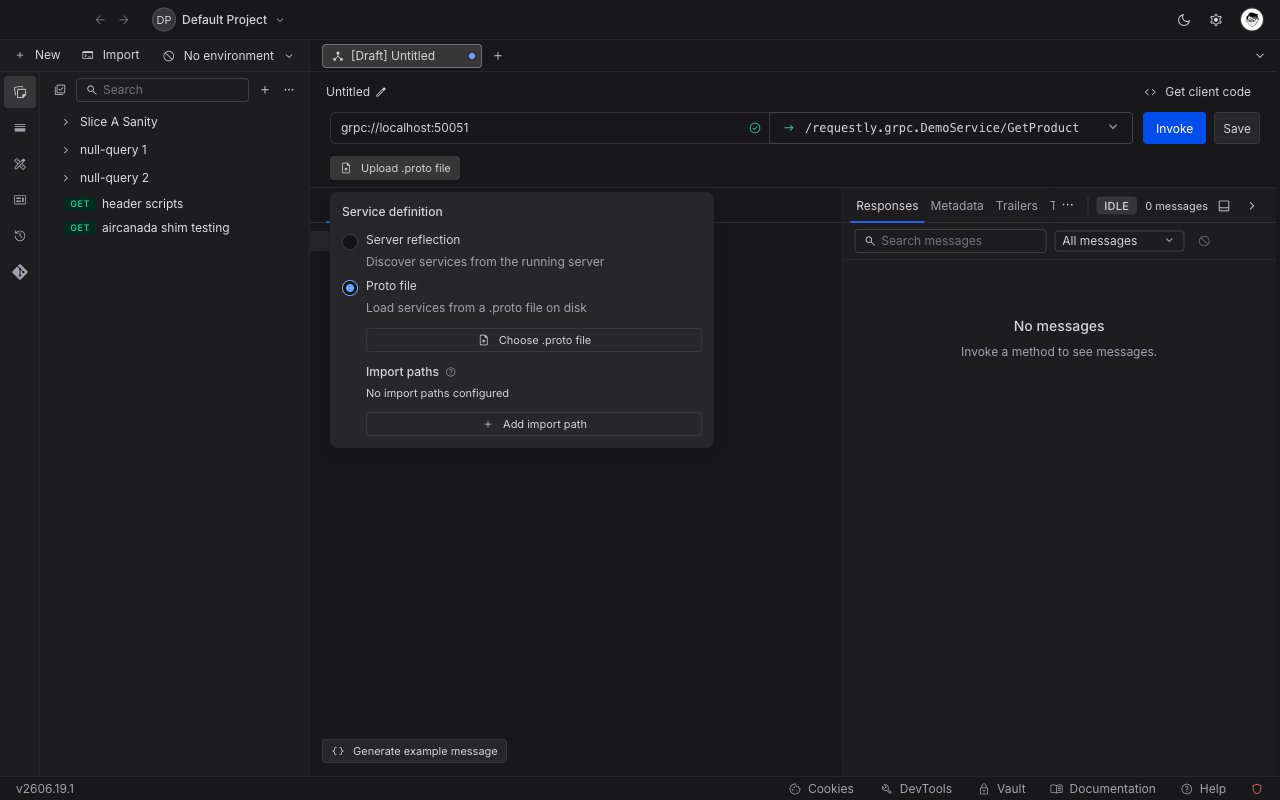 Open the schema source control next to the address bar and switch from **Server reflection** to **Proto file**.
Click **Choose .proto file** and select the file on disk. Requestly parses it and lists the discovered services and methods in the **Select method** dropdown.
If your `.proto` file imports other definitions, use **Add import path** to point Requestly at the directories that contain them. Well-known types such as `google.protobuf` are resolved automatically.
## Add metadata
gRPC metadata works like request headers. Open the **Metadata** tab and add key/value pairs. You can enable or disable individual entries with the checkbox, and use `{{variables}}` for dynamic values.
## Handle streaming methods
For server-streaming, client-streaming, and bidirectional methods, the call stays open after you invoke it instead of returning a single response. While a stream is active you have three controls:
* **Invoke** starts the call. Once connected, the address bar's button changes to **Cancel**, which closes the connection immediately in both directions.
* **Send** pushes the message currently in the editor onto the stream without closing it. Available on client-streaming and bidirectional methods, where the client can send more than one message.
* **End streaming** closes the request (client) side of the stream while leaving it open for the server to finish responding. Available on client-streaming and bidirectional methods.
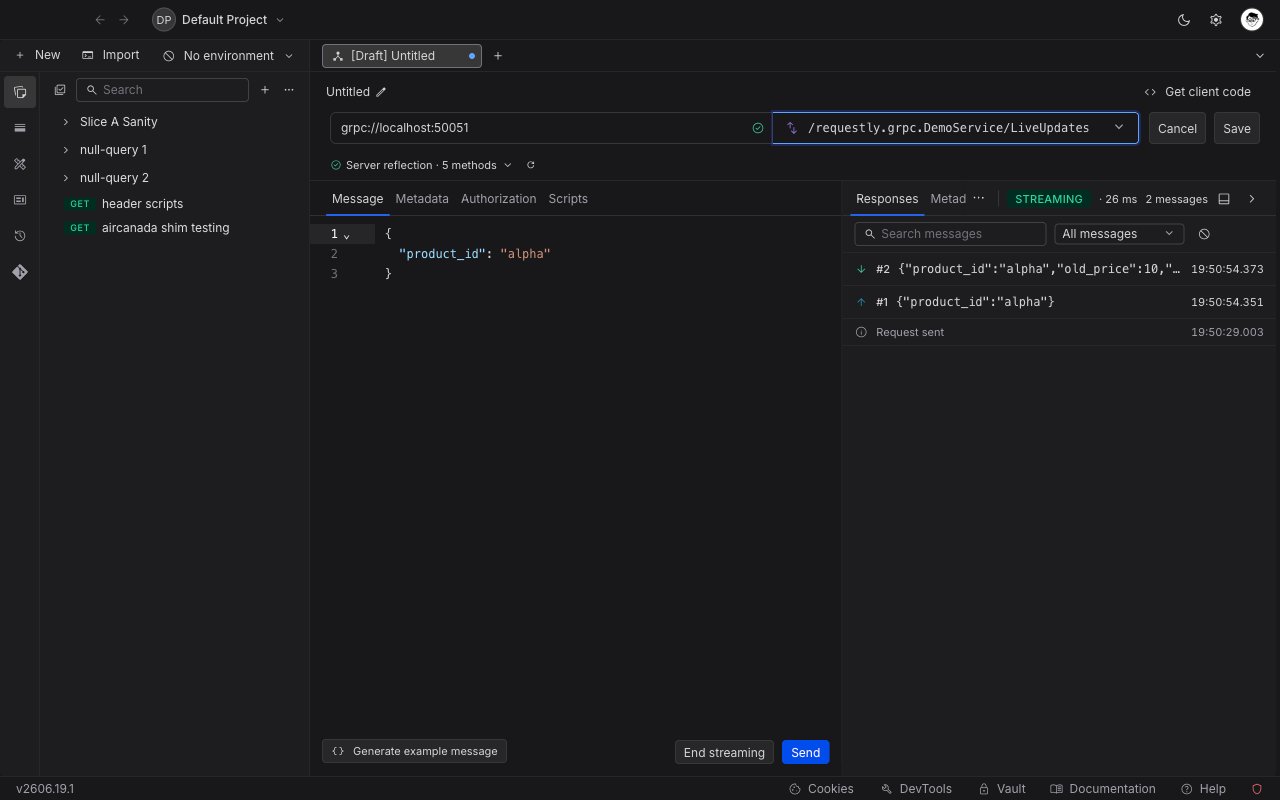
The response panel lists every message in order. Each row shows a direction indicator (an up arrow for messages you sent, a down arrow for messages the server sent back), a sequence number, the timestamp, and a preview you can expand to the full JSON body. Filter by **Sent** or **Received**, or search across all messages.
### Bidirectional streaming
A bidirectional method keeps both sides open at once: you can keep sending messages while the server keeps responding. Invoke the method to open the stream, use **Send** to push each new message, watch responses arrive in the panel, and click **End streaming** when you are done sending.
Open the schema source control next to the address bar and switch from **Server reflection** to **Proto file**.
Click **Choose .proto file** and select the file on disk. Requestly parses it and lists the discovered services and methods in the **Select method** dropdown.
If your `.proto` file imports other definitions, use **Add import path** to point Requestly at the directories that contain them. Well-known types such as `google.protobuf` are resolved automatically.
## Add metadata
gRPC metadata works like request headers. Open the **Metadata** tab and add key/value pairs. You can enable or disable individual entries with the checkbox, and use `{{variables}}` for dynamic values.
## Handle streaming methods
For server-streaming, client-streaming, and bidirectional methods, the call stays open after you invoke it instead of returning a single response. While a stream is active you have three controls:
* **Invoke** starts the call. Once connected, the address bar's button changes to **Cancel**, which closes the connection immediately in both directions.
* **Send** pushes the message currently in the editor onto the stream without closing it. Available on client-streaming and bidirectional methods, where the client can send more than one message.
* **End streaming** closes the request (client) side of the stream while leaving it open for the server to finish responding. Available on client-streaming and bidirectional methods.
The response panel lists every message in order. Each row shows a direction indicator (an up arrow for messages you sent, a down arrow for messages the server sent back), a sequence number, the timestamp, and a preview you can expand to the full JSON body. Filter by **Sent** or **Received**, or search across all messages.
### Bidirectional streaming
A bidirectional method keeps both sides open at once: you can keep sending messages while the server keeps responding. Invoke the method to open the stream, use **Send** to push each new message, watch responses arrive in the panel, and click **End streaming** when you are done sending.
 ## Read the response
The response panel shows:
* **Responses**: each message sent and received, with timestamps and an expandable JSON body. Filter by direction or search across messages.
* **Metadata**: the response headers returned by the server.
* **Trailers**: the trailing metadata, including the final gRPC status code and message (for example, `0 OK` or `12 UNIMPLEMENTED`).
The panel header shows the status code, the response time, and the number of messages exchanged.
## Get client code
Click **Get client code** to generate a ready-to-use code snippet for the current request in several languages.
## What's Next?
Secure your gRPC requests with API keys, tokens, or OAuth flows
Make your gRPC messages and metadata dynamic with variables
Group related gRPC requests together
## Read the response
The response panel shows:
* **Responses**: each message sent and received, with timestamps and an expandable JSON body. Filter by direction or search across messages.
* **Metadata**: the response headers returned by the server.
* **Trailers**: the trailing metadata, including the final gRPC status code and message (for example, `0 OK` or `12 UNIMPLEMENTED`).
The panel header shows the status code, the response time, and the number of messages exchanged.
## Get client code
Click **Get client code** to generate a ready-to-use code snippet for the current request in several languages.
## What's Next?
Secure your gRPC requests with API keys, tokens, or OAuth flows
Make your gRPC messages and metadata dynamic with variables
Group related gRPC requests together