> ## Documentation Index
> Fetch the complete documentation index at: https://docs.requestly.com/llms.txt
> Use this file to discover all available pages before exploring further.
# Writing Tests
> Learn to write and execute API tests in Requestly using JavaScript, including validations like status code checks and JSON body tests.
Automated API testing ensures endpoints function as expected. Requestly allows you to write tests using JavaScript with the [`rq`](/api-client/scripts#requestly-javascript-api-rq) object enabling validations, schema checks, and automated workflows.
Common testing approaches include:
* **Contract Testing**: Validate responses against JSON schemas.
* **Unit Testing**: Test individual endpoints in isolation.
* **Error Handling**: Verify API behavior for invalid inputs.
You can execute tests using either [Pre-request scripts](/api-client/scripts#pre-request-scripts) (run before a request is sent) or [Post-response scripts](/api-client/scripts#post-response-scripts) (run after a response is received).
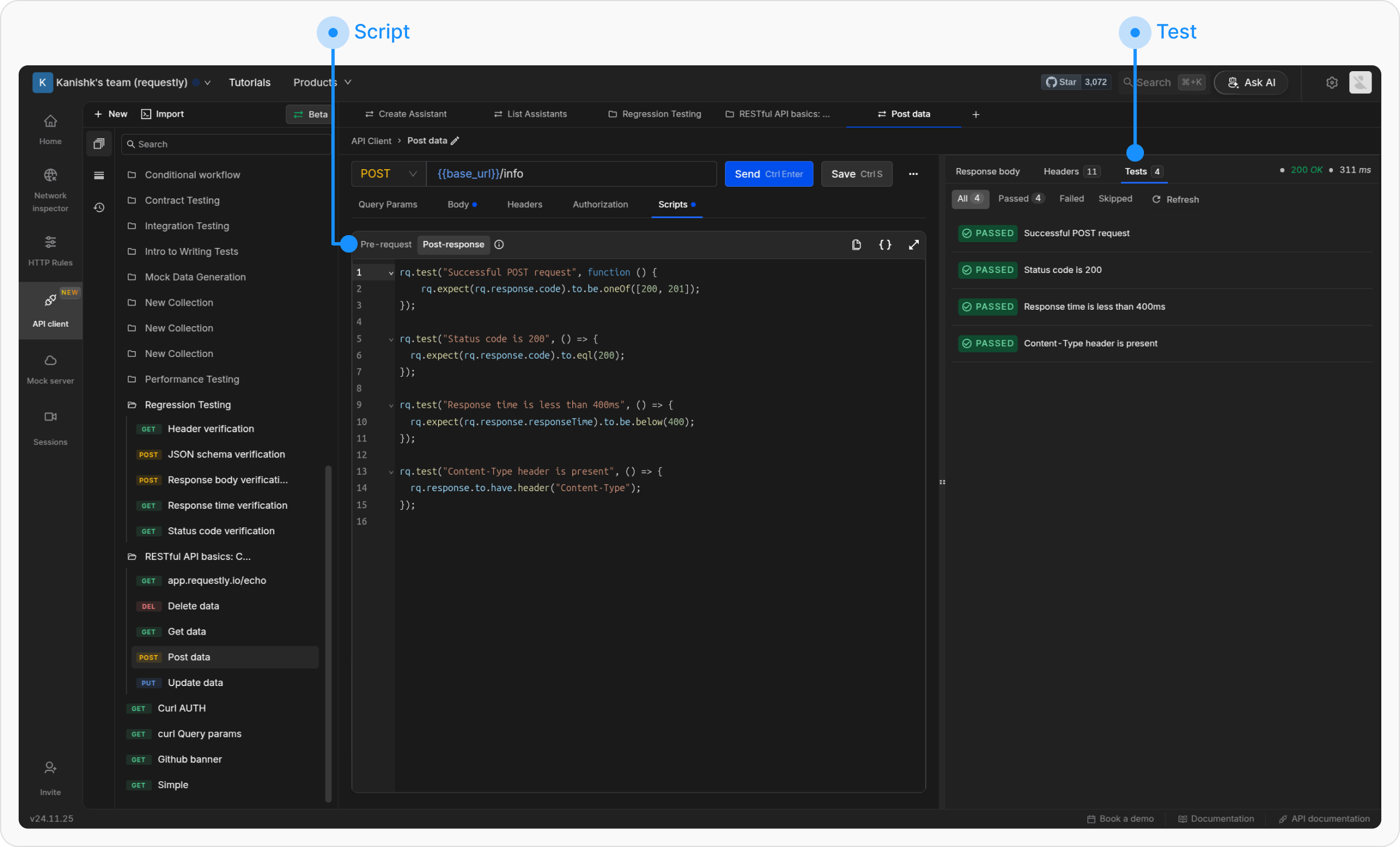 The Pre-request and Post-response tabs provide a scripting environment that allows dynamic behavior for API requests.
* The **Scripts → Pre-request tab** enables processing before sending a request, such as setting variable values or modifying headers.
* The **Scripts → Post-response tab** runs after receiving the response and allows for test assertions, logging, and response validation. This tab includes the [Chai.js library](https://www.chaijs.com/api/bdd/), supporting behavior-driven development (BDD) syntax for test assertions.
## Scripting Environment
Requestly provides a JavaScript runtime with built-in utilities. Here’s a quick reference table for key methods:
| **Method/Interface** | **Description** |
| --------------------------------------------------------------- | -------------------------------------------------------------------------------------- |
| [`rq.test`](/api-client/rq-api-reference/rq-test) | Define a test with a name and callback for assertions. |
| [`rq.expect`](/api-client/rq-api-reference/rq-expect) | Use [Chai.js BDD ](https://www.chaijs.com/api/bdd/)style assertions to compare values. |
| [`rq.environment`](/api-client/rq-api-reference/rq-environment) | Access and manage environment variables. |
| [`rq.globals`](/api-client/rq-api-reference/rq-globals) | Access and manage global variables. |
| [`rq.response`](/api-client/rq-api-reference/rq-response) | Access response details (status, body, headers, etc.). |
| [`rq.request`](/api-client/rq-api-reference/rq-request) | Access request details (method, headers, body, URL, etc.). |
## Writing Tests
To create a test, use the following syntax:
Requestly tests use **Chai.js for assertions**. For more details and examples, visit the official ***Chai.js documentation***.
```javascript theme={null}
rq.test("Test name", () => {
rq.expect(actualValue).to.equal(expectedValue);
});
```
## Example Tests
### Status Code Check
```javascript theme={null}
rq.test("Status is 200", () => {
rq.response.to.have.status(200);
});
```
### JSON Body Validation
```javascript theme={null}
rq.test("User exists", () => {
rq.response.to.have.jsonBody("user.name", "John");
});
```
### Header Check
```javascript theme={null}
rq.test("Has auth header", () => {
rq.response.to.have.header("Authorization");
});
```
### Schema Validation
```javascript theme={null}
rq.test("Valid schema", () => {
rq.response.to.have.jsonSchema({
type: "object",
required: ["id"],
properties: { id: { type: "number" } }
});
});
```
### Skipping Tests
```javascript theme={null}
rq.test.skip("Temporarily disabled test", () => {
// This test won't run
});
```
## Response specific assertions
The `.to` API is supported only for response data in Post-response scripts.
**Status code assertions**
```javascript theme={null}
// Success responses
rq.response.to.be.ok // 2XX
rq.response.to.be.success // 200
rq.response.to.be.accepted // 202
// Client error responses
rq.response.to.be.badRequest // 400
rq.response.to.be.unauthorized // 401
rq.response.to.be.forbidden // 403
rq.response.to.be.notFound // 404
rq.response.to.be.rateLimited // 429
rq.response.to.be.clientError // 4XX
// Server error responses
rq.response.to.be.serverError // 5XX
// Other status categories
rq.response.to.be.error // 4XX or 5XX
rq.response.to.be.info // 1XX
rq.response.to.be.redirection // 3XX
```
`.to.have` **assertions**
```javascript theme={null}
// Checks if response body exactly matches expected value.
rq.response.to.have.body(expectedValue: string)
// Checks response status code or text.
rq.response.to.have.status(expectedValue: number | string)
rq.response.to.have.status(200);
rq.response.to.have.status("OK");
// Checks if response has specified header (case-insensitive)
rq.response.to.have.header(headerName: string)
// Validates that response body is valid JSON.
rq.response.to.have.jsonBody();
// Checks if a path exists in the response.
rq.response.to.have.jsonBody(path: string)
rq.response.to.have.jsonBody("user.name");
// Checks if a JSON path has a specific value.
rq.response.to.have.jsonBody(path: string, value: any)
rq.response.to.have.jsonBody("user.name", "John");
// Validates the response body against a JSON schema. Accepts optional Ajv configuration.
rq.response.to.have.jsonSchema(schema: object, ajvOptions?: AjvOptions)
rq.response.to.have.jsonSchema({
type: "object",
required: ["id", "name"],
properties: {
id: { type: "number" },
name: { type: "string" },
email: { type: "string", format: "email" }
}
}, { allErrors: true });
```
**Negation with** `.to.not`
All the above assertions can be negated by inserting `.not` after `.to`:
```javascript theme={null}
rq.response.to.not.be.error;
rq.response.to.not.have.header("X-Custom");
rq.response.to.not.have.jsonBody("error");
```
The Pre-request and Post-response tabs provide a scripting environment that allows dynamic behavior for API requests.
* The **Scripts → Pre-request tab** enables processing before sending a request, such as setting variable values or modifying headers.
* The **Scripts → Post-response tab** runs after receiving the response and allows for test assertions, logging, and response validation. This tab includes the [Chai.js library](https://www.chaijs.com/api/bdd/), supporting behavior-driven development (BDD) syntax for test assertions.
## Scripting Environment
Requestly provides a JavaScript runtime with built-in utilities. Here’s a quick reference table for key methods:
| **Method/Interface** | **Description** |
| --------------------------------------------------------------- | -------------------------------------------------------------------------------------- |
| [`rq.test`](/api-client/rq-api-reference/rq-test) | Define a test with a name and callback for assertions. |
| [`rq.expect`](/api-client/rq-api-reference/rq-expect) | Use [Chai.js BDD ](https://www.chaijs.com/api/bdd/)style assertions to compare values. |
| [`rq.environment`](/api-client/rq-api-reference/rq-environment) | Access and manage environment variables. |
| [`rq.globals`](/api-client/rq-api-reference/rq-globals) | Access and manage global variables. |
| [`rq.response`](/api-client/rq-api-reference/rq-response) | Access response details (status, body, headers, etc.). |
| [`rq.request`](/api-client/rq-api-reference/rq-request) | Access request details (method, headers, body, URL, etc.). |
## Writing Tests
To create a test, use the following syntax:
Requestly tests use **Chai.js for assertions**. For more details and examples, visit the official ***Chai.js documentation***.
```javascript theme={null}
rq.test("Test name", () => {
rq.expect(actualValue).to.equal(expectedValue);
});
```
## Example Tests
### Status Code Check
```javascript theme={null}
rq.test("Status is 200", () => {
rq.response.to.have.status(200);
});
```
### JSON Body Validation
```javascript theme={null}
rq.test("User exists", () => {
rq.response.to.have.jsonBody("user.name", "John");
});
```
### Header Check
```javascript theme={null}
rq.test("Has auth header", () => {
rq.response.to.have.header("Authorization");
});
```
### Schema Validation
```javascript theme={null}
rq.test("Valid schema", () => {
rq.response.to.have.jsonSchema({
type: "object",
required: ["id"],
properties: { id: { type: "number" } }
});
});
```
### Skipping Tests
```javascript theme={null}
rq.test.skip("Temporarily disabled test", () => {
// This test won't run
});
```
## Response specific assertions
The `.to` API is supported only for response data in Post-response scripts.
**Status code assertions**
```javascript theme={null}
// Success responses
rq.response.to.be.ok // 2XX
rq.response.to.be.success // 200
rq.response.to.be.accepted // 202
// Client error responses
rq.response.to.be.badRequest // 400
rq.response.to.be.unauthorized // 401
rq.response.to.be.forbidden // 403
rq.response.to.be.notFound // 404
rq.response.to.be.rateLimited // 429
rq.response.to.be.clientError // 4XX
// Server error responses
rq.response.to.be.serverError // 5XX
// Other status categories
rq.response.to.be.error // 4XX or 5XX
rq.response.to.be.info // 1XX
rq.response.to.be.redirection // 3XX
```
`.to.have` **assertions**
```javascript theme={null}
// Checks if response body exactly matches expected value.
rq.response.to.have.body(expectedValue: string)
// Checks response status code or text.
rq.response.to.have.status(expectedValue: number | string)
rq.response.to.have.status(200);
rq.response.to.have.status("OK");
// Checks if response has specified header (case-insensitive)
rq.response.to.have.header(headerName: string)
// Validates that response body is valid JSON.
rq.response.to.have.jsonBody();
// Checks if a path exists in the response.
rq.response.to.have.jsonBody(path: string)
rq.response.to.have.jsonBody("user.name");
// Checks if a JSON path has a specific value.
rq.response.to.have.jsonBody(path: string, value: any)
rq.response.to.have.jsonBody("user.name", "John");
// Validates the response body against a JSON schema. Accepts optional Ajv configuration.
rq.response.to.have.jsonSchema(schema: object, ajvOptions?: AjvOptions)
rq.response.to.have.jsonSchema({
type: "object",
required: ["id", "name"],
properties: {
id: { type: "number" },
name: { type: "string" },
email: { type: "string", format: "email" }
}
}, { allErrors: true });
```
**Negation with** `.to.not`
All the above assertions can be negated by inserting `.not` after `.to`:
```javascript theme={null}
rq.response.to.not.be.error;
rq.response.to.not.have.header("X-Custom");
rq.response.to.not.have.jsonBody("error");
```