

The Requestly Interceptor Browser Extension is a lightweight yet powerful tool designed for developers working on browser-based workflows. Requestly Interceptor’s browser extension is available for all major browsers including Chrome, Firefox, Edge, Brave, Vivaldi, Arc, and Opera. With the Browser Extension, you can:Documentation Index
Fetch the complete documentation index at: https://docs.requestly.com/llms.txt
Use this file to discover all available pages before exploring further.
- Intercept and modify network requests directly in your browser
- Use the in-browser Network Inspector
- Capture rich debugging data (console logs, network logs, screen recordings)
- Connect with the Desktop App for enhanced capabilities like bulk mocking
Click here to downloadthe Requestly Interceptor extension for your favorite browser.
Extension Popup
You can open the Requestly Interceptor Extension popup by clicking its icon in the browser’s extensions list or top bar if pinned. We recommend pinning the Requestly Interceptor Extension for quick access.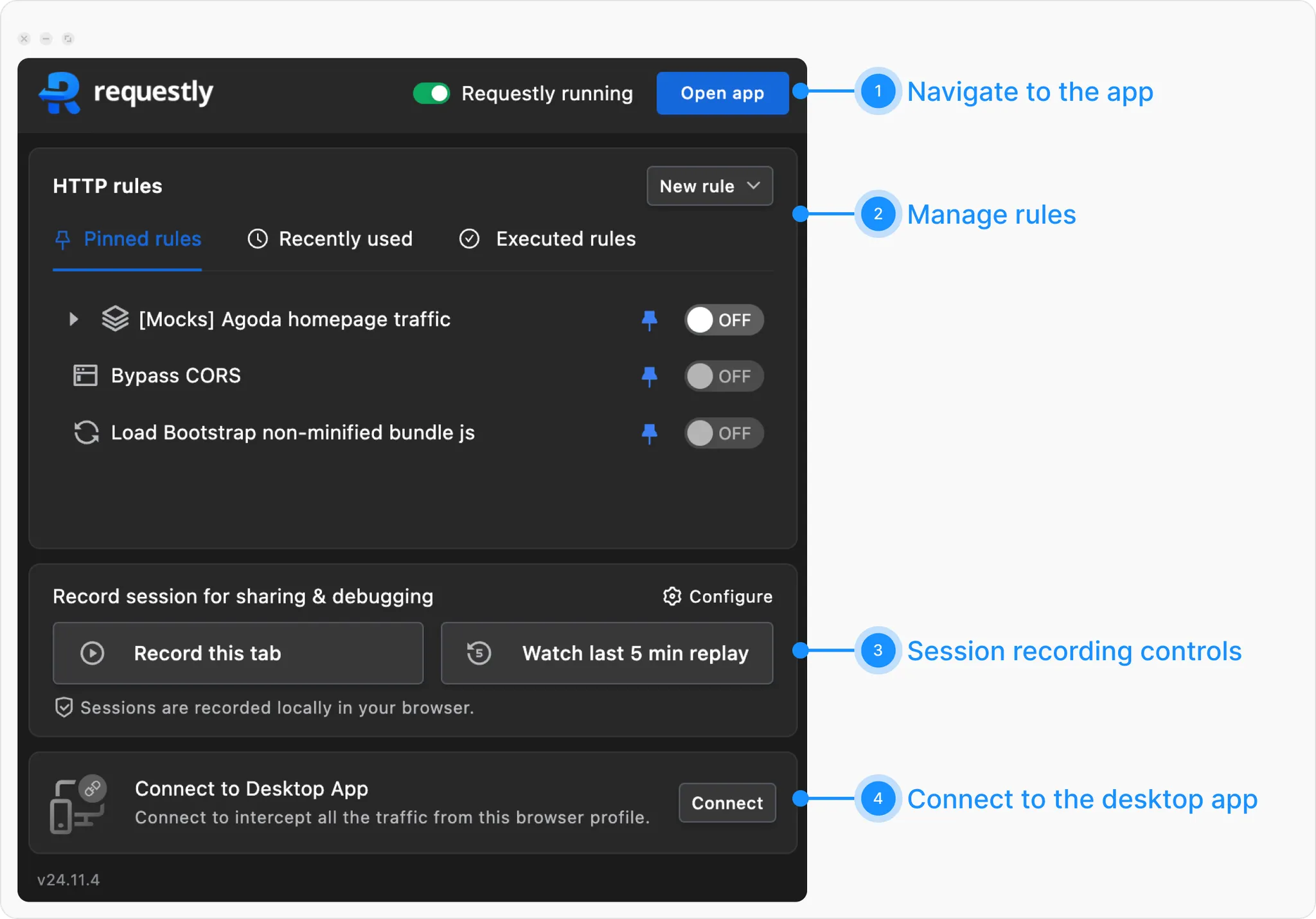
-
The first section includes the Running Status toggle to turn the extension on/off and an Open App button to launch the Requestly Interceptor app (
https://app.requestly.io/) for creating rules and using the web app. - The second section helps manage rules. Pinned rules and recently used rules appear for quick access. The Executed Rules tab shows rules applied to the current page. You can toggle rules using the toggle button and quickly create new ones using the button in the top-right corner.
-
The third section is for reporting webpage issues with detailed information, including screen recordings, console logs, network logs, local storage, and environment details.
Record this tabstarts recording, andWatch last 5 min replayshows recent activity, enabled via the Configure option. Data is stored locally and doesn’t affect performance unless shared. You can click onRecord this taband check out the working of this feature quickly. - The last section, visible only if the Desktop App is running, lets you intercept browser traffic via the desktop app. Click Connect to link the browser profile to the app, useful for tasks like bulk mocking.
Web App
The Web App can be accessed using theOpen App button in the Extension Popup or by visiting https://app.requestly.io/ directly in your browser. The app is organised into main sections, represented by icons on the left sidebar:
- Home: The homepage provides an overview of your resources and quick access to key actions.
- Network Inspector: Similar to the browser’s dev tools, but with additional features.
- HTTP Rules: Allows you to override network requests by modifying parts of the request or redirecting them, our most popular feature.
- Sessions: Contains saved sessions from the Extension Popup discussed earlier.
- File Server: Allows you to host custom files and mock endpoints in the cloud so you can test APIs and resource overrides with shareable URLs.
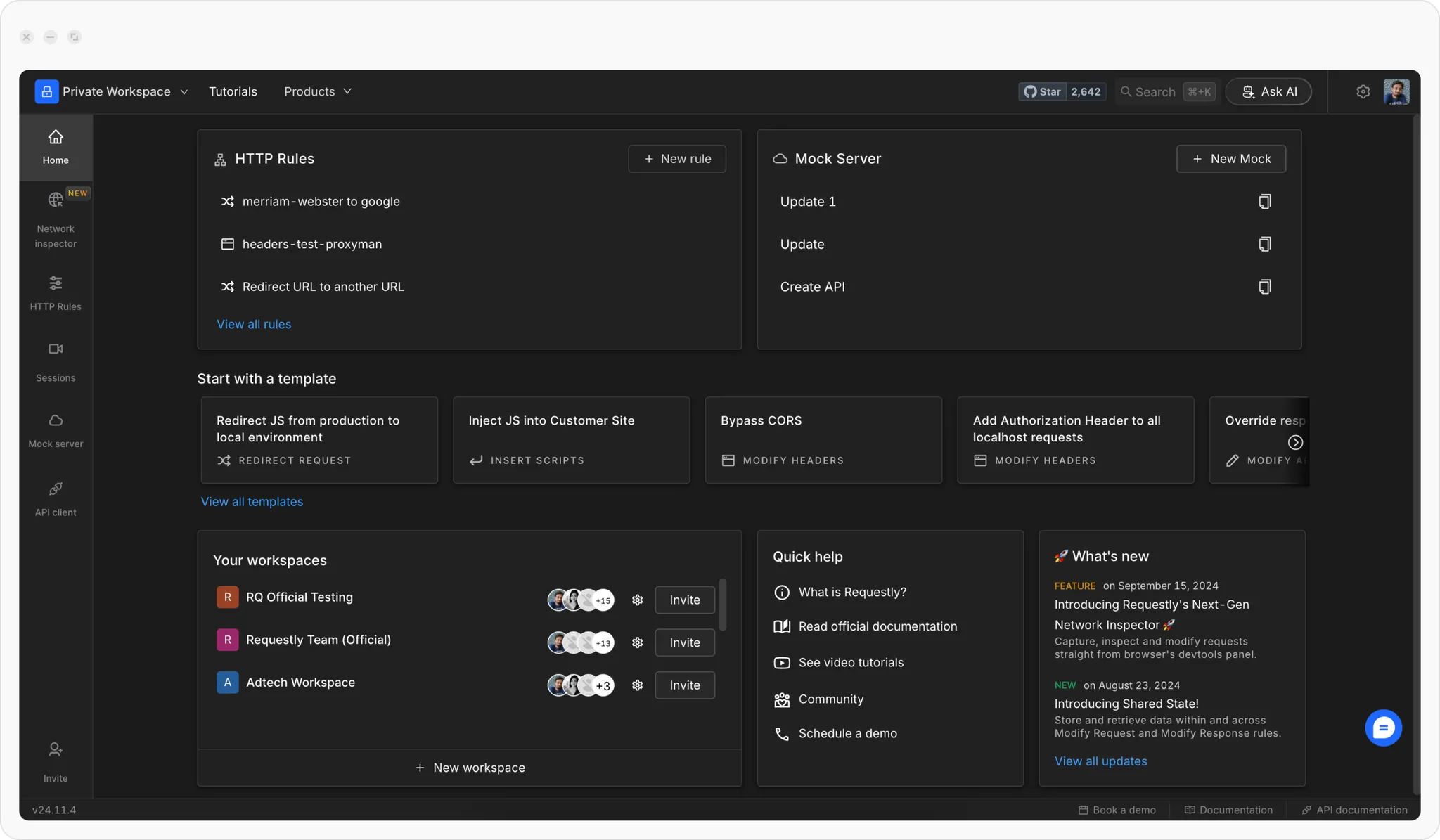
- Workspace Selector , Allows you to create a new workspace or switch between existing ones. Workspaces are where you group your work for specific teams or projects.
- Star , A GitHub widget to star our repository and track Requestly Interceptor’s development.
- Search , Helps you quickly navigate the app; search for an action like “Create New Workspace” and hit enter to quickly create new workspace.
- Ask AI , An AI bot that can instantly assist with most queries. While our support team is prompt, AI provides even faster responses.
- Settings (Cog Icon) , Opens the settings page, where you can configure Requestly Interceptor to suit your needs.
- Profile Picture Dropdown , Displays your logged-in profile information and includes links to billing and logout.
- Invite Button , This lets you invite teammates to collaborate on Requestly Interceptor.
- Version Information , Displays the current version of Requestly Interceptor, which can be helpful when communicating with our support team.
- Chat Support Icon , Located slightly above the API Documentation link, this connects you to our dedicated customer support team.
When To Use The Browser Extension
Use the Browser Extension when you want to:- inspect and modify traffic from websites and browser apps
- debug HTTP traffic without configuring a system proxy
- create HTTP Rules in a browser-first workflow
- capture browser-based debugging context quickly
Recommended Next Steps
Getting Started Overview
Choose a path and complete setup for interception-focused workflows.
Inspect Browser Traffic
Learn how interception works inside the browser extension.
Create Your First HTTP Rule
Modify headers, redirect URLs, or rewrite responses without changing application code.
Troubleshoot Browser Setup
Check common extension and rules issues if traffic changes are not applying.