Documentation Index
Fetch the complete documentation index at: https://docs.requestly.com/llms.txt
Use this file to discover all available pages before exploring further.
Requestly can convert any configured API request into a ready-to-paste code snippet. Use this to move from manual testing to implementation without rewriting the request from scratch.
How to Generate Client Code
Open API Request
Navigate to the API request for which you want to generate code.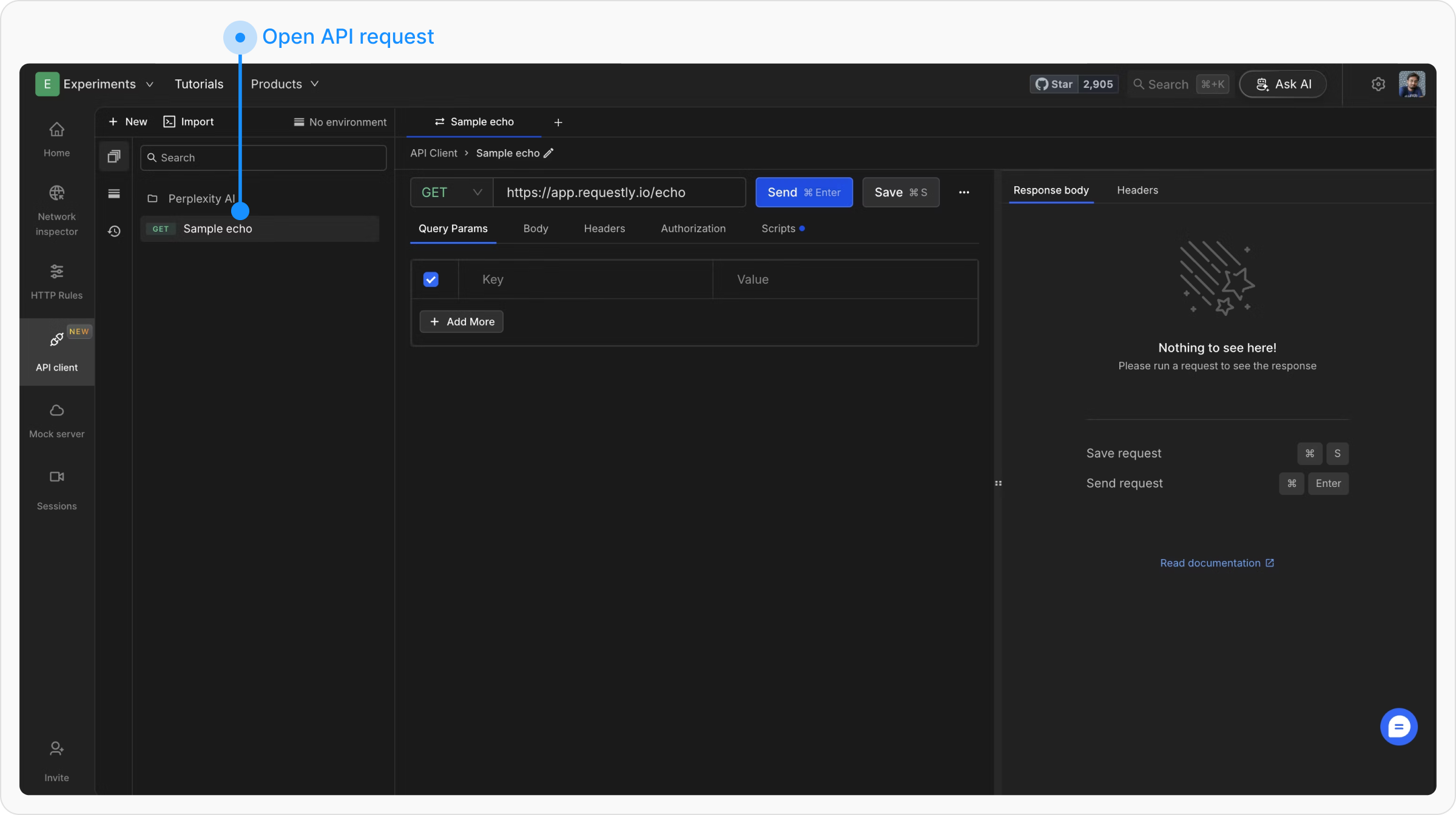
Access Code Generation Menu
Click the three dots next to the Save button, then select Copy As from the dropdown.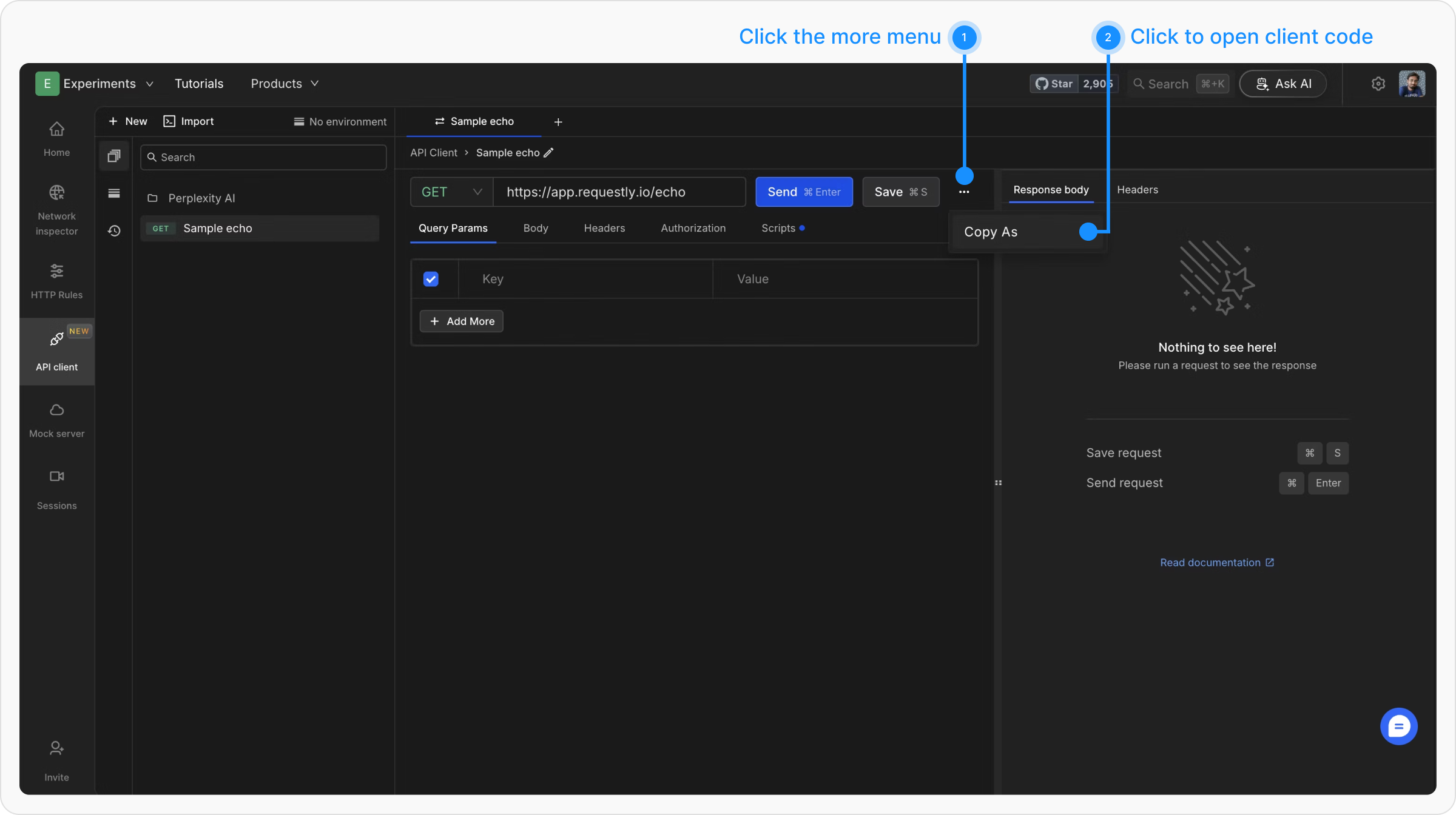
Choose a Programming Language
A modal opens with the generated code. Use the dropdown at the top left to switch languages.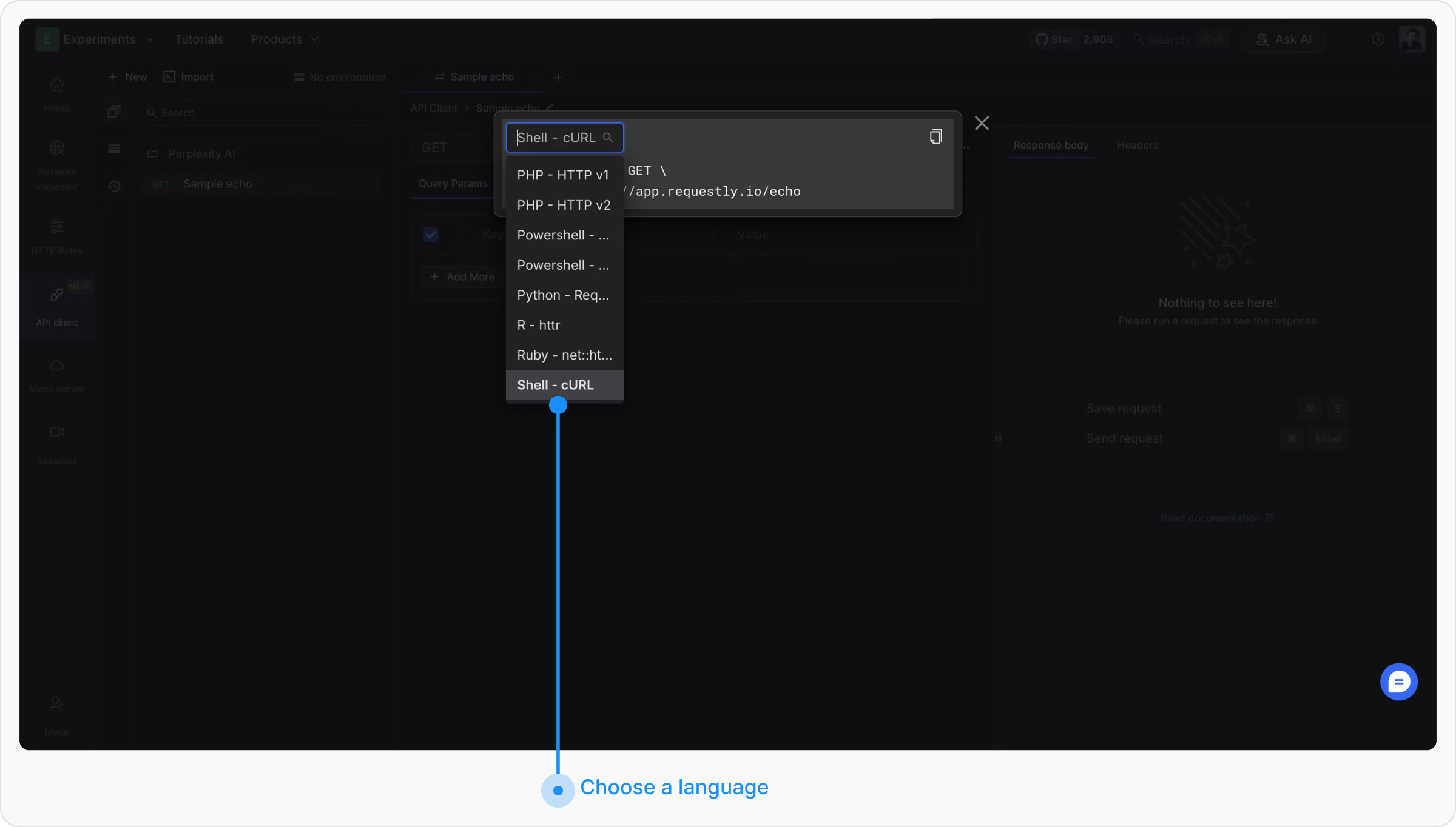
Copy the Code
Click Copy in the top right corner to copy the snippet to your clipboard.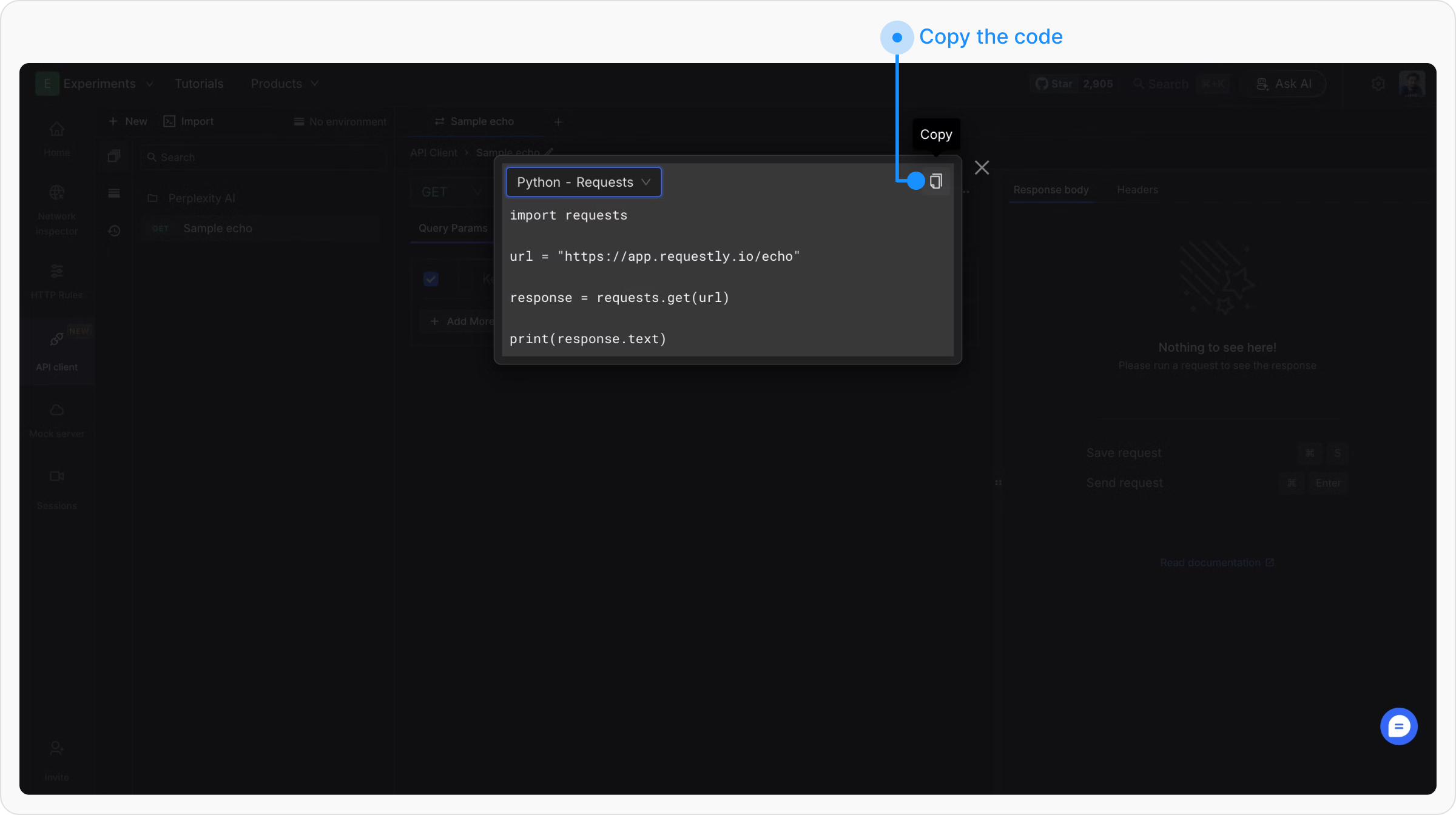
Example Output
For a POST https://api.example.com/users request with a JSON body and a Bearer token, here is what the generated code looks like per language:
Shell - cURL
JavaScript - Fetch
Python - Requests
Go - Native
Java - OkHttp
C# - HttpClient
Swift - URLSession
PHP - cURL
PowerShell
Ruby - net::http
curl --request POST \
  --url https://api.example.com/users \
  --header 'Authorization: Bearer YOUR_TOKEN' \
  --header 'Content-Type: application/json' \
  --data '{"name":"Jane Doe","email":"[email protected]"}'
const response = await fetch("https://api.example.com/users", {
  method: "POST",
  headers: {
    "Authorization": "Bearer YOUR_TOKEN",
    "Content-Type": "application/json"
  },
  body: JSON.stringify({ name: "Jane Doe", email: "[email protected]" })
});

const data = await response.json();
console.log(data);
import requests

url = "https://api.example.com/users"
headers = {
    "Authorization": "Bearer YOUR_TOKEN",
    "Content-Type": "application/json"
}
payload = {"name": "Jane Doe", "email": "[email protected]"}

response = requests.post(url, json=payload, headers=headers)
print(response.status_code, response.json())
package main

import (
    "bytes"
    "fmt"
    "io"
    "net/http"
)

func main() {
    body := bytes.NewBufferString(`{"name":"Jane Doe","email":"[email protected]"}`)
    req, _ := http.NewRequest("POST", "https://api.example.com/users", body)
    req.Header.Set("Authorization", "Bearer YOUR_TOKEN")
    req.Header.Set("Content-Type", "application/json")

    resp, _ := http.DefaultClient.Do(req)
    defer resp.Body.Close()
    data, _ := io.ReadAll(resp.Body)
    fmt.Println(string(data))
}
OkHttpClient client = new OkHttpClient();

MediaType mediaType = MediaType.parse("application/json");
RequestBody body = RequestBody.create(mediaType,
    "{\"name\":\"Jane Doe\",\"email\":\"[email protected]\"}");

Request request = new Request.Builder()
    .url("https://api.example.com/users")
    .post(body)
    .addHeader("Authorization", "Bearer YOUR_TOKEN")
    .addHeader("Content-Type", "application/json")
    .build();

Response response = client.newCall(request).execute();
System.out.println(response.body().string());
using var client = new HttpClient();
client.DefaultRequestHeaders.Add("Authorization", "Bearer YOUR_TOKEN");

var content = new StringContent(
    "{\"name\":\"Jane Doe\",\"email\":\"[email protected]\"}",
    System.Text.Encoding.UTF8, "application/json");

var response = await client.PostAsync("https://api.example.com/users", content);
Console.WriteLine(await response.Content.ReadAsStringAsync());
var request = URLRequest(url: URL(string: "https://api.example.com/users")!)
request.httpMethod = "POST"
request.setValue("Bearer YOUR_TOKEN", forHTTPHeaderField: "Authorization")
request.setValue("application/json", forHTTPHeaderField: "Content-Type")
request.httpBody = #"{"name":"Jane Doe","email":"[email protected]"}"#.data(using: .utf8)

let (data, response) = try await URLSession.shared.data(for: request)
print(String(data: data, encoding: .utf8)!)
<?php
$ch = curl_init("https://api.example.com/users");
curl_setopt($ch, CURLOPT_POST, true);
curl_setopt($ch, CURLOPT_HTTPHEADER, [
    "Authorization: Bearer YOUR_TOKEN",
    "Content-Type: application/json"
]);
curl_setopt($ch, CURLOPT_POSTFIELDS,
    '{"name":"Jane Doe","email":"[email protected]"}');
curl_setopt($ch, CURLOPT_RETURNTRANSFER, true);

$response = curl_exec($ch);
curl_close($ch);
echo $response;
$headers = @{
    "Authorization" = "Bearer YOUR_TOKEN"
    "Content-Type"  = "application/json"
}
$body = '{"name":"Jane Doe","email":"[email protected]"}'

Invoke-RestMethod -Method Post `
  -Uri "https://api.example.com/users" `
  -Headers $headers `
  -Body $body
require 'net/http'
require 'json'

uri = URI('https://api.example.com/users')
http = Net::HTTP.new(uri.host, uri.port)
http.use_ssl = true

request = Net::HTTP::Post.new(uri)
request['Authorization'] = 'Bearer YOUR_TOKEN'
request['Content-Type'] = 'application/json'
request.body = { name: 'Jane Doe', email: '[email protected]' }.to_json

response = http.request(request)
puts response.code, response.body
Supported Languages
| Language | Library / Variant |
|---|
| C | libcurl |
| C# | HttpClient, RestSharp |
| Clojure | clj-http |
| Go | Native |
| HTTP | Raw HTTP message |
| Java | AsyncHttp, NetHttp, OkHttp, Unirest |
| JavaScript | Axios, Fetch, jQuery, XHR |
| Kotlin | OkHttp |
| Node.js | Axios, Fetch, HTTP, Request, Unirest |
| Objective-C | NSURLSession |
| OCaml | CoHTTP |
| PHP | cURL, Guzzle, HTTP v1, HTTP v2 |
| PowerShell | Invoke-WebRequest, Invoke-RestMethod |
| Python | Requests |
| R | httr |
| Ruby | net::http |
| Shell | cURL, HTTPie, Wget |
| Swift | URLSession |

