Learn how to add query parameters, path variables, and request body data to your API requests in Requestly.
Parameters and request bodies allow you to send data with your API requests. This guide covers query parameters, path variables, and different request body formats.
Path variables allow you to define dynamic segments in your API URL using the :variableName syntax. This is useful for RESTful APIs where resource identifiers are part of the URL path.For example, if your API endpoint is:
Requestly automatically detects the path variables (:userId and :postId) from the URL and displays them in the Params tab under Path Variables. You can then set values for each variable:
Key
Value
Description
userId
123
The user’s unique identifier
postId
456
The post’s unique identifier
When you send the request, Requestly compiles the URL with your provided values:
https://api.example.com/users/123/posts/456
Path variables are automatically extracted from your URL. Simply type a URL with :variableName segments, and they’ll appear in the Path Variables table for you to fill in.
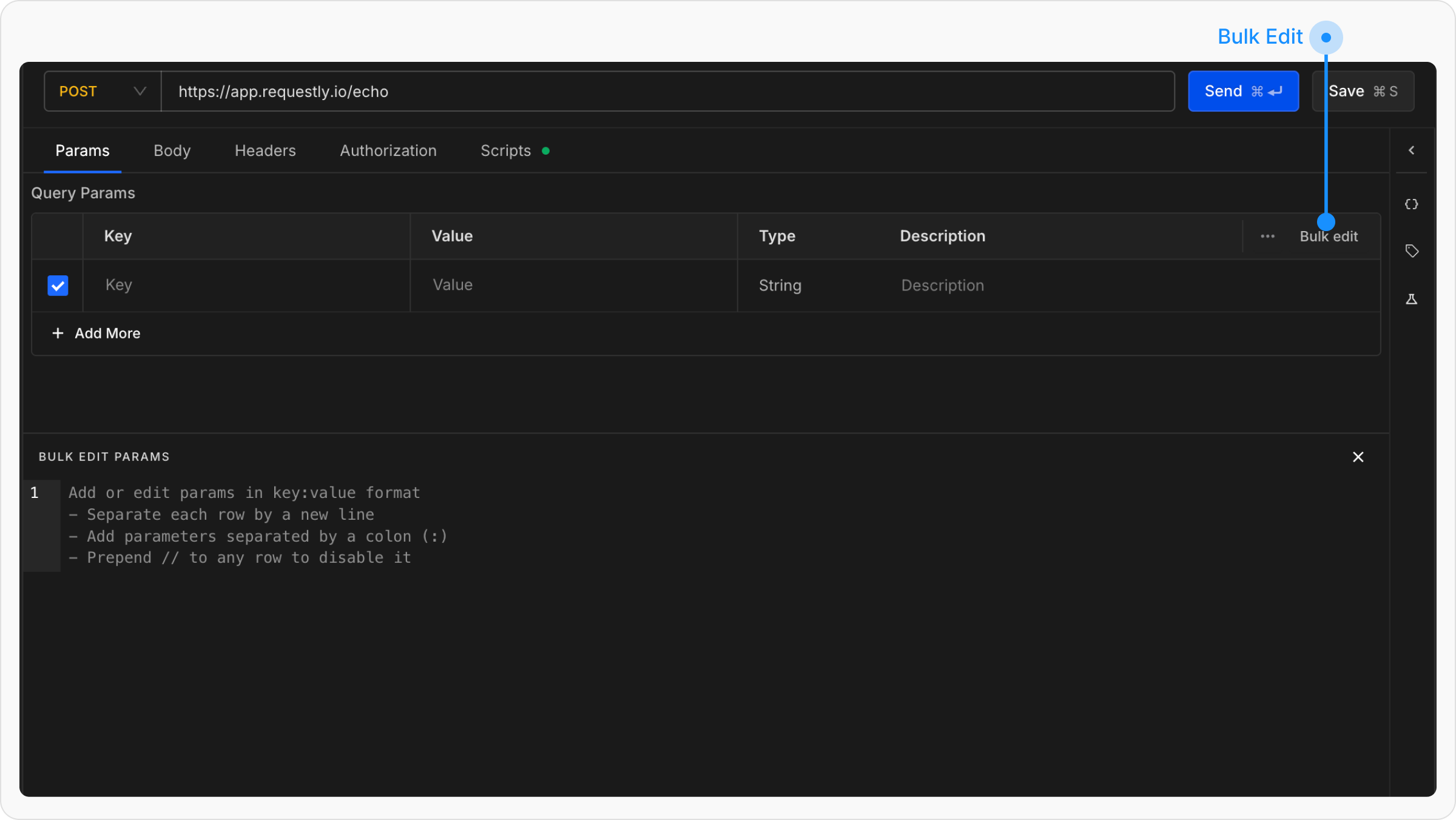
In the Query Params section, you can add query parameters as key-value pairs to send extra information with the URL. To add more parameters, click on the + Add More button.Each query parameter consists of:
Key: The parameter name
Value: The parameter value
Type: An enum to enforce the value type
Description (optional): Internal documentation explaining the purpose of the parameter
For example:
Adding uid=123 to https://app.requestly.io/echo results in: https://app.requestly.io/echo?uid=123
The checkboxes next to each parameter let you include or exclude them without deleting them. For instance, if you uncheck a parameter, the final URL will not include it.
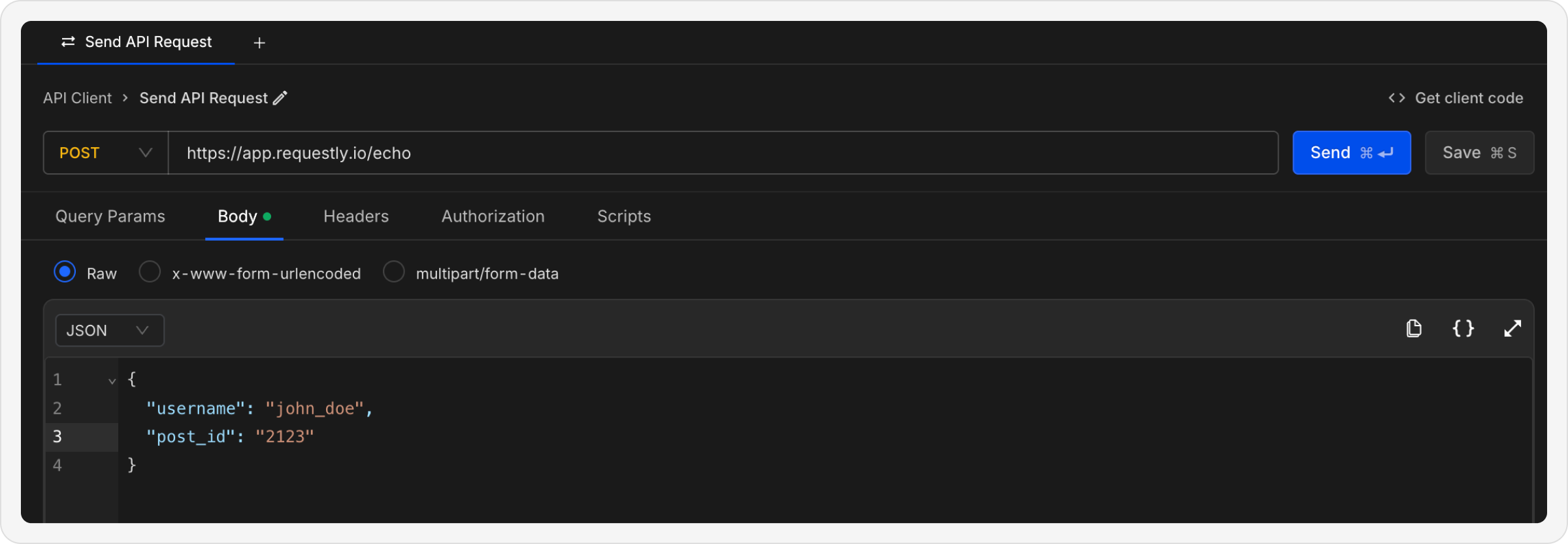
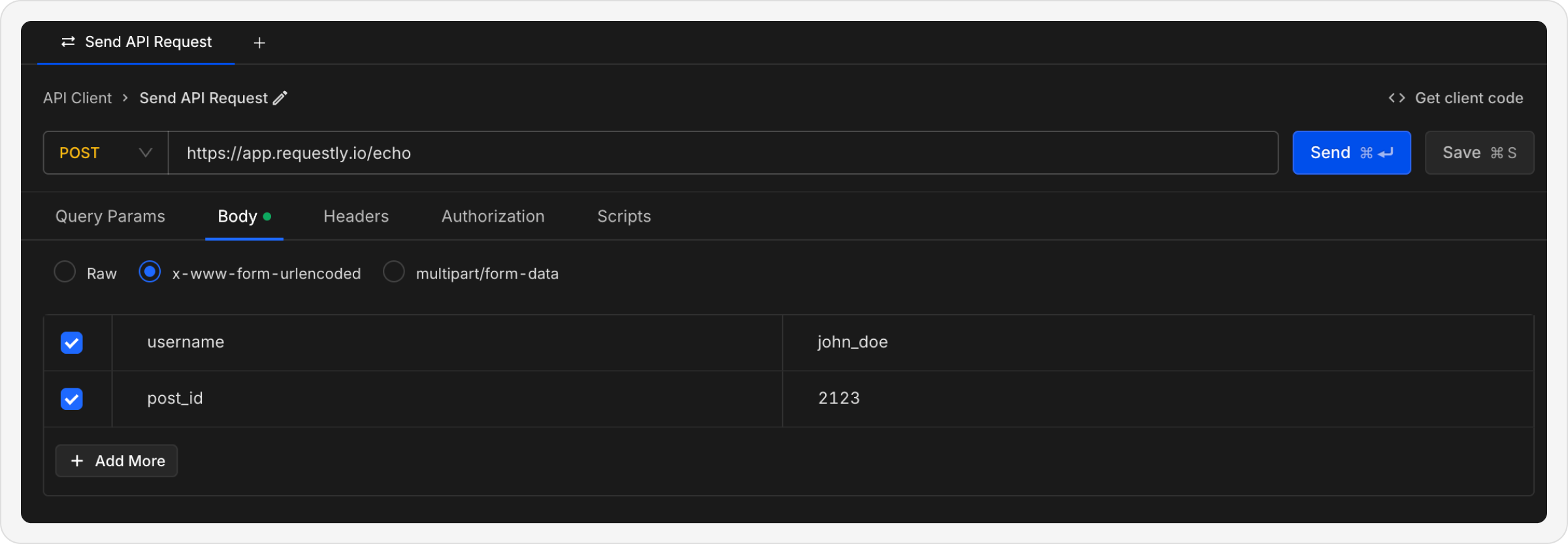
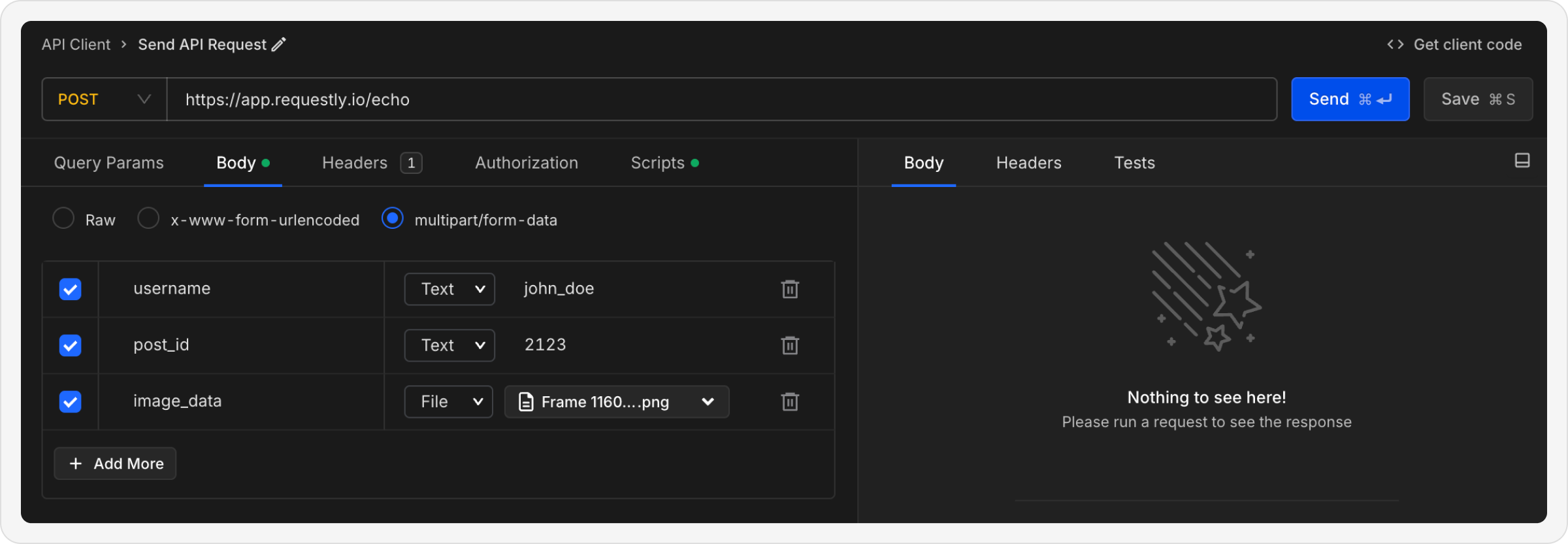
For POST, PUT, or PATCH requests, use the Body tab to send data to the server. Requestly supports multiple body formats to accommodate different API requirements.
Each row has a Content-Type column. It sets the Content-Type header of that
one part. Text rows and file rows both support it.Use it when an API needs a typed part. The common case is one JSON metadata part
plus one file part in the same request:
BOUNDARY is the delimiter Requestly generates. It also appears in the
request-level Content-Type header, as multipart/form-data; boundary=BOUNDARY.
Leave the field empty to use the default. The placeholder shows Auto. An empty
value on a text row sends no Content-Type header for that part. An empty
value on a file row sends application/octet-stream.
Requestly does not validate the value. You can enter any string, including an
invalid MIME type, because a wrong content type is sometimes the case under test.Postman imports and exports carry this field on text rows, so the value survives a
round-trip. File rows are a separate matter: Requestly cannot export the local file
itself, so re-attach files after an import.Generated code snippets carry the value in curl: each typed part gains
;type=<value> in its --form argument. Other snippet languages follow their
generator’s capability. python/requests keeps the type on file parts and drops
it on text parts. Most other languages do the same. A few drop it on both
parts, and a few keep it on both. Check the generated snippet before you rely
on it for a typed part.
For GraphQL APIs, use the dedicated GraphQL request type which provides:
Query/Mutation editor with syntax highlighting
Variables panel
Schema introspection, or a schema you attach yourself from a file or a URL
Requestly will automatically add certain headers to your requests based on your request body selections. When you add a request body, Requestly automatically sets the appropriate Content-Type header:
Body Type
Content-Type Header
RAW (JSON)
application/json
RAW (Text)
text/plain
RAW (XML)
application/xml
RAW (HTML)
text/html
RAW (JavaScript)
application/javascript
x-www-form-urlencoded
application/x-www-form-urlencoded
multipart/form-data
multipart/form-data
You can view and override the autogenerated headers in the Headers tab. These headers are automatically managed by Requestly to ensure your requests are properly formatted.
Add authentication and custom headers to your requests
Add Authorization
Set up API authentication methods
Use Variables
Make your requests dynamic with variables
{"docsConfig":{"theme":"mint","$schema":"https://mintlify.com/docs.json","name":"Requestly","description":"Design, build and test APIs in one place. Docs for the Requestly API Client: collections, environments, scripting, and Git-native sync.","colors":{"primary":"#2563eb","light":"#3b82f6","dark":"#1d4ed8"},"logo":{"light":"https://mintcdn.com/requestly/1os8lH_VUE6QydeH/images/logo-light.webp?fit=max\u0026auto=format\u0026n=1os8lH_VUE6QydeH\u0026q=85\u0026s=f4d79e60313d7b955f46e0ad446bc80d","dark":"https://mintcdn.com/requestly/1os8lH_VUE6QydeH/images/logo-dark.webp?fit=max\u0026auto=format\u0026n=1os8lH_VUE6QydeH\u0026q=85\u0026s=a20b66ddb959d92b66960804d0615fd7","href":"https://docs.requestly.com"},"favicon":"https://mintcdn.com/requestly/Z9psaKI2OUaqbNe1/images/favicon.webp?fit=max\u0026auto=format\u0026n=Z9psaKI2OUaqbNe1\u0026q=85\u0026s=7814a541aed21e1e617f27baa7b601eb","navbar":{"primary":{"type":"button","label":"Download","href":"https://requestly.com/downloads"}},"footer":{"socials":{"x":"https://x.com/requestlyio","linkedin":"https://linkedin.com/company/requestly","github":"https://github.com/requestly/requestly","youtube":"https://youtube.com/@requestly"},"links":[{"header":"Product","items":[{"label":"Features","href":"https://requestly.com"},{"label":"Pricing","href":"https://app.requestly.io/pricing"},{"label":"Chrome Extension","href":"https://rqst.ly/chrome-store"},{"label":"Desktop App","href":"https://requestly.com/desktop"}]},{"header":"Resources","items":[{"label":"Blog","href":"https://requestly.com/blog"},{"label":"Support","href":"https://requestly.com/contact-us"}]},{"header":"Company","items":[{"label":"About","href":"https://www.browserstack.com/company"},{"label":"Privacy Policy","href":"https://requestly.com/privacy"},{"label":"Terms of Service","href":"https://requestly.com/terms"}]}]},"search":{"prompt":"Search Requestly docs..."},"seo":{"metatags":{"og:type":"documentation","og:site_name":"Requestly Documentation","twitter:card":"summary_large_image","twitter:site":"@requestlyio"},"indexing":"navigable"},"integrations":{"telemetry":{"enabled":true},"cookies":{"key":"rq_consent_tracking","value":"granted"}},"errors":{"404":{"redirect":true,"title":"Page Not Found","description":"The page you're looking for doesn't exist. Try searching or browse our documentation sections."}},"contextual":{"options":["copy","view","chatgpt","claude"],"display":"header"},"styling":{"latex":false},"navigation":{"pages":[]}},"deployment":{"deploymentMetadataValue":{"subdomain":"requestly","hasAudioNarration":false,"actualSubdomain":"requestly","customDomains":["docs.requestly.com"],"gitSource":{"type":"github","owner":"requestly","repo":"requestly-api-client","deployBranch":"staging","contentDirectory":"documentation","isPrivate":true,"mountPath":"","label":""},"chroma":{"liveDeploymentHistoryId":"6ae84ae46e6e556c3ab6a7dd","collectionId":"8c9f4c80-914c-400c-b01e-4771aa68256e","schemaVersion":"v3","latestBuiltDeploymentHistoryId":"6ae84ae46e6e556c3ab6a7dd"},"feedback":{"thumbs":true,"edits":false,"issues":false},"entitlements":{"AI_CHAT":{"status":"ENABLED"},"WEB_MCP":{"status":"ENABLED"},"NARRATION":{"status":"ENABLED"}},"buildId":"6ae850203630049289fe320a","clientVersion":"0.0.4044","searchFilterCounts":[{"language":"default","tag":"API Client","count":114},{"language":"default","tag":"Getting Started","count":84},{"language":"default","tag":"Sending Requests","count":23},{"language":"default","tag":"Requestly Scripts Reference","count":15},{"language":"default","tag":"Variables \u0026 Environments","count":12},{"language":"default","tag":"Git","count":10},{"language":"default","tag":"Account \u0026 Administration","count":9},{"language":"default","tag":"Import \u0026 Export","count":9},{"language":"default","tag":"Mock Server","count":8},{"language":"default","tag":"Authorization","count":8}]},"assistantConfig":{},"basePath":"","hasChatPermissions":false,"hasWebMcpPermissions":true,"toggles":[{"name":"kill-isr","enabled":true,"variant":{"name":"disabled","enabled":false,"feature_enabled":true},"impressionData":false},{"name":"agent-mintlify-slack","enabled":true,"variant":{"name":"disabled","enabled":false,"feature_enabled":true},"impressionData":false},{"name":"agent-integrations-settings","enabled":true,"variant":{"name":"disabled","enabled":false,"feature_enabled":true},"impressionData":false},{"name":"automations-pr-grouping","enabled":true,"variant":{"name":"disabled","enabled":false,"feature_enabled":true},"impressionData":false},{"name":"custom-prefix","enabled":true,"variant":{"name":"disabled","enabled":false,"feature_enabled":true},"impressionData":false},{"name":"analytics-v7","enabled":true,"variant":{"name":"disabled","enabled":false,"feature_enabled":true},"impressionData":false},{"name":"user-flows-analytics","enabled":true,"variant":{"name":"disabled","enabled":false,"feature_enabled":true},"impressionData":false},{"name":"no-publish-flow","enabled":true,"variant":{"name":"disabled","enabled":false,"feature_enabled":true},"impressionData":false},{"name":"workos-onboarding","enabled":true,"variant":{"name":"disabled","enabled":false,"feature_enabled":true},"impressionData":false},{"name":"llms-txt-v2","enabled":true,"variant":{"name":"disabled","enabled":false,"feature_enabled":true},"impressionData":false},{"name":"snapshot-serving-live","enabled":true,"variant":{"name":"disabled","enabled":false,"feature_enabled":true},"impressionData":false},{"name":"stripTemperatureMiddleware","enabled":true,"variant":{"name":"disabled","enabled":false,"feature_enabled":true},"impressionData":false},{"name":"support-platform-pylon-zendesk","enabled":true,"variant":{"name":"disabled","enabled":false,"feature_enabled":true},"impressionData":false},{"name":"snapshot-serving","enabled":true,"variant":{"name":"disabled","enabled":false,"feature_enabled":true},"impressionData":false},{"name":"instant-rollback","enabled":true,"variant":{"name":"disabled","enabled":false,"feature_enabled":true},"impressionData":false},{"name":"granular-notifications-server","enabled":true,"variant":{"name":"disabled","enabled":false,"feature_enabled":true},"impressionData":false},{"name":"granular-notifications","enabled":true,"variant":{"name":"disabled","enabled":false,"feature_enabled":true},"impressionData":false},{"name":"automations-fable","enabled":true,"variant":{"name":"disabled","enabled":false,"feature_enabled":true},"impressionData":false},{"name":"fixed-ai-action-pricing","enabled":true,"variant":{"name":"disabled","enabled":false,"feature_enabled":true},"impressionData":false},{"name":"automation-resolve-merge-conflict","enabled":true,"variant":{"name":"disabled","enabled":false,"feature_enabled":true},"impressionData":false},{"name":"scoped-publishing","enabled":true,"variant":{"name":"disabled","enabled":false,"feature_enabled":true},"impressionData":false},{"name":"mintql","enabled":true,"variant":{"name":"disabled","enabled":false,"feature_enabled":true},"impressionData":false},{"name":"page-level-analytics","enabled":true,"variant":{"name":"disabled","enabled":false,"feature_enabled":true},"impressionData":false},{"name":"editor-version-history-v2","enabled":true,"variant":{"name":"disabled","enabled":false,"feature_enabled":true},"impressionData":false},{"name":"billing-page-v2","enabled":true,"variant":{"name":"disabled","enabled":false,"feature_enabled":true},"impressionData":false},{"name":"full-page-search","enabled":true,"variant":{"name":"disabled","enabled":false,"feature_enabled":true},"impressionData":false},{"name":"workspace-projects","enabled":true,"variant":{"name":"disabled","enabled":false,"feature_enabled":true},"impressionData":false},{"name":"assistant-v5","enabled":true,"variant":{"name":"disabled","enabled":false,"feature_enabled":true},"impressionData":false},{"name":"byok-sep-25","enabled":true,"variant":{"name":"disabled","enabled":false,"feature_enabled":true},"impressionData":false},{"name":"fork-pr-previews","enabled":true,"variant":{"name":"disabled","enabled":false,"feature_enabled":true},"impressionData":false},{"name":"revalidation-jwt","enabled":true,"variant":{"name":"disabled","enabled":false,"feature_enabled":true},"impressionData":false},{"name":"vite-origin","enabled":true,"variant":{"name":"disabled","enabled":false,"feature_enabled":true},"impressionData":false},{"name":"billing-updated-9-15","enabled":true,"variant":{"name":"disabled","enabled":false,"feature_enabled":true},"impressionData":false},{"name":"workos-sso-scim","enabled":true,"variant":{"name":"disabled","enabled":false,"feature_enabled":true},"impressionData":false},{"name":"hobby-abuse-scan","enabled":true,"variant":{"name":"disabled","enabled":false,"feature_enabled":true},"impressionData":false},{"name":"dashboard-inbox","enabled":true,"variant":{"name":"disabled","enabled":false,"feature_enabled":true},"impressionData":false},{"name":"workos-signup","enabled":true,"variant":{"name":"disabled","enabled":false,"feature_enabled":true},"impressionData":false},{"name":"turbopuffer-dual-write","enabled":true,"variant":{"name":"disabled","enabled":false,"feature_enabled":true},"impressionData":false},{"name":"workos-enabled","enabled":true,"variant":{"name":"disabled","enabled":false,"feature_enabled":true},"impressionData":false},{"name":"approve-review-flow","enabled":true,"variant":{"name":"disabled","enabled":false,"feature_enabled":true},"impressionData":false},{"name":"sso-setup-deadline-banner","enabled":true,"variant":{"name":"disabled","enabled":false,"feature_enabled":true},"impressionData":false}],"googleFontsInlined":false},"customCss":[{"filePath":"changelog-layout.css","content":":has(>#content-container):has(#content[data-page-title=Changelogs]){max-width:1376px!important;margin-left:auto!important;margin-right:auto!important;padding-left:0!important;padding-right:0!important}@media (max-width:1471px){:has(>#content-container):has(#content[data-page-title=Changelogs]){margin-left:5%!important;margin-right:5%!important}}"}],"page":{"pagePath":"api-client/send-api-request/create-requests/parameters-and-body","slug":"/api-client/send-api-request/create-requests/parameters-and-body","pageMetadata":{"title":"Parameters and Body Data","label":"Parameters and Body","slug":"parameters-and-body","description":"Learn how to add query parameters, path variables, and request body data to your API requests in Requestly.","visibility":"PUBLIC","href":"/api-client/send-api-request/create-requests/parameters-and-body"},"description":{"compiledSource":"\"use strict\";\nconst {jsx: _jsx} = arguments[0];\nconst {useMDXComponents: _provideComponents} = arguments[0];\nfunction _createMdxContent(props) {\n const _components = {\n p: \"p\",\n ..._provideComponents(),\n ...props.components\n };\n return _jsx(_components.p, {\n children: \"Learn how to add query parameters, path variables, and request body data to your API requests in Requestly.\"\n });\n}\nfunction MDXContent(props = {}) {\n const {wrapper: MDXLayout} = {\n ..._provideComponents(),\n ...props.components\n };\n return MDXLayout ? _jsx(MDXLayout, {\n ...props,\n children: _jsx(_createMdxContent, {\n ...props\n })\n }) : _createMdxContent(props);\n}\nreturn {\n default: MDXContent\n};\n","frontmatter":{},"scope":{}},"pageType":"default","mdx":{"mdxSource":{"compiledSource":"\"use strict\";const{Fragment:_Fragment,jsx:_jsx,jsxs:_jsxs}=arguments[0];const{useMDXComponents:_provideComponents}=arguments[0];function _createMdxContent(props){const _components={a:`a`,code:`code`,li:`li`,p:`p`,pre:`pre`,span:`span`,strong:`strong`,tbody:`tbody`,td:`td`,th:`th`,thead:`thead`,tr:`tr`,ul:`ul`,..._provideComponents(),...props.components},{Card,CardGroup,CodeBlock,Heading,Note,OptimizedImage,Tab,Table,Tabs,Tip}=_components;if(!Card)_missingMdxReference(`Card`,true);if(!CardGroup)_missingMdxReference(`CardGroup`,true);if(!CodeBlock)_missingMdxReference(`CodeBlock`,true);if(!Heading)_missingMdxReference(`Heading`,true);if(!Note)_missingMdxReference(`Note`,true);if(!OptimizedImage)_missingMdxReference(`OptimizedImage`,true);if(!Tab)_missingMdxReference(`Tab`,true);if(!Table)_missingMdxReference(`Table`,true);if(!Tabs)_missingMdxReference(`Tabs`,true);if(!Tip)_missingMdxReference(`Tip`,true);return _jsxs(_Fragment,{children:[_jsx(_components.p,{children:`Parameters and request bodies allow you to send data with your API requests. This guide covers query parameters, path variables, and different request body formats.`}),`\n`,_jsx(Heading,{level:`2`,id:`path-variables`,children:`Path Variables`}),`\n`,_jsxs(_components.p,{children:[`Path variables allow you to define dynamic segments in your API URL using the `,_jsx(_components.strong,{children:`:variableName`}),` syntax. This is useful for RESTful APIs where resource identifiers are part of the URL path.`]}),`\n`,_jsx(_components.p,{children:`For example, if your API endpoint is:`}),`\n`,_jsx(CodeBlock,{numberOfLines:`2`,language:`text`,children:_jsx(_components.pre,{className:`shiki shiki-themes github-light-default dark-plus`,style:{backgroundColor:`#ffffff`,\"--shiki-dark-bg\":`#0B0C0E`,color:`#1f2328`,\"--shiki-dark\":`#D4D4D4`},language:`text`,children:_jsxs(_components.code,{language:`text`,numberOfLines:`2`,children:[_jsx(_components.span,{className:`line`,children:_jsx(_components.span,{children:`https://api.example.com/users/:userId/posts/:postId`})}),`\n`,_jsx(_components.span,{className:`line`,children:_jsx(_components.span,{})})]})})}),`\n`,_jsxs(_components.p,{children:[`Requestly automatically detects the path variables (`,_jsx(_components.code,{children:`:userId`}),` and `,_jsx(_components.code,{children:`:postId`}),`) from the URL and displays them in the `,_jsx(_components.strong,{children:`Params`}),` tab under `,_jsx(_components.strong,{children:`Path Variables`}),`. You can then set values for each variable:`]}),`\n`,_jsxs(Table,{children:[_jsx(_components.thead,{children:_jsxs(_components.tr,{children:[_jsx(_components.th,{children:`Key`}),_jsx(_components.th,{children:`Value`}),_jsx(_components.th,{children:`Description`})]})}),_jsxs(_components.tbody,{children:[_jsxs(_components.tr,{children:[_jsx(_components.td,{children:`userId`}),_jsx(_components.td,{\"data-numeric\":`true`,children:`123`}),_jsx(_components.td,{children:`The user’s unique identifier`})]}),_jsxs(_components.tr,{children:[_jsx(_components.td,{children:`postId`}),_jsx(_components.td,{\"data-numeric\":`true`,children:`456`}),_jsx(_components.td,{children:`The post’s unique identifier`})]})]})]}),`\n`,_jsx(_components.p,{children:`When you send the request, Requestly compiles the URL with your provided values:`}),`\n`,_jsx(CodeBlock,{numberOfLines:`2`,language:`text`,children:_jsx(_components.pre,{className:`shiki shiki-themes github-light-default dark-plus`,style:{backgroundColor:`#ffffff`,\"--shiki-dark-bg\":`#0B0C0E`,color:`#1f2328`,\"--shiki-dark\":`#D4D4D4`},language:`text`,children:_jsxs(_components.code,{language:`text`,numberOfLines:`2`,children:[_jsx(_components.span,{className:`line`,children:_jsx(_components.span,{children:`https://api.example.com/users/123/posts/456`})}),`\n`,_jsx(_components.span,{className:`line`,children:_jsx(_components.span,{})})]})})}),`\n`,_jsx(Tip,{children:_jsxs(_components.p,{children:[`Path variables are automatically extracted from your URL. Simply type a URL with `,_jsx(_components.code,{children:`:variableName`}),` segments, and they’ll appear in the Path Variables table for you to fill in.`]})}),`\n`,_jsx(Heading,{level:`2`,id:`query-parameters`,children:`Query Parameters`}),`\n`,_jsxs(_components.p,{children:[`In the `,_jsx(_components.strong,{children:`Query Params`}),` section, you can add query parameters as `,_jsx(_components.strong,{children:`key-value pairs`}),` to send extra information with the URL. To add more parameters, click on the `,_jsx(_components.code,{children:`+ Add More`}),` button.`]}),`\n`,_jsx(_components.p,{children:`Each query parameter consists of:`}),`\n`,_jsxs(_components.ul,{children:[`\n`,_jsxs(_components.li,{children:[_jsx(_components.strong,{children:`Key`}),`: The parameter name`]}),`\n`,_jsxs(_components.li,{children:[_jsx(_components.strong,{children:`Value`}),`: The parameter value`]}),`\n`,_jsxs(_components.li,{children:[_jsx(_components.strong,{children:`Type`}),`: An enum to enforce the value type`]}),`\n`,_jsxs(_components.li,{children:[_jsx(_components.strong,{children:`Description`}),` (optional): Internal documentation explaining the purpose of the parameter`]}),`\n`]}),`\n`,_jsx(_components.p,{children:`For example:`}),`\n`,_jsxs(_components.ul,{children:[`\n`,_jsxs(_components.li,{children:[`Adding `,_jsx(_components.code,{children:`uid=123`}),` to `,_jsx(_components.code,{children:`https://app.requestly.io/echo`}),` results in: `,_jsx(_components.code,{children:`https://app.requestly.io/echo?uid=123`})]}),`\n`]}),`\n`,_jsx(Tip,{children:_jsx(_components.p,{children:`The checkboxes next to each parameter let you include or exclude them without deleting them. For instance, if you uncheck a parameter, the final URL will not include it.`})}),`\n`,_jsx(Heading,{level:`3`,id:`bulk-edit-query-parameters`,children:`Bulk Edit Query Parameters`}),`\n`,_jsx(OptimizedImage,{src:`https://mintcdn.com/requestly/hqaBs_u8toaieppT/images/QueryParam-1.png?fit=max\u0026auto=format\u0026n=hqaBs_u8toaieppT\u0026q=85\u0026s=181c19a0ccdf064958641adf0b4fbe7c`,align:`center`,fullwidth:`false`,\"data-og-width\":`2400`,width:`2400`,\"data-og-height\":`1352`,height:`1352`,\"data-path\":`images/QueryParam-1.png`,\"data-optimize\":`true`,\"data-opv\":`3`,srcset:`https://mintcdn.com/requestly/hqaBs_u8toaieppT/images/QueryParam-1.png?w=280\u0026fit=max\u0026auto=format\u0026n=hqaBs_u8toaieppT\u0026q=85\u0026s=16f331fe0897837298b60852ee3c6dbf 280w, https://mintcdn.com/requestly/hqaBs_u8toaieppT/images/QueryParam-1.png?w=560\u0026fit=max\u0026auto=format\u0026n=hqaBs_u8toaieppT\u0026q=85\u0026s=a86b1e693eb0969e1e482f5f33139ed2 560w, https://mintcdn.com/requestly/hqaBs_u8toaieppT/images/QueryParam-1.png?w=840\u0026fit=max\u0026auto=format\u0026n=hqaBs_u8toaieppT\u0026q=85\u0026s=5e9a0f6017a729293132a40dcec0e561 840w, https://mintcdn.com/requestly/hqaBs_u8toaieppT/images/QueryParam-1.png?w=1100\u0026fit=max\u0026auto=format\u0026n=hqaBs_u8toaieppT\u0026q=85\u0026s=7c52c4ee9f4f21e1f9b2c7e10e02eb5c 1100w, https://mintcdn.com/requestly/hqaBs_u8toaieppT/images/QueryParam-1.png?w=1650\u0026fit=max\u0026auto=format\u0026n=hqaBs_u8toaieppT\u0026q=85\u0026s=767702b18b606a979d067f9d29372db0 1650w, https://mintcdn.com/requestly/hqaBs_u8toaieppT/images/QueryParam-1.png?w=2500\u0026fit=max\u0026auto=format\u0026n=hqaBs_u8toaieppT\u0026q=85\u0026s=7ebb634aa5d311d86074bab007b199c8 2500w`}),`\n`,_jsxs(_components.p,{children:[`You can also manage query parameters using `,_jsx(_components.strong,{children:`Bulk Edit`}),`. This allows you to add or update multiple parameters at once in a key:value format.`]}),`\n`,_jsxs(_components.ul,{children:[`\n`,_jsx(_components.li,{children:`Add one parameter per line`}),`\n`,_jsxs(_components.li,{children:[`Separate keys and values using a colon `,_jsx(_components.code,{children:`:`})]}),`\n`,_jsxs(_components.li,{children:[`Prefix any line with `,_jsx(_components.code,{children:`//`}),` to disable that parameter`]}),`\n`]}),`\n`,_jsx(_components.p,{children:`Bulk Edit is useful when working with a large number of query parameters or when making quick mass updates.`}),`\n`,_jsx(_components.p,{children:_jsx(_components.strong,{children:`Example:`})}),`\n`,_jsx(CodeBlock,{numberOfLines:`5`,language:`text`,children:_jsx(_components.pre,{className:`shiki shiki-themes github-light-default dark-plus`,style:{backgroundColor:`#ffffff`,\"--shiki-dark-bg\":`#0B0C0E`,color:`#1f2328`,\"--shiki-dark\":`#D4D4D4`},language:`text`,children:_jsxs(_components.code,{language:`text`,numberOfLines:`5`,children:[_jsx(_components.span,{className:`line`,children:_jsx(_components.span,{children:`page:1`})}),`\n`,_jsx(_components.span,{className:`line`,children:_jsx(_components.span,{children:`limit:50`})}),`\n`,_jsx(_components.span,{className:`line`,children:_jsx(_components.span,{children:`sort:desc`})}),`\n`,_jsx(_components.span,{className:`line`,children:_jsx(_components.span,{children:`// filter:active`})}),`\n`,_jsx(_components.span,{className:`line`,children:_jsx(_components.span,{})})]})})}),`\n`,_jsx(Heading,{level:`2`,id:`request-body`,children:`Request Body`}),`\n`,_jsxs(_components.p,{children:[`For POST, PUT, or PATCH requests, use the `,_jsx(_components.strong,{children:`Body`}),` tab to send data to the server. Requestly supports multiple body formats to accommodate different API requirements.`]}),`\n`,_jsx(Heading,{level:`3`,id:`supported-body-types`,children:`Supported Body Types`}),`\n`,_jsxs(Tabs,{children:[_jsxs(Tab,{title:`RAW (JSON/Text)`,id:`raw-json%2Ftext`,children:[_jsxs(_components.p,{children:[`Send raw data as plain `,_jsx(_components.strong,{children:`text`}),` or structured `,_jsx(_components.strong,{children:`JSON`}),`.`]}),_jsx(_components.p,{children:_jsx(_components.strong,{children:`When to use:`})}),_jsxs(_components.ul,{children:[`\n`,_jsx(_components.li,{children:`Sending JSON data to REST APIs`}),`\n`,_jsx(_components.li,{children:`Posting XML or plain text`}),`\n`,_jsx(_components.li,{children:`Sending custom formatted data`}),`\n`]}),_jsx(_components.p,{children:`You can select the language format:`}),_jsxs(_components.ul,{children:[`\n`,_jsxs(_components.li,{children:[_jsx(_components.strong,{children:`JSON`}),` – for structured data like API payloads`]}),`\n`,_jsxs(_components.li,{children:[_jsx(_components.strong,{children:`Text`}),` – for plain string or unstructured data`]}),`\n`,_jsxs(_components.li,{children:[_jsx(_components.strong,{children:`XML`}),` – for XML-based APIs`]}),`\n`,_jsxs(_components.li,{children:[_jsx(_components.strong,{children:`HTML`}),` – for HTML content`]}),`\n`,_jsxs(_components.li,{children:[_jsx(_components.strong,{children:`JavaScript`}),`: for JavaScript payloads`]}),`\n`]}),_jsx(OptimizedImage,{src:`https://mintcdn.com/requestly/C-8RNowaOOgmOMj9/images/send-api-request/76a50480-84ca-4ffd-87c0-cf27e0e5208b.png?fit=max\u0026auto=format\u0026n=C-8RNowaOOgmOMj9\u0026q=85\u0026s=450022384d7075f9dbaf4e4ff731111f`,align:`center`,fullwidth:`false`,\"data-og-width\":`2400`,width:`2400`,\"data-og-height\":`832`,height:`832`,\"data-path\":`images/send-api-request/76a50480-84ca-4ffd-87c0-cf27e0e5208b.png`,\"data-optimize\":`true`,\"data-opv\":`3`,srcset:`https://mintcdn.com/requestly/C-8RNowaOOgmOMj9/images/send-api-request/76a50480-84ca-4ffd-87c0-cf27e0e5208b.png?w=280\u0026fit=max\u0026auto=format\u0026n=C-8RNowaOOgmOMj9\u0026q=85\u0026s=84895d6c26dcf7074a0b7638dd58dc41 280w, https://mintcdn.com/requestly/C-8RNowaOOgmOMj9/images/send-api-request/76a50480-84ca-4ffd-87c0-cf27e0e5208b.png?w=560\u0026fit=max\u0026auto=format\u0026n=C-8RNowaOOgmOMj9\u0026q=85\u0026s=8d80f6f2f0c47401a28cbe3b9483cf1d 560w, https://mintcdn.com/requestly/C-8RNowaOOgmOMj9/images/send-api-request/76a50480-84ca-4ffd-87c0-cf27e0e5208b.png?w=840\u0026fit=max\u0026auto=format\u0026n=C-8RNowaOOgmOMj9\u0026q=85\u0026s=689479e84e2e610219fe2cf14240a397 840w, https://mintcdn.com/requestly/C-8RNowaOOgmOMj9/images/send-api-request/76a50480-84ca-4ffd-87c0-cf27e0e5208b.png?w=1100\u0026fit=max\u0026auto=format\u0026n=C-8RNowaOOgmOMj9\u0026q=85\u0026s=a026209b44b19f1b662e2a0ed3077ca8 1100w, https://mintcdn.com/requestly/C-8RNowaOOgmOMj9/images/send-api-request/76a50480-84ca-4ffd-87c0-cf27e0e5208b.png?w=1650\u0026fit=max\u0026auto=format\u0026n=C-8RNowaOOgmOMj9\u0026q=85\u0026s=20dc4b6c77e96385fca5c187be60dcdd 1650w, https://mintcdn.com/requestly/C-8RNowaOOgmOMj9/images/send-api-request/76a50480-84ca-4ffd-87c0-cf27e0e5208b.png?w=2500\u0026fit=max\u0026auto=format\u0026n=C-8RNowaOOgmOMj9\u0026q=85\u0026s=1f698aad6488a9a83e9fed34b96f46a9 2500w`}),_jsx(_components.p,{children:_jsx(_components.strong,{children:`Example JSON:`})}),_jsx(CodeBlock,{filename:``,numberOfLines:`6`,language:`json`,children:_jsx(_components.pre,{className:`shiki shiki-themes github-light-default dark-plus`,style:{backgroundColor:`#ffffff`,\"--shiki-dark-bg\":`#0B0C0E`,color:`#1f2328`,\"--shiki-dark\":`#D4D4D4`},language:`json`,children:_jsxs(_components.code,{language:`json`,numberOfLines:`6`,children:[_jsx(_components.span,{className:`line`,children:_jsx(_components.span,{style:{color:`#1F2328`,\"--shiki-dark\":`#D4D4D4`},children:`{`})}),`\n`,_jsxs(_components.span,{className:`line`,children:[_jsx(_components.span,{style:{color:`#116329`,\"--shiki-dark\":`#9CDCFE`},children:` \"name\"`}),_jsx(_components.span,{style:{color:`#1F2328`,\"--shiki-dark\":`#D4D4D4`},children:`: `}),_jsx(_components.span,{style:{color:`#0A3069`,\"--shiki-dark\":`#CE9178`},children:`\"John Doe\"`}),_jsx(_components.span,{style:{color:`#1F2328`,\"--shiki-dark\":`#D4D4D4`},children:`,`})]}),`\n`,_jsxs(_components.span,{className:`line`,children:[_jsx(_components.span,{style:{color:`#116329`,\"--shiki-dark\":`#9CDCFE`},children:` \"email\"`}),_jsx(_components.span,{style:{color:`#1F2328`,\"--shiki-dark\":`#D4D4D4`},children:`: `}),_jsx(_components.span,{style:{color:`#0A3069`,\"--shiki-dark\":`#CE9178`},children:`\"[email protected]\"`}),_jsx(_components.span,{style:{color:`#1F2328`,\"--shiki-dark\":`#D4D4D4`},children:`,`})]}),`\n`,_jsxs(_components.span,{className:`line`,children:[_jsx(_components.span,{style:{color:`#116329`,\"--shiki-dark\":`#9CDCFE`},children:` \"age\"`}),_jsx(_components.span,{style:{color:`#1F2328`,\"--shiki-dark\":`#D4D4D4`},children:`: `}),_jsx(_components.span,{style:{color:`#0550AE`,\"--shiki-dark\":`#B5CEA8`},children:`30`}),_jsx(_components.span,{style:{color:`#1F2328`,\"--shiki-dark\":`#D4D4D4`},children:`,`})]}),`\n`,_jsxs(_components.span,{className:`line`,children:[_jsx(_components.span,{style:{color:`#116329`,\"--shiki-dark\":`#9CDCFE`},children:` \"active\"`}),_jsx(_components.span,{style:{color:`#1F2328`,\"--shiki-dark\":`#D4D4D4`},children:`: `}),_jsx(_components.span,{style:{color:`#0550AE`,\"--shiki-dark\":`#569CD6`},children:`true`})]}),`\n`,_jsx(_components.span,{className:`line`,children:_jsx(_components.span,{style:{color:`#1F2328`,\"--shiki-dark\":`#D4D4D4`},children:`}`})}),`\n`]})})})]}),_jsxs(Tab,{title:`x-www-form-urlencoded`,id:`x-www-form-urlencoded`,children:[_jsx(_components.p,{children:`Sends data as URL-encoded key-value pairs. This format is commonly used for HTML form submissions.`}),_jsx(_components.p,{children:_jsx(_components.strong,{children:`When to use:`})}),_jsxs(_components.ul,{children:[`\n`,_jsx(_components.li,{children:`Traditional web form submissions`}),`\n`,_jsx(_components.li,{children:`Simple key-value data`}),`\n`,_jsx(_components.li,{children:`APIs that expect form data`}),`\n`]}),_jsx(_components.p,{children:`Each field consists of:`}),_jsxs(_components.ul,{children:[`\n`,_jsxs(_components.li,{children:[_jsx(_components.strong,{children:`Key`}),`: Field name`]}),`\n`,_jsxs(_components.li,{children:[_jsx(_components.strong,{children:`Value`}),`: Field value`]}),`\n`,_jsxs(_components.li,{children:[_jsx(_components.strong,{children:`Description`}),`: Optional documentation`]}),`\n`]}),_jsx(OptimizedImage,{src:`https://mintcdn.com/requestly/C-8RNowaOOgmOMj9/images/send-api-request/79119883-fd9d-4b33-b617-4f7a7bf36f0e.png?fit=max\u0026auto=format\u0026n=C-8RNowaOOgmOMj9\u0026q=85\u0026s=7769dbe319598a3a103a6b84c196f6ea`,align:`center`,fullwidth:`false`,\"data-og-width\":`2400`,width:`2400`,\"data-og-height\":`832`,height:`832`,\"data-path\":`images/send-api-request/79119883-fd9d-4b33-b617-4f7a7bf36f0e.png`,\"data-optimize\":`true`,\"data-opv\":`3`,srcset:`https://mintcdn.com/requestly/C-8RNowaOOgmOMj9/images/send-api-request/79119883-fd9d-4b33-b617-4f7a7bf36f0e.png?w=280\u0026fit=max\u0026auto=format\u0026n=C-8RNowaOOgmOMj9\u0026q=85\u0026s=2897ea00e047283673238731b7ca7558 280w, https://mintcdn.com/requestly/C-8RNowaOOgmOMj9/images/send-api-request/79119883-fd9d-4b33-b617-4f7a7bf36f0e.png?w=560\u0026fit=max\u0026auto=format\u0026n=C-8RNowaOOgmOMj9\u0026q=85\u0026s=6d6d1260ee3d7b5a9319570ec110ef7f 560w, https://mintcdn.com/requestly/C-8RNowaOOgmOMj9/images/send-api-request/79119883-fd9d-4b33-b617-4f7a7bf36f0e.png?w=840\u0026fit=max\u0026auto=format\u0026n=C-8RNowaOOgmOMj9\u0026q=85\u0026s=8820965fdb59f07ea324d31353712355 840w, https://mintcdn.com/requestly/C-8RNowaOOgmOMj9/images/send-api-request/79119883-fd9d-4b33-b617-4f7a7bf36f0e.png?w=1100\u0026fit=max\u0026auto=format\u0026n=C-8RNowaOOgmOMj9\u0026q=85\u0026s=9dd9b33f65f602858737a39bf501301f 1100w, https://mintcdn.com/requestly/C-8RNowaOOgmOMj9/images/send-api-request/79119883-fd9d-4b33-b617-4f7a7bf36f0e.png?w=1650\u0026fit=max\u0026auto=format\u0026n=C-8RNowaOOgmOMj9\u0026q=85\u0026s=dc1bdaea2fa6fa4b2dfb5572754190b5 1650w, https://mintcdn.com/requestly/C-8RNowaOOgmOMj9/images/send-api-request/79119883-fd9d-4b33-b617-4f7a7bf36f0e.png?w=2500\u0026fit=max\u0026auto=format\u0026n=C-8RNowaOOgmOMj9\u0026q=85\u0026s=fc47f141f482fd2e2017386bb049ce9f 2500w`}),_jsx(_components.p,{children:_jsx(_components.strong,{children:`Example:`})}),_jsx(CodeBlock,{numberOfLines:`4`,language:`text`,children:_jsx(_components.pre,{className:`shiki shiki-themes github-light-default dark-plus`,style:{backgroundColor:`#ffffff`,\"--shiki-dark-bg\":`#0B0C0E`,color:`#1f2328`,\"--shiki-dark\":`#D4D4D4`},language:`text`,children:_jsxs(_components.code,{language:`text`,numberOfLines:`4`,children:[_jsx(_components.span,{className:`line`,children:_jsx(_components.span,{children:`username=johndoe`})}),`\n`,_jsx(_components.span,{className:`line`,children:_jsx(_components.span,{children:`password=secret123`})}),`\n`,_jsx(_components.span,{className:`line`,children:_jsx(_components.span,{children:`remember=true`})}),`\n`,_jsx(_components.span,{className:`line`,children:_jsx(_components.span,{})})]})})})]}),_jsxs(Tab,{title:`multipart/form-data`,id:`multipart%2Fform-data`,\"data-child-heading-ids\":`[\"per-field-content-type\"]`,children:[_jsx(_components.p,{children:`Used when uploading files along with form fields. Each field is sent as a separate part of the request body.`}),_jsx(_components.p,{children:_jsx(_components.strong,{children:`When to use:`})}),_jsxs(_components.ul,{children:[`\n`,_jsx(_components.li,{children:`Uploading images, documents, or files`}),`\n`,_jsx(_components.li,{children:`Sending files with metadata`}),`\n`,_jsx(_components.li,{children:`Form submissions with file attachments`}),`\n`]}),_jsx(_components.p,{children:`Each field can be either:`}),_jsxs(_components.ul,{children:[`\n`,_jsxs(_components.li,{children:[_jsx(_components.strong,{children:`Text field`}),`: Regular key-value pair`]}),`\n`,_jsxs(_components.li,{children:[_jsx(_components.strong,{children:`File field`}),`: File upload with browse button`]}),`\n`]}),_jsx(OptimizedImage,{src:`https://mintcdn.com/requestly/C-8RNowaOOgmOMj9/images/send-api-request/fa74f6c1-8ebb-4652-8667-7993cc3d57f7.png?fit=max\u0026auto=format\u0026n=C-8RNowaOOgmOMj9\u0026q=85\u0026s=dc6acaa14725584cd91c4f70e0eae999`,align:`center`,fullwidth:`false`,\"data-og-width\":`2400`,width:`2400`,\"data-og-height\":`832`,height:`832`,\"data-path\":`images/send-api-request/fa74f6c1-8ebb-4652-8667-7993cc3d57f7.png`,\"data-optimize\":`true`,\"data-opv\":`3`,srcset:`https://mintcdn.com/requestly/C-8RNowaOOgmOMj9/images/send-api-request/fa74f6c1-8ebb-4652-8667-7993cc3d57f7.png?w=280\u0026fit=max\u0026auto=format\u0026n=C-8RNowaOOgmOMj9\u0026q=85\u0026s=30e0379698a23e0d734b6c7b6be3e65f 280w, https://mintcdn.com/requestly/C-8RNowaOOgmOMj9/images/send-api-request/fa74f6c1-8ebb-4652-8667-7993cc3d57f7.png?w=560\u0026fit=max\u0026auto=format\u0026n=C-8RNowaOOgmOMj9\u0026q=85\u0026s=8956d836a7e52fe3793c078dc395e7a5 560w, https://mintcdn.com/requestly/C-8RNowaOOgmOMj9/images/send-api-request/fa74f6c1-8ebb-4652-8667-7993cc3d57f7.png?w=840\u0026fit=max\u0026auto=format\u0026n=C-8RNowaOOgmOMj9\u0026q=85\u0026s=3174cb69003026f52ab20285e7227ffa 840w, https://mintcdn.com/requestly/C-8RNowaOOgmOMj9/images/send-api-request/fa74f6c1-8ebb-4652-8667-7993cc3d57f7.png?w=1100\u0026fit=max\u0026auto=format\u0026n=C-8RNowaOOgmOMj9\u0026q=85\u0026s=f9d6816472b2e242c0b81d1599fdbd03 1100w, https://mintcdn.com/requestly/C-8RNowaOOgmOMj9/images/send-api-request/fa74f6c1-8ebb-4652-8667-7993cc3d57f7.png?w=1650\u0026fit=max\u0026auto=format\u0026n=C-8RNowaOOgmOMj9\u0026q=85\u0026s=0b9f7e66560030ad6cfa643899716056 1650w, https://mintcdn.com/requestly/C-8RNowaOOgmOMj9/images/send-api-request/fa74f6c1-8ebb-4652-8667-7993cc3d57f7.png?w=2500\u0026fit=max\u0026auto=format\u0026n=C-8RNowaOOgmOMj9\u0026q=85\u0026s=0735c999fd906ad526382bbd514c5c13 2500w`}),_jsxs(_components.p,{children:[_jsx(_components.strong,{children:`Example use case:`}),` Uploading a user profile picture with name and bio`]}),_jsx(Heading,{level:`3`,id:`per-field-content-type`,children:`Per-field Content-Type`}),_jsxs(_components.p,{children:[`Each row has a `,_jsx(_components.strong,{children:`Content-Type`}),` column. It sets the `,_jsx(_components.code,{children:`Content-Type`}),` header of that\none part. Text rows and file rows both support it.`]}),_jsx(_components.p,{children:`Use it when an API needs a typed part. The common case is one JSON metadata part\nplus one file part in the same request:`}),_jsxs(Table,{children:[_jsx(_components.thead,{children:_jsxs(_components.tr,{children:[_jsx(_components.th,{children:`Key`}),_jsx(_components.th,{children:`Type`}),_jsx(_components.th,{children:`Value`}),_jsx(_components.th,{children:`Content-Type`})]})}),_jsxs(_components.tbody,{children:[_jsxs(_components.tr,{children:[_jsx(_components.td,{children:_jsx(_components.code,{children:`metadata`})}),_jsx(_components.td,{children:`Text`}),_jsx(_components.td,{children:_jsx(_components.code,{children:`{\"title\":\"Q3 contract\"}`})}),_jsx(_components.td,{children:_jsx(_components.code,{children:`application/json`})})]}),_jsxs(_components.tr,{children:[_jsx(_components.td,{children:_jsx(_components.code,{children:`file`})}),_jsx(_components.td,{children:`File`}),_jsx(_components.td,{children:_jsx(_components.code,{children:`contract.pdf`})}),_jsx(_components.td,{children:_jsx(_components.code,{children:`application/pdf`})})]})]})]}),_jsx(_components.p,{children:`That request goes on the wire as:`}),_jsx(CodeBlock,{numberOfLines:`12`,language:`text`,children:_jsx(_components.pre,{className:`shiki shiki-themes github-light-default dark-plus`,style:{backgroundColor:`#ffffff`,\"--shiki-dark-bg\":`#0B0C0E`,color:`#1f2328`,\"--shiki-dark\":`#D4D4D4`},language:`text`,children:_jsxs(_components.code,{language:`text`,numberOfLines:`12`,children:[_jsx(_components.span,{className:`line`,children:_jsx(_components.span,{children:`--BOUNDARY`})}),`\n`,_jsx(_components.span,{className:`line`,children:_jsx(_components.span,{children:`Content-Disposition: form-data; name=\"metadata\"`})}),`\n`,_jsx(_components.span,{className:`line`,children:_jsx(_components.span,{children:`Content-Type: application/json`})}),`\n`,_jsx(_components.span,{className:`line`,children:_jsx(_components.span,{})}),`\n`,_jsx(_components.span,{className:`line`,children:_jsx(_components.span,{children:`{\"title\":\"Q3 contract\"}`})}),`\n`,_jsx(_components.span,{className:`line`,children:_jsx(_components.span,{children:`--BOUNDARY`})}),`\n`,_jsx(_components.span,{className:`line`,children:_jsx(_components.span,{children:`Content-Disposition: form-data; name=\"file\"; filename=\"contract.pdf\"`})}),`\n`,_jsx(_components.span,{className:`line`,children:_jsx(_components.span,{children:`Content-Type: application/pdf`})}),`\n`,_jsx(_components.span,{className:`line`,children:_jsx(_components.span,{})}),`\n`,_jsx(_components.span,{className:`line`,children:_jsx(_components.span,{children:`\u003cfile bytes>`})}),`\n`,_jsx(_components.span,{className:`line`,children:_jsx(_components.span,{children:`--BOUNDARY--`})}),`\n`,_jsx(_components.span,{className:`line`,children:_jsx(_components.span,{})})]})})}),_jsxs(_components.p,{children:[_jsx(_components.code,{children:`BOUNDARY`}),` is the delimiter Requestly generates. It also appears in the\nrequest-level `,_jsx(_components.code,{children:`Content-Type`}),` header, as `,_jsx(_components.code,{children:`multipart/form-data; boundary=BOUNDARY`}),`.`]}),_jsx(Note,{children:_jsxs(_components.p,{children:[`Leave the field empty to use the default. The placeholder shows `,_jsx(_components.code,{children:`Auto`}),`. An empty\nvalue on a `,_jsx(_components.strong,{children:`text`}),` row sends no `,_jsx(_components.code,{children:`Content-Type`}),` header for that part. An empty\nvalue on a `,_jsx(_components.strong,{children:`file`}),` row sends `,_jsx(_components.code,{children:`application/octet-stream`}),`.`]})}),_jsx(_components.p,{children:`Requestly does not validate the value. You can enter any string, including an\ninvalid MIME type, because a wrong content type is sometimes the case under test.`}),_jsx(_components.p,{children:`Postman imports and exports carry this field on text rows, so the value survives a\nround-trip. File rows are a separate matter: Requestly cannot export the local file\nitself, so re-attach files after an import.`}),_jsxs(_components.p,{children:[`Generated code snippets carry the value in curl: each typed part gains\n`,_jsx(_components.code,{children:`;type=\u003cvalue>`}),` in its `,_jsx(_components.code,{children:`--form`}),` argument. Other snippet languages follow their\ngenerator’s capability. `,_jsx(_components.code,{children:`python/requests`}),` keeps the type on file parts and drops\nit on text parts. Most other languages do the same. A few drop it on both\nparts, and a few keep it on both. Check the generated snippet before you rely\non it for a typed part.`]})]}),_jsxs(Tab,{title:`GraphQL`,id:`graphql`,children:[_jsx(_components.p,{children:`For GraphQL APIs, use the dedicated GraphQL request type which provides:`}),_jsxs(_components.ul,{children:[`\n`,_jsx(_components.li,{children:`Query/Mutation editor with syntax highlighting`}),`\n`,_jsx(_components.li,{children:`Variables panel`}),`\n`,_jsx(_components.li,{children:`Schema introspection, or a schema you attach yourself from a file or a URL`}),`\n`]}),_jsxs(_components.p,{children:[`Learn more in our `,_jsx(_components.a,{href:`/api-client/send-api-request/graphql-request`,children:`GraphQL Request guide`}),`.`]})]})]}),`\n`,_jsx(Heading,{level:`2`,id:`autogenerated-headers`,children:`Autogenerated Headers`}),`\n`,_jsxs(_components.p,{children:[`Requestly will automatically add certain headers to your requests based on your request body selections. When you add a request body, Requestly automatically sets the appropriate `,_jsx(_components.code,{children:`Content-Type`}),` header:`]}),`\n`,_jsxs(Table,{children:[_jsx(_components.thead,{children:_jsxs(_components.tr,{children:[_jsx(_components.th,{children:`Body Type`}),_jsx(_components.th,{children:`Content-Type Header`})]})}),_jsxs(_components.tbody,{children:[_jsxs(_components.tr,{children:[_jsx(_components.td,{children:`RAW (JSON)`}),_jsx(_components.td,{children:_jsx(_components.code,{children:`application/json`})})]}),_jsxs(_components.tr,{children:[_jsx(_components.td,{children:`RAW (Text)`}),_jsx(_components.td,{children:_jsx(_components.code,{children:`text/plain`})})]}),_jsxs(_components.tr,{children:[_jsx(_components.td,{children:`RAW (XML)`}),_jsx(_components.td,{children:_jsx(_components.code,{children:`application/xml`})})]}),_jsxs(_components.tr,{children:[_jsx(_components.td,{children:`RAW (HTML)`}),_jsx(_components.td,{children:_jsx(_components.code,{children:`text/html`})})]}),_jsxs(_components.tr,{children:[_jsx(_components.td,{children:`RAW (JavaScript)`}),_jsx(_components.td,{children:_jsx(_components.code,{children:`application/javascript`})})]}),_jsxs(_components.tr,{children:[_jsx(_components.td,{children:`x-www-form-urlencoded`}),_jsx(_components.td,{children:_jsx(_components.code,{children:`application/x-www-form-urlencoded`})})]}),_jsxs(_components.tr,{children:[_jsx(_components.td,{children:`multipart/form-data`}),_jsx(_components.td,{children:_jsx(_components.code,{children:`multipart/form-data`})})]})]})]}),`\n`,_jsx(Tip,{children:_jsx(_components.p,{children:`You can view and override the autogenerated headers in the Headers tab. These headers are automatically managed by Requestly to ensure your requests are properly formatted.`})}),`\n`,_jsx(Heading,{level:`2`,id:`what’s-next`,children:`What’s Next?`}),`\n`,_jsxs(CardGroup,{cols:3,children:[_jsx(Card,{title:`Configure Headers`,icon:`list`,href:`/api-client/send-api-request/request-headers`,children:_jsx(_components.p,{children:`Add authentication and custom headers to your requests`})}),_jsx(Card,{title:`Add Authorization`,icon:`shield`,href:`/api-client/authorization`,children:_jsx(_components.p,{children:`Set up API authentication methods`})}),_jsx(Card,{title:`Use Variables`,icon:`brackets-curly`,href:`/api-client/environments-and-variables`,children:_jsx(_components.p,{children:`Make your requests dynamic with variables`})})]})]})}function MDXContent(props={}){const{wrapper:MDXLayout}={..._provideComponents(),...props.components};return MDXLayout?_jsx(MDXLayout,{...props,children:_jsx(_createMdxContent,{...props})}):_createMdxContent(props)}return{default:MDXContent};function _missingMdxReference(id,component){throw new Error(`Expected `+(component?`component`:`object`)+\" `\"+id+\"` to be defined: you likely forgot to import, pass, or provide it.\")}","frontmatter":{},"scope":{"config":{},"pageMetadata":{"title":"Parameters and Body Data","label":"Parameters and Body","slug":"parameters-and-body","description":"Learn how to add query parameters, path variables, and request body data to your API requests in Requestly.","visibility":"PUBLIC","href":"/api-client/send-api-request/create-requests/parameters-and-body"}}},"mdxSourceWithNoJs":null},"mdxExtracts":{"tableOfContents":[{"title":"Path Variables","slug":"path-variables","depth":2,"children":[]},{"title":"Query Parameters","slug":"query-parameters","depth":2,"children":[{"title":"Bulk Edit Query Parameters","slug":"bulk-edit-query-parameters","depth":3,"children":[]}]},{"title":"Request Body","slug":"request-body","depth":2,"children":[{"title":"Supported Body Types","slug":"supported-body-types","depth":3,"children":[]},{"title":"Per-field Content-Type","slug":"per-field-content-type","depth":3,"children":[],"tabId":"multipart%2Fform-data"}]},{"title":"Autogenerated Headers","slug":"autogenerated-headers","depth":2,"children":[]},{"title":"What’s Next?","slug":"what’s-next","depth":2,"children":[]}],"codeExamples":{}},"jsLinks":["/_mintlify/custom/requestly/2cf99d119986eba4/js/botsonic.js","/_mintlify/custom/requestly/5c5995a0f8a825f2/js/download-popup.js","/_mintlify/custom/requestly/9e92f7b5c9350811/js/analytics.js","/_mintlify/custom/requestly/63b7c64ab43d10df/js/consent-bootstrap.js"],"subdomain":"requestly","siteName":"Requestly","title":"Parameters and Body Data - Requestly","navMaps":{"firstHrefInVersion":{},"firstHrefInLanguage":{}},"lastModified":"2026-08-25T04:28:56.871Z","originalFileLocation":"api-client/send-api-request/create-requests/parameters-and-body.mdx"},"headHtml":"\u003cscript data-mint-head>(function(){var d=document.documentElement,p=null;if(!p){try{p=localStorage.getItem(\"isDarkMode\")}catch(e){}if(p==='true')p='dark';else if(p==='false')p='light';if(p!=='light'\u0026\u0026p!=='dark'\u0026\u0026p!=='system')p=\"system\"}var r=p==='system'?(matchMedia(\"(prefers-color-scheme: dark)\").matches?'dark':'light'):p;d.classList.remove(r==='dark'?'light':'dark');d.classList.add(r);d.setAttribute(\"data-theme-preference\",p)})();\u003c/script>\u003cmeta data-mint-head name=\"description\" content=\"Learn how to add query parameters, path variables, and request body data to your API requests in Requestly.\">\u003cmeta data-mint-head name=\"application-name\" content=\"Requestly\">\u003cmeta data-mint-head name=\"generator\" content=\"Mintlify\">\u003clink data-mint-head rel=\"icon\" type=\"image/png\" sizes=\"192x192\" href=\"/mintlify-assets/_mintlify/favicons/requestly/7Syc77EEQZldZCdP/_generated/favicon/android-chrome-192x192.png\" media=\"(prefers-color-scheme: light)\">\u003clink data-mint-head rel=\"apple-touch-icon\" type=\"image/png\" sizes=\"180x180\" href=\"/mintlify-assets/_mintlify/favicons/requestly/7Syc77EEQZldZCdP/_generated/favicon/apple-touch-icon.png\">\u003clink data-mint-head rel=\"icon\" type=\"image/png\" sizes=\"16x16\" href=\"/mintlify-assets/_mintlify/favicons/requestly/7Syc77EEQZldZCdP/_generated/favicon/favicon-16x16.png\" media=\"(prefers-color-scheme: light)\">\u003clink data-mint-head rel=\"icon\" type=\"image/png\" sizes=\"32x32\" href=\"/mintlify-assets/_mintlify/favicons/requestly/7Syc77EEQZldZCdP/_generated/favicon/favicon-32x32.png\" media=\"(prefers-color-scheme: light)\">\u003clink data-mint-head rel=\"shortcut icon\" type=\"image/x-icon\" href=\"/mintlify-assets/_mintlify/favicons/requestly/7Syc77EEQZldZCdP/_generated/favicon/favicon.ico\" media=\"(prefers-color-scheme: light)\">\u003clink data-mint-head rel=\"icon\" type=\"image/png\" sizes=\"192x192\" href=\"/mintlify-assets/_mintlify/favicons/requestly/7Syc77EEQZldZCdP/_generated/favicon-dark/android-chrome-192x192.png\" media=\"(prefers-color-scheme: dark)\">\u003clink data-mint-head rel=\"icon\" type=\"image/png\" sizes=\"16x16\" href=\"/mintlify-assets/_mintlify/favicons/requestly/7Syc77EEQZldZCdP/_generated/favicon-dark/favicon-16x16.png\" media=\"(prefers-color-scheme: dark)\">\u003clink data-mint-head rel=\"icon\" type=\"image/png\" sizes=\"32x32\" href=\"/mintlify-assets/_mintlify/favicons/requestly/7Syc77EEQZldZCdP/_generated/favicon-dark/favicon-32x32.png\" media=\"(prefers-color-scheme: dark)\">\u003clink data-mint-head rel=\"shortcut icon\" type=\"image/x-icon\" href=\"/mintlify-assets/_mintlify/favicons/requestly/7Syc77EEQZldZCdP/_generated/favicon-dark/favicon.ico\" media=\"(prefers-color-scheme: dark)\">\u003cmeta data-mint-head property=\"og:title\" content=\"Parameters and Body Data - Requestly\">\u003cmeta data-mint-head property=\"og:description\" content=\"Learn how to add query parameters, path variables, and request body data to your API requests in Requestly.\">\u003cmeta data-mint-head property=\"og:site_name\" content=\"Requestly Documentation\">\u003cmeta data-mint-head property=\"og:url\" content=\"https://docs.requestly.com/api-client/send-api-request/create-requests/parameters-and-body\">\u003cmeta data-mint-head property=\"og:type\" content=\"website\">\u003cmeta data-mint-head property=\"og:image\" content=\"https://requestly.mintlify.app/_mintlify/api/og/v2?division=Create+Requests\u0026amp;title=Parameters+and+Body+Data\u0026amp;description=Learn+how+to+add+query+parameters%2C+path+variables%2C+and+request+body+data+to+your+API+requests+in+Requestly.\u0026amp;theme=f0a4e6c7d308f6656aeac52d\u0026amp;signature=7562739fdfa744d5f071d505957f3c9151e71d5490db784c2d41c3860b19e08a\">\u003cmeta data-mint-head property=\"og:image:width\" content=\"1200\">\u003cmeta data-mint-head property=\"og:image:height\" content=\"630\">\u003cmeta data-mint-head name=\"twitter:card\" content=\"summary_large_image\">\u003cmeta data-mint-head name=\"twitter:title\" content=\"Parameters and Body Data - Requestly\">\u003cmeta data-mint-head name=\"twitter:description\" content=\"Learn how to add query parameters, path variables, and request body data to your API requests in Requestly.\">\u003cmeta data-mint-head name=\"twitter:image\" content=\"https://requestly.mintlify.app/_mintlify/api/og/v2?division=Create+Requests\u0026amp;title=Parameters+and+Body+Data\u0026amp;description=Learn+how+to+add+query+parameters%2C+path+variables%2C+and+request+body+data+to+your+API+requests+in+Requestly.\u0026amp;theme=f0a4e6c7d308f6656aeac52d\u0026amp;signature=7562739fdfa744d5f071d505957f3c9151e71d5490db784c2d41c3860b19e08a\">\u003cmeta data-mint-head name=\"twitter:image:width\" content=\"1200\">\u003cmeta data-mint-head name=\"twitter:image:height\" content=\"630\">\u003cmeta data-mint-head name=\"msapplication-config\" content=\"/mintlify-assets/_mintlify/favicons/requestly/7Syc77EEQZldZCdP/_generated/favicon/browserconfig.xml\">\u003cmeta data-mint-head name=\"apple-mobile-web-app-title\" content=\"Requestly\">\u003cmeta data-mint-head name=\"msapplication-TileColor\" content=\"#2563eb\">\u003clink data-mint-head rel=\"canonical\" href=\"https://docs.requestly.com/api-client/send-api-request/create-requests/parameters-and-body\">\u003clink data-mint-head rel=\"alternate\" type=\"application/xml\" href=\"/sitemap.xml\">\u003clink data-mint-head rel=\"alternate\" type=\"text/markdown\" href=\"/api-client/send-api-request/create-requests/parameters-and-body.md\">\u003cscript data-mint-head type=\"application/ld+json\">{\"@context\":\"https://schema.org\",\"@graph\":[{\"@type\":\"Organization\",\"@id\":\"https://docs.requestly.com/#organization\",\"name\":\"Requestly\",\"url\":\"https://docs.requestly.com\",\"logo\":{\"@type\":\"ImageObject\",\"url\":\"https://mintcdn.com/requestly/1os8lH_VUE6QydeH/images/logo-light.webp?fit=max\u0026auto=format\u0026n=1os8lH_VUE6QydeH\u0026q=85\u0026s=f4d79e60313d7b955f46e0ad446bc80d\"}},{\"@type\":\"WebSite\",\"@id\":\"https://docs.requestly.com#website\",\"name\":\"Requestly\",\"url\":\"https://docs.requestly.com\",\"publisher\":{\"@id\":\"https://docs.requestly.com/#organization\"}},{\"@type\":\"WebPage\",\"@id\":\"https://docs.requestly.com/api-client/send-api-request/create-requests/parameters-and-body#webpage\",\"url\":\"https://docs.requestly.com/api-client/send-api-request/create-requests/parameters-and-body\",\"name\":\"Parameters and Body Data\",\"description\":\"Learn how to add query parameters, path variables, and request body data to your API requests in Requestly.\",\"dateModified\":\"2026-08-25T04:28:56.871Z\",\"isPartOf\":{\"@id\":\"https://docs.requestly.com#website\"},\"breadcrumb\":{\"@id\":\"https://docs.requestly.com/api-client/send-api-request/create-requests/parameters-and-body#breadcrumb\"}},{\"@type\":\"BreadcrumbList\",\"@id\":\"https://docs.requestly.com/api-client/send-api-request/create-requests/parameters-and-body#breadcrumb\",\"itemListElement\":[{\"@type\":\"ListItem\",\"position\":1,\"name\":\"Getting Started\",\"item\":\"https://docs.requestly.com/api-client/overview\"},{\"@type\":\"ListItem\",\"position\":2,\"name\":\"Sending Requests\",\"item\":\"https://docs.requestly.com/api-client/send-api-request/create-requests/overview\"},{\"@type\":\"ListItem\",\"position\":3,\"name\":\"Create Requests\",\"item\":\"https://docs.requestly.com/api-client/send-api-request/create-requests/overview\"},{\"@type\":\"ListItem\",\"position\":4,\"name\":\"Parameters and Body Data\",\"item\":\"https://docs.requestly.com/api-client/send-api-request/create-requests/parameters-and-body\"}]},{\"@type\":[\"Article\",\"TechArticle\"],\"@id\":\"https://docs.requestly.com/api-client/send-api-request/create-requests/parameters-and-body#article\",\"headline\":\"Parameters and Body Data\",\"name\":\"Parameters and Body Data\",\"description\":\"Learn how to add query parameters, path variables, and request body data to your API requests in Requestly.\",\"url\":\"https://docs.requestly.com/api-client/send-api-request/create-requests/parameters-and-body\",\"mainEntityOfPage\":{\"@id\":\"https://docs.requestly.com/api-client/send-api-request/create-requests/parameters-and-body#webpage\"},\"dateModified\":\"2026-08-25T04:28:56.871Z\",\"publisher\":{\"@id\":\"https://docs.requestly.com/#organization\"},\"isPartOf\":{\"@id\":\"https://docs.requestly.com#website\"}}]}\u003c/script>\u003cscript data-mint-head type=\"application/ld+json\">{\"@context\":\"https://schema.org\",\"@type\":\"WebSite\",\"name\":\"Requestly\",\"creator\":{\"@type\":\"Organization\",\"name\":\"Mintlify\",\"url\":\"https://mintlify.com\"}}\u003c/script>","siteName":"Requestly","nav":{"global":null,"tabs":[{"tab":"API Client","icon":"house","groups":[{"group":"Getting Started","pages":[{"title":"Getting Started","href":"/api-client/overview"},{"title":"Verify Your Linux Download","icon":"shield-check","href":"/api-client/verify-linux-download"},{"group":"Sending Requests","pages":[{"group":"Create Requests","pages":[{"title":"Overview","href":"/api-client/send-api-request/create-requests/overview"},{"title":"Configure Request","description":"Learn how to configure HTTP methods, URLs, and send API requests in Requestly.","href":"/api-client/send-api-request/create-requests/configure-request"},{"title":"Parameters and Body Data","href":"/api-client/send-api-request/create-requests/parameters-and-body"},{"title":"Request Headers","description":"Learn how to configure HTTP headers for authentication, content types, and custom metadata in your API requests.","href":"/api-client/send-api-request/create-requests/request-headers"},{"title":"Generate Client Code","href":"/api-client/send-api-request/create-requests/generate-client-code"}]},{"title":"GraphQL Request","href":"/api-client/send-api-request/graphql-request"},{"title":"gRPC Request","href":"/api-client/send-api-request/grpc-request"},{"title":"SOAP Requests","href":"/api-client/send-api-request/send-soap"},{"group":"Realtime","pages":[{"title":"WebSocket Request","href":"/api-client/send-api-request/websocket-request"},{"title":"Socket.IO Request","href":"/api-client/send-api-request/socketio-request"},{"title":"MQTT Request","href":"/api-client/send-api-request/mqtt-request"}]},{"group":"Authorization","pages":[{"title":"Authorization","href":"/api-client/send-api-request/authorization"},{"title":"Digest Auth","href":"/api-client/send-api-request/authorization/digest"},{"title":"JWT Bearer","href":"/api-client/send-api-request/authorization/jwt-bearer"},{"title":"NTLM","href":"/api-client/send-api-request/authorization/ntlm"},{"title":"OAuth 1.0","href":"/api-client/send-api-request/authorization/oauth1"},{"title":"OAuth 2.0","href":"/api-client/send-api-request/authorization/oauth2"},{"title":"Hawk","href":"/api-client/send-api-request/authorization/hawk"},{"title":"AWS Signature v4","href":"/api-client/send-api-request/authorization/aws-signature-v4"}]},{"title":"SSL Certificates","href":"/api-client/send-api-request/ssl-certificates"},{"title":"Cookies","href":"/api-client/send-api-request/cookies"},{"title":"Filter a JSON Response","href":"/api-client/send-api-request/filter-json-response"},{"title":"API Call History","href":"/api-client/send-api-request/replay-request-from-history"}]},{"group":"Organizing APIs","pages":[{"title":"API Collections","href":"/api-client/api-collections"},{"title":"Create Request \u0026 Response Examples","href":"/api-client/examples"}]},{"group":"Import \u0026 Export","pages":[{"title":"Overview","href":"/api-client/import-export"},{"title":"Import from cURL","href":"/api-client/import-export/import-from-curl"},{"title":"Import from postman","href":"/api-client/import-export/import-from-postman"},{"title":"Import from Bruno","href":"/api-client/import-export/import-from-bruno"},{"title":"Import SOAP requests from WSDL","href":"/api-client/import-export/import-from-wsdl"},{"title":"Import / Export OpenAPI Spec","href":"/api-client/import-export/import-openapi-spec"},{"title":"Import / Export Collections","href":"/api-client/import-export/import-export-api-collections"},{"title":"Import / Export Environments","href":"/api-client/import-export/import-export-api-environment"},{"title":"Import from HAR","href":"/api-client/import-export/import-from-har"}]},{"group":"Variables \u0026 Environments","pages":[{"title":"Variables and Environment","href":"/api-client/environments-and-variables"},{"title":"Environment Variables","href":"/api-client/environments-and-variables/environment-variables"},{"title":"Collection \u0026 SubCollection Variables","href":"/api-client/environments-and-variables/collection-and-subcollection-variables"},{"title":"Global Variables","href":"/api-client/environments-and-variables/global-variables"},{"title":"Runtime Variables","href":"/api-client/environments-and-variables/runtime-variables"},{"title":"Dynamic Variables","href":"/api-client/environments-and-variables/dynamic-variables"},{"title":"Variable Precedence","href":"/api-client/environments-and-variables/variable-precedence"},{"title":"Using Variables in API Requests","href":"/api-client/environments-and-variables/using-variables-in-api-requests"},{"title":"Set a Response Value as a Variable","href":"/api-client/environments-and-variables/set-response-value-as-variable"},{"group":"Vault","pages":[{"title":"Overview","href":"/api-client/vault/vault"},{"title":"AWS Secrets Manager","href":"/api-client/vault/aws-secrets-manager"},{"title":"Azure Key Vault","href":"/api-client/vault/azure-key-vault"}]}]},{"group":"API Testing","pages":[{"title":"Generate API Test Cases using the Test Authoring Agent","href":"/api-client/ai-test-generator"},{"title":"Pre-request \u0026 Post-response Scripts","href":"/api-client/scripts"},{"title":"Code Snippets in Scripts","href":"/api-client/script-snippets"},{"title":"Writing Tests","href":"/api-client/tests"},{"title":"DevTools","href":"/api-client/devtools"},{"title":"Import packages into your scripts","href":"/api-client/import-packages-into-your-scripts"}]},{"group":"Automation","pages":[{"title":"Collection Runner","href":"/api-client/collection-runner"},{"title":"Run Collections with Custom Data","href":"/api-client/collection-runner-data-file"},{"title":"Scheduled Runs","href":"/api-client/scheduled-runs"},{"group":"Command Line","pages":[{"title":"CLI","href":"/api-client/cli"},{"title":"Run on CI/CD","href":"/api-client/run-on-cicd"}]}]},{"group":"Git","pages":[{"title":"Overview","href":"/api-client/git/overview"},{"title":"Connect a project to Git","href":"/api-client/git/connect-a-project"},{"title":"Stage and commit changes","href":"/api-client/git/commit-changes"},{"title":"Push and pull","href":"/api-client/git/push-and-pull"},{"title":"Providers and authentication","href":"/api-client/git/providers-and-authentication"},{"title":"Switch and create branches","href":"/api-client/git/branches"},{"title":"Browse history and diffs","href":"/api-client/git/history-and-diffs"},{"title":"Stash changes","href":"/api-client/git/stashes"},{"title":"Resolve merge conflicts","href":"/api-client/git/resolve-conflicts"},{"title":"Manage remotes","href":"/api-client/git/remotes"}]},{"group":"Requestly Scripts Reference","pages":[{"title":"Overview","href":"/api-client/rq-api-reference/overview"},{"title":"rq.collectionVariables (Collection variables)","href":"/api-client/rq-api-reference/rq-collection-variables"},{"title":"rq.environment (Environment variables)","href":"/api-client/rq-api-reference/rq-environment"},{"title":"rq.execution (Execution control)","href":"/api-client/rq-api-reference/rq-execution"},{"title":"rq.expect (Expect object)","href":"/api-client/rq-api-reference/rq-expect"},{"title":"rq.globals (Global variables)","href":"/api-client/rq-api-reference/rq-globals"},{"title":"rq.info (Execution info)","href":"/api-client/rq-api-reference/rq-info"},{"title":"rq.iterationData (Iteration data)","href":"/api-client/rq-api-reference/rq-iteration-data"},{"title":"rq.request (Request object)","href":"/api-client/rq-api-reference/rq-request"},{"title":"rq.response (Response object)","href":"/api-client/rq-api-reference/rq-response"},{"title":"rq.sendRequest (Send a request)","href":"/api-client/rq-api-reference/rq-send-request"},{"title":"rq.test (Test object)","href":"/api-client/rq-api-reference/rq-test"},{"title":"rq.variables (All scopes)","href":"/api-client/rq-api-reference/rq-variables"},{"title":"rq.vault (Vault object)","href":"/api-client/rq-api-reference/rq-vault"},{"title":"rq.visualizer (Response visualization)","href":"/api-client/rq-api-reference/rq-visualizer"}]}]},{"group":"API Design","pages":[{"title":"API Design","href":"/api-client/api-design/overview"},{"title":"Create and Edit a Specification","href":"/api-client/api-design/create-and-edit-a-specification"},{"title":"Component Library","href":"/api-client/api-design/component-library"},{"title":"Issues \u0026 Governance","href":"/api-client/api-design/issues-and-governance"},{"title":"Sync a Collection from a Specification","href":"/api-client/api-design/sync-a-collection-from-a-specification"},{"title":"Versions \u0026 Releases","href":"/api-client/api-design/versions-and-releases"},{"title":"Publish API Documentation","href":"/api-client/api-design/publish-api-docs"}]},{"group":"Mock Server","pages":[{"title":"Introduction","href":"/api-client/mock-server"},{"group":"Create a mock","pages":[{"title":"From a Collection","href":"/api-client/mock-server/create-from-collection"},{"title":"From an OpenAPI File","href":"/api-client/mock-server/create-from-openapi"}]},{"title":"Routes","href":"/api-client/mock-server/routes"},{"title":"Responses and selection modes","href":"/api-client/mock-server/responses"},{"title":"Matching rules","href":"/api-client/mock-server/rules"},{"title":"Private Mocks","href":"/api-client/mock-server/private-mocks"},{"title":"Request Logs","href":"/api-client/mock-server/logs"}]},{"group":"Collaboration \u0026 Projects","pages":[{"title":"Introduction","href":"/collaboration/workspaces"},{"title":"Local project","href":"/collaboration/local-workspace"},{"title":"Working with multiple projects","href":"/collaboration/multiple-workspaces"},{"group":"Shared projects","pages":[{"title":"Team projects","href":"/collaboration/how-to-get-started-with-shared-workspace"},{"title":"Managing your project","href":"/collaboration/how-to-get-started-with-shared-workspace/managing-workspace"},{"title":"User Roles and Permissions","href":"/collaboration/how-to-get-started-with-shared-workspace/user-roles"}]}]},{"group":"Account \u0026 Administration","pages":[{"title":"Billing \u0026 Subscriptions","href":"/account/billing-subscriptions"},{"title":"Organization resources","href":"/account/organization-resources"},{"title":"Data residency","href":"/account/data-residency"},{"title":"AI features and your data","href":"/account/ai-and-your-data"},{"title":"Data Recovery Policy","href":"/account/data-recovery"},{"title":"How is the Browser Extension Different from the Desktop App","href":"/account/how-is-browser-extension-different-from-a-desktop-app"},{"group":"Single Sign-On","pages":[{"title":"Set up Microsoft Entra ID","href":"/account/sso/how-to-set-up-sso-with-microsoft-entra-id"},{"title":"SAML SSO with Okta","href":"/account/sso/setup-sso-with-okta"}]},{"group":"Enterprise Deployment","pages":[{"title":"Deploy on Windows","href":"/account/enterprise-deployment/deploy-windows-msix"}]}]}]},{"tab":"HTTP Interceptor","icon":"globe","href":"https://interceptor-docs.requestly.com"},{"tab":"Changelogs","icon":"clock","pages":[{"title":"Changelogs","href":"/changelogs"}]}]},"basePath":"","title":"Parameters and Body Data - Requestly","buildId":"dpl_DeHjVRGfFnhYQwHnfC2pjeXXv8h9","deploymentId":"dpl_DeHjVRGfFnhYQwHnfC2pjeXXv8h9","dynamics":["a74be98ba7"],"chunks":["zoom-image-lightbox-BG6oD64b.js","lightbox-handle-r17bVUz3.js"]}