

401 and a WWW-Authenticate challenge. Requestly hashes your credentials together with values from that challenge and replays the request with an Authorization: Digest header.
You never fill in the challenge values yourself. Enter a username and a password, pick the algorithm and quality of protection your API expects, and send.
Digest applies to HTTP requests. It is not offered for gRPC, and a WebSocket, Socket.IO, or GraphQL request cannot perform the challenge exchange.
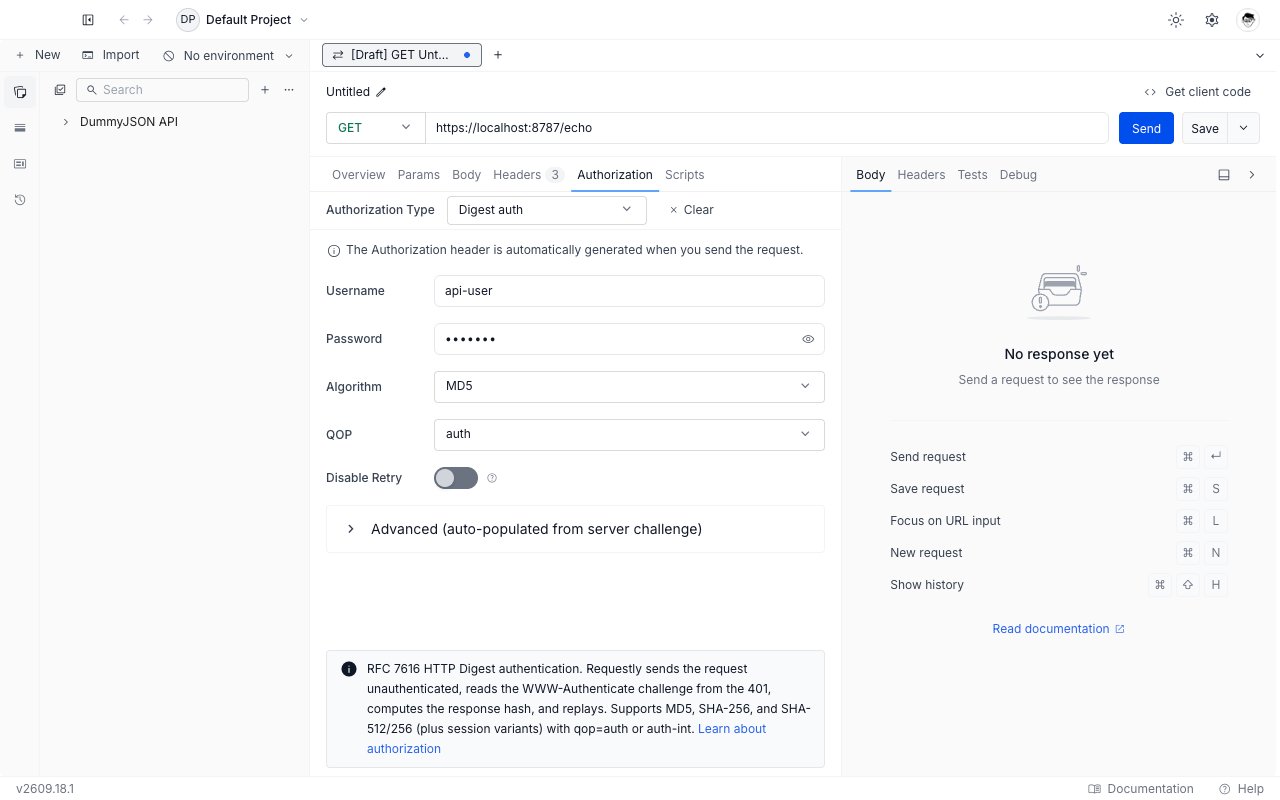
Set up Digest auth
1
Open the Authorization tab
Open any request or collection, then go to the Authorization tab.
2
Select Digest auth
Pick Digest auth from the Authorization Type dropdown. The Digest fields appear below the dropdown.
3
4
Match the algorithm and QOP to your API
Leave Algorithm on
MD5 and QOP on auth unless your API documentation names something else. See the field reference below.5
Send the request
Click Send. Requestly performs the challenge exchange and replays the request for you.
Field reference
Algorithm
Pick the algorithm your API advertises in its challenge:If the server’s challenge names a different algorithm than the one you picked, the server’s choice wins. The same applies to QOP.
QOP
- auth (default): the signature covers the HTTP method and the request URI. Correct for almost every API.
- auth-int: the signature also covers the request body, so a proxy cannot alter the body in transit. Pick it only when your API documentation requires it, and only for requests whose body is text.
Disable Retry
Turn this on while debugging. Requestly sends the request once, stops at the401, and hands you the response so you can read the server’s WWW-Authenticate header and see exactly which realm, nonce, algorithm, and QOP it is asking for. Turn it back off to authenticate normally.
Advanced fields
Expand Advanced (auto-populated from server challenge) to see the five values that come from the server:
These start empty and fill in after the first send. You can edit them, but the next send overwrites them with whatever the server returns, so treat the panel as a read-out rather than as configuration.
Inherit Digest auth from a collection
Set Digest auth once on a collection and leave every request inside it on Inherit from parent. Requestly walks up from the request to the nearest ancestor that sets a concrete auth type and uses that configuration. Two things to know:- A request that picks its own auth type stops inheriting.
- A collection or folder whose auth type is cleared or left unset stops the walk, so requests below it send no credentials even if a higher collection sets Digest.
Troubleshooting
Every send comes back 401
Every send comes back 401
Read the server’s
WWW-Authenticate header first: turn on Disable Retry, send once, and compare the realm, algorithm, and qop it lists against what you configured. A username or password with a stray trailing space is the next most common cause.The request fails with auth-int but works with auth
The request fails with auth-int but works with auth
auth-int hashes the request body, so it needs a body it can read as text. Switch QOP back to auth unless your API documentation explicitly requires auth-int.The server keeps issuing a new challenge
The server keeps issuing a new challenge
Requestly sends the request at most three times in total. If the third attempt still comes back with a challenge, the send fails with an error rather than returning the last response. A server that rejects every nonce it just issued is usually rotating nonces faster than the exchange can complete, or is behind a load balancer sending each attempt to a different backend.
What’s Next?
NTLM
The other challenge-response scheme in the dropdown.
Vault
Keep the password out of the collection.
Authorization
Back to every auth type Requestly supports.