

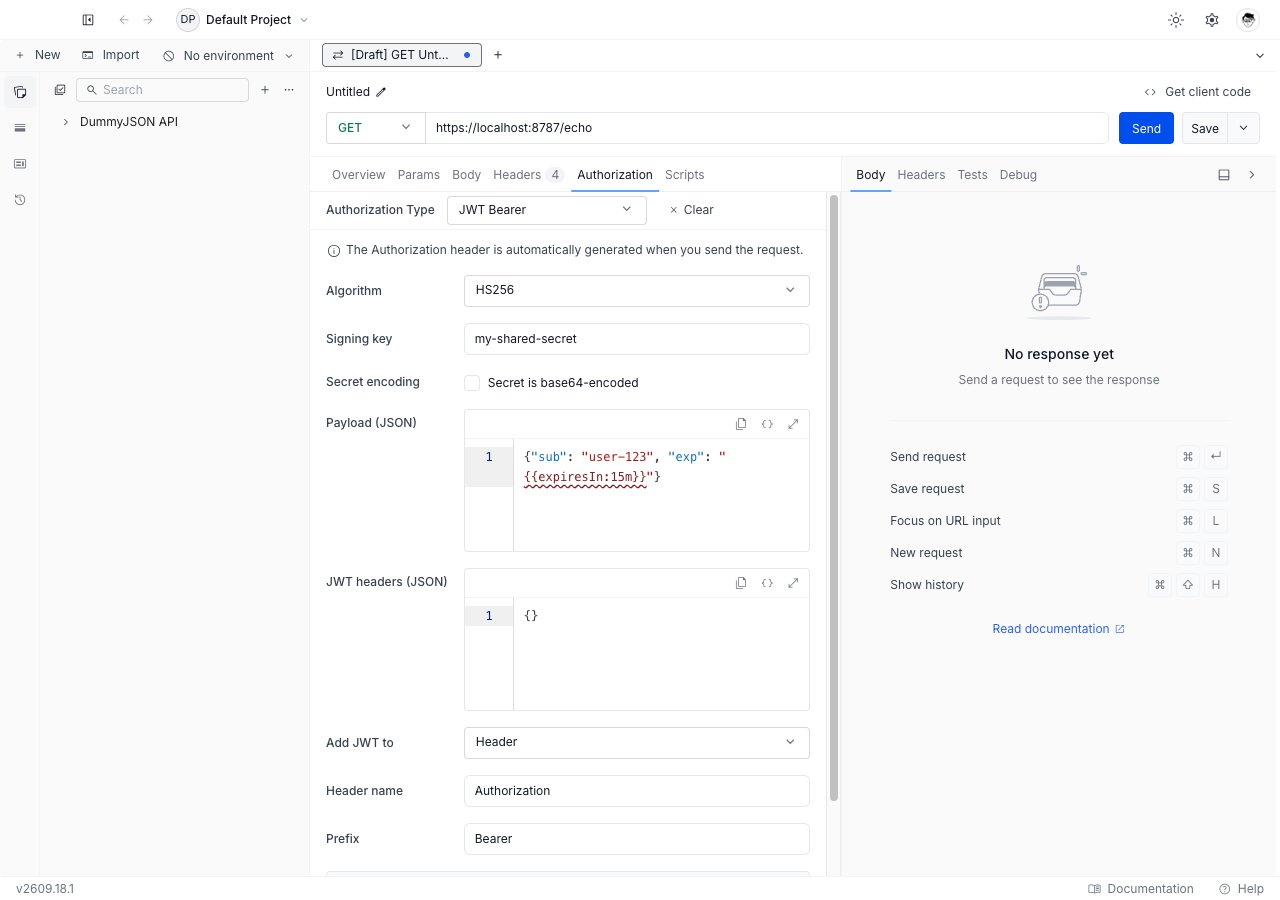
Set up JWT Bearer
1
Open the Authorization tab
Open any request or collection, then go to the Authorization tab.
2
Select JWT Bearer
Pick JWT Bearer from the Authorization Type dropdown. The JWT fields appear below the dropdown.
3
Pick an algorithm
Choose from the Algorithm dropdown. The choice decides what the signing key field expects: a shared secret for
HS*, a private key for everything else.4
Supply the signing key
For
HS*, paste the shared secret. For RS*, ES*, and PS*, paste the whole PKCS#8 private key, including its BEGIN PRIVATE KEY and END PRIVATE KEY armor lines.5
Write the claim payload
Edit Payload (JSON) to hold the claims the API expects, such as
sub, aud, and iss. See the payload section below for the two things Requestly fills in for you.6
Choose where the token goes
Leave Add JWT to on
Header for the usual Authorization: Bearer <token> shape, or switch to Query param when the API reads the token from the URL.7
Send the request
Click Send. Requestly signs a new token and attaches it.
Algorithms
Twelve algorithms are available, in four families:HS256 is the default on a new configuration. The unsigned none algorithm is refused and cannot be selected.
The field shape follows the family. HS* shows a single-line secret box; every other family shows a multi-line editor, because a PEM key has to keep its line breaks.
Secret is base64-encoded
This checkbox appears forHS* only. Turn it on when the API gave you the shared secret as base64 rather than as plain text, so Requestly decodes it before signing instead of hashing the base64 characters themselves.
Payload
Payload (JSON) holds the token’s claims. It must be a JSON object. Requestly applies two conveniences to the top level of that object before signing.iat is filled in for you
Leaveiat out, or set it to null or "", and Requestly writes the current time in seconds. Set it to a number and Requestly keeps your number exactly as written, which is what you want when reproducing a bug against a fixed timestamp.
The expiresIn directive
Write{{expiresIn:<number><unit>}} as a claim value and Requestly replaces it with the current time plus that duration. Units are s, m, h, and d.
iat or an {{expiresIn:…}} value nested inside a sub-object through unchanged.
JWT headers
JWT headers (JSON) sets the token’s JOSE header. Leave it as{} for the common case: Requestly already sets alg from the dropdown. Use it when the API needs an extra header such as a kid key identifier:
Attachment
Add JWT to decides where the signed token lands.- Header
- Query param
Two further fields appear:
- Header name, default
Authorization. - Prefix, default
Bearer. Clear it to send the bare token with no prefix.
Authorization: Bearer eyJhbGciOi….Inherit JWT Bearer from a collection
Set JWT Bearer once on the collection and leave every request inside it on Inherit from parent. Requestly walks up from the request to the nearest ancestor that sets a concrete auth type, and signs a fresh token per request from that configuration. A request that picks its own auth type stops inheriting, and a collection or folder whose auth type is cleared or left unset stops the walk for everything below it.Troubleshooting
The API rejects the token signature
The API rejects the token signature
Confirm both sides agree on the algorithm, then confirm the key form. An
HS256 secret that the provider issued as base64 needs Secret is base64-encoded turned on; without it Requestly signs with the literal base64 characters and the signature will not verify.The key fails to parse
The key fails to parse
RS*, ES*, and PS* expect a PKCS#8 key, the block whose armor line reads BEGIN PRIVATE KEY. Convert an older PKCS#1 key, whose armor line reads BEGIN RSA PRIVATE KEY, first. Encrypted keys with a passphrase are not supported; decrypt a copy for use here.The token is always expired
The token is always expired
A literal number in
exp is a fixed point in time and goes stale the moment it passes. Replace it with {{expiresIn:15m}} so every send gets a fresh window.A warning sits under the payload editor
A warning sits under the payload editor
The payload is not valid JSON, or an
{{expiresIn}} directive is malformed. The warning names which. Fix it before sending; Requestly will not sign an unparseable payload.What’s Next?
OAuth 2.0
Use a grant flow when the provider issues the token.
Vault
Keep the signing key out of the collection.
Authorization
Back to every auth type Requestly supports.